
UCP now has a checkout for ordering food. On 10 November the spec merged PR #897, Food Checkout: an agent orders from one restaurant at a time, builds each dish with its choices and a note for the kitchen, picks delivery or pickup, adds a tip, and gets back an order number and a tracking link. It's the first capability from the Food Tech Council, and the first time UCP has a vertical of its own beyond shopping and lodging.
The change is on the spec's main branch and planned for the 2026-12-08 release, a plan that can move. We built it into a test restaurant and followed it through an agent run, from the menu to the order. Every request, reply and screenshot below is from that session, and the run is linked.
What is UCP Food Checkout?
UCP Food Checkout is a checkout capability for prepared food, dev.ucp.food.checkout, with two extensions: dev.ucp.food.fulfillment for delivery or pickup, and dev.ucp.food.tip for gratuity. In the spec's words:
The Checkout capability allows Platforms to facilitate checkout sessions for prepared food and beverage orders — from restaurants, cafes, bakeries, food trucks, etc.
It sits in its own service, dev.ucp.food, next to dev.ucp.shopping. It keeps shopping checkout's lifecycle (the same six statuses, the same five operations, the same totals, messages and payment handlers) and changes what a line is. The restaurant stays the merchant of record and keeps its menu, its prices and its kitchen.
Jing Li (Google) wrote it, and Ilya Grigorik (Shopify) and Amit Handa approved it. The Food Tech Council's inaugural members are Block (Square), DoorDash, Google, Toast and Uber Eats.
How it differs from shopping checkout
| Shopping checkout | Food checkout | |
|---|---|---|
| A line is | an item (a product or variant) and a quantity |
a dish, its modifications (each with a quantity per dish) and a note for the kitchen |
| Who you buy from | the business | one food_establishment per session |
| Fulfillment | shipping or pickup to destinations | delivery or pickup, as soon as possible or a requested_fulfillment_time, with handoff preferences and courier notes |
| Tips | not defined | dev.ucp.food.tip: options from the restaurant, a tip line in totals |
| After completion | an order you can fetch with the order capability | an order confirmation with a label and a tracking_url |
| Notices | policies and disclosures | food-safety disclosures: allergens, consumer_advisory, nutritional_info |
The rules an agent has to follow
- One kitchen per order. A session is bound to one establishment, and every dish must come from its live menu.
- Ids, not descriptions. The agent sends a dish's
idand its modifications' ids, plus quantities and the note. Titles and prices come back from the restaurant, which re-prices on every update. - Quantity per dish, never by repetition. "Platforms MUST NOT convey quantity by repetition": two eggs is one modification with
quantity: 2. Two of the same dish built differently are two lines. - A note is only a note. The kitchen note "MUST NOT alter price or structured modifications". When a note asks for something the menu sells as a modification, the restaurant should warn with
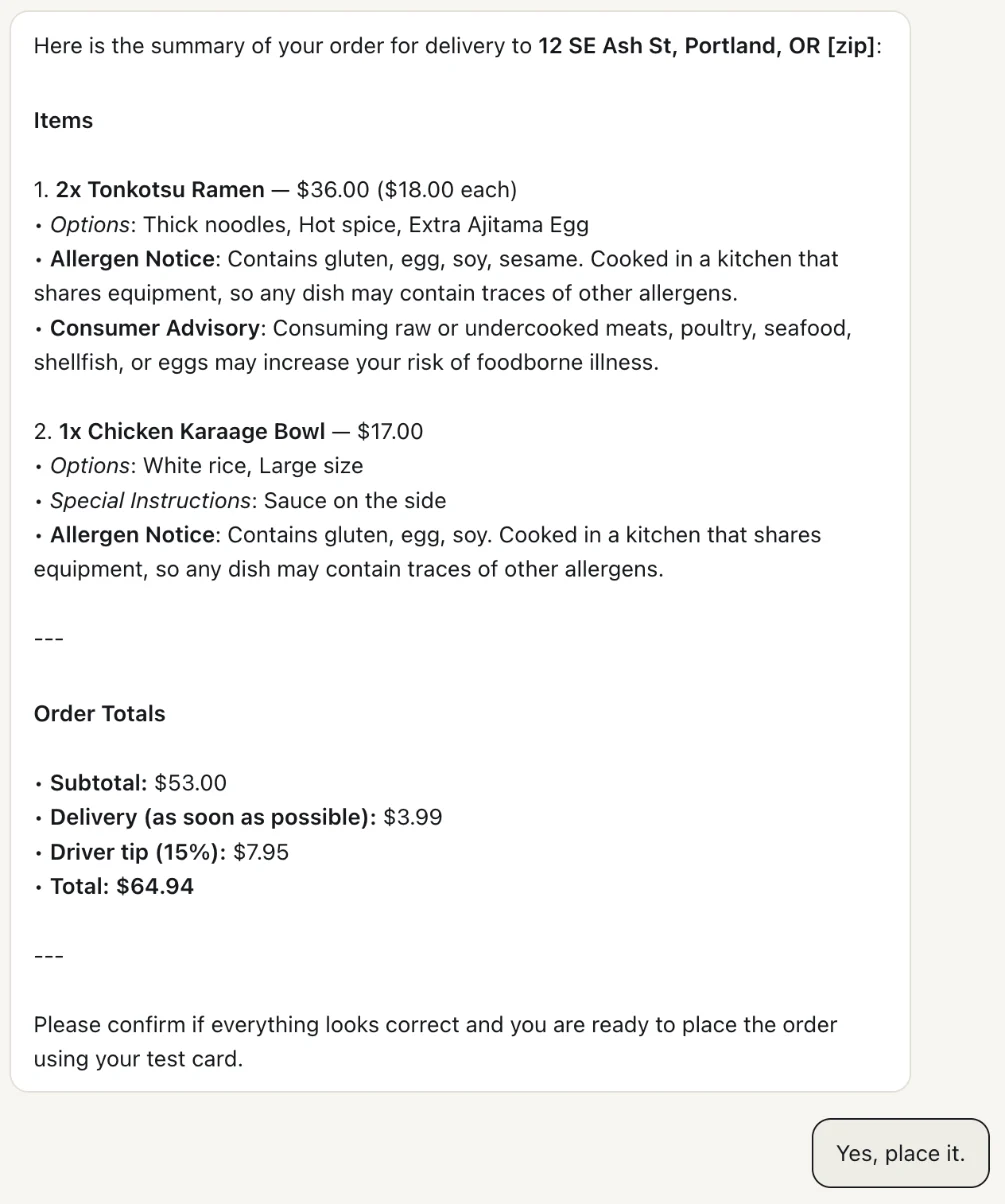
note_contains_modification, and the agent must never present the note as an applied change. - Show the final total. Delivery fees and tips can change up to the end, so the agent "MUST present the final totals[] for buyer confirmation before submitting payment."
- Show the food-safety notices. Allergen and consumer-advisory disclosures go beside the dish they concern, and aren't dismissed automatically.
- Give the buyer the tracking link. A completed order carries
tracking_url, and the agent passes it on.
The setup
The restaurant is Kettle Street Noodles on food.ucpsandbox.com, one of our UCP Sandbox test stores: a takeout noodle bar with ramen and rice bowls that have required choices and add-ons, test cards only, and nothing cooked.
It offers both checkouts. Shopping checkout stays where it was, on /mcp and /ucp, for any agent. Food checkout has endpoints of its own, because its tools have the same names as the shopping ones:
"services": {
  "dev.ucp.shopping": [
    { "transport": "mcp",  "endpoint": "https://food.ucpsandbox.com/mcp" },
    { "transport": "rest", "endpoint": "https://food.ucpsandbox.com/ucp" }
  ],
  "dev.ucp.food": [
    { "transport": "mcp",  "endpoint": "https://food.ucpsandbox.com/food/mcp" },
    { "transport": "rest", "endpoint": "https://food.ucpsandbox.com/ucp/food" }
  ]
}
Food checkout is only active for an agent whose profile declares dev.ucp.food.checkout, the same capability intersection every UCP capability goes through. UCP Playground declares it, and connects to the food endpoints when a store offers them. The run used Gemini 3.6 Flash over MCP.
Step 1: the agent reads the menu
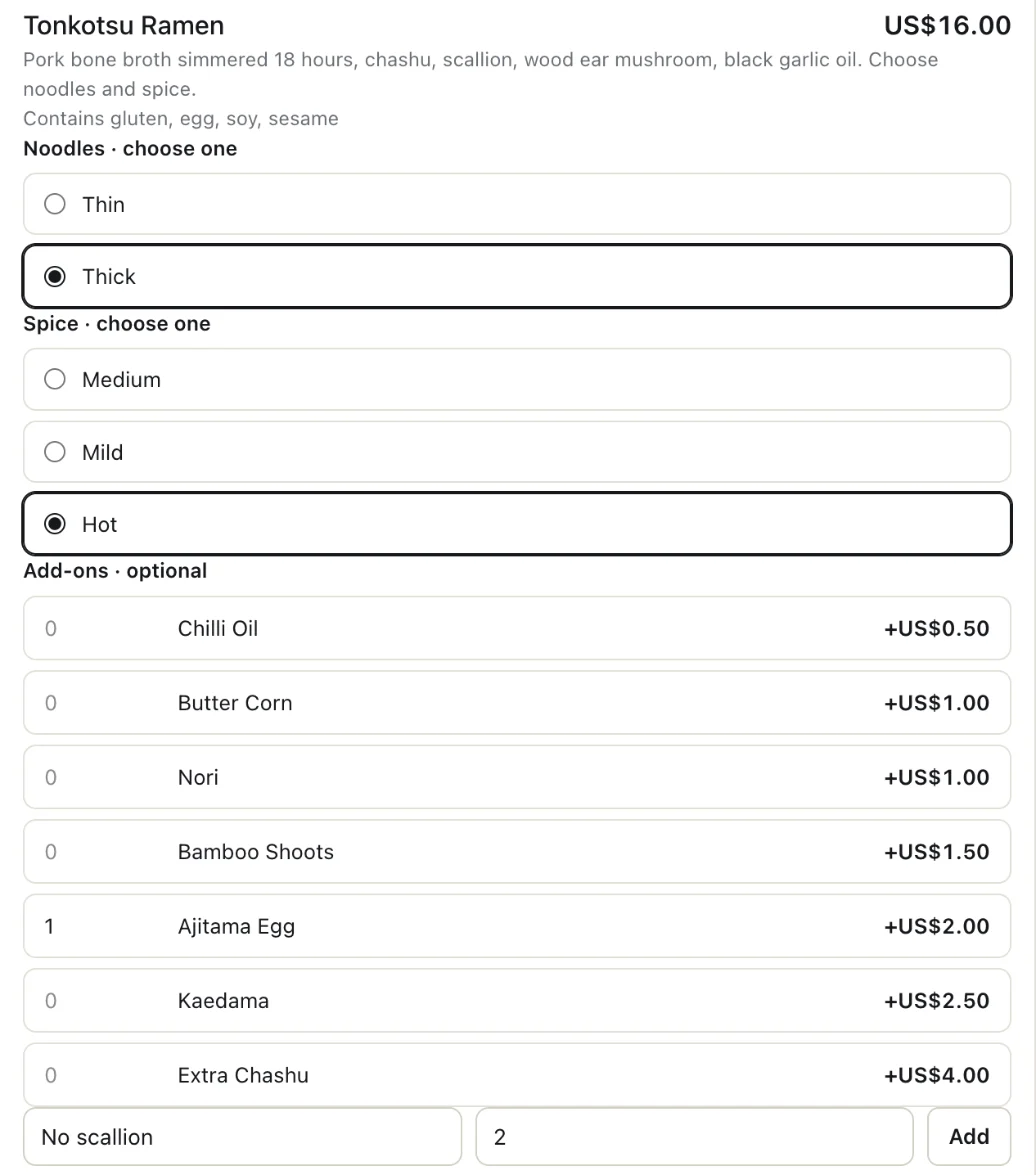
Finding a restaurant and reading its menu are outside the spec: dish and modification ids "come from upper-funnel menu discovery". So the test restaurant offers its own get_menu tool, clearly labelled as not part of UCP. It lists each dish with its choice groups:
{
  "id": "ramen_tonkotsu",
  "title": "Tonkotsu Ramen",
  "price": { "amount": 1600, "currency": "USD" },
  "allergens": ["gluten", "egg", "soy", "sesame"],
  "modifier_groups": [
    { "id": "noodles", "title": "Noodles", "min_selections": 1, "max_selections": 1,
      "modifications": [{ "id": "noodles_thin", "title": "Thin" }, { "id": "noodles_thick", "title": "Thick" }] },
    { "id": "spice", "title": "Spice", "min_selections": 1, "max_selections": 1, "modifications": ["…"] },
    { "id": "addons", "title": "Add-ons", "min_selections": 0,
      "modifications": [{ "id": "addon_ajitama", "title": "Ajitama Egg", "price": { "amount": 200, "currency": "USD" }, "max_quantity": 3 }, "…"] }
  ]
}
Playground's Inspect shows the same menu as a buyer would see it, and builds an order by hand: one choice from each required group, add-ons with a quantity, and a note.
Step 2: the agent builds the order
The buyer asked for two Tonkotsu Ramen with thick noodles, hot, and an extra egg each, and a large Karaage bowl with white rice and the sauce on the side, delivered, with a 15% tip. The agent turned the order into one create_checkout:
{
  "food_establishment": { "id": "loc_division" },
  "line_items": [
    { "dish": { "id": "ramen_tonkotsu" }, "quantity": 2,
      "modifications": [{ "id": "noodles_thick" }, { "id": "spice_hot" }, { "id": "addon_ajitama" }] },
    { "dish": { "id": "bowl_karaage" }, "quantity": 1,
      "modifications": [{ "id": "rice_white" }, { "id": "size_large" }],
      "note": "sauce on the side" }
  ],
  "fulfillment": { "methods": [{ "type": "delivery",
    "destination": { "type": "delivery_address", "address": { "…": "12 SE Ash St, Portland, OR 97214" } } }] }
}
"Sauce on the side" went in the note, which is where it belongs: the menu has no modification for it. The tip isn't there yet. The tip extension has the agent choose a suggested tip on update, once the restaurant has returned its options (selected_option_id is omitted on create); only a set amount, custom_amount, can go on create. Our test restaurant follows that: a suggested tip sent on create isn't applied, and the checkout says why.
Step 3: the restaurant prices each dish
The restaurant echoes each dish with its own titles and prices, and totals the line: (dish + each modification × its quantity) × the dish's quantity. Two ramen at $16 plus a $2 egg each come to $36.
{
  "id": "li_1",
  "quantity": 2,
  "dish": { "id": "ramen_tonkotsu", "title": "Tonkotsu Ramen", "price": 1600 },
  "modifications": [
    { "id": "noodles_thick", "title": "Thick", "price": 0 },
    { "id": "spice_hot", "title": "Hot", "price": 0 },
    { "id": "addon_ajitama", "title": "Ajitama Egg", "price": 200 }
  ],
  "totals": [{ "type": "subtotal", "amount": 3600 }, { "type": "total", "amount": 3600 }]
}
If a required choice is missing, the line stays and the checkout says what to choose (modification_required). If an id isn't on the dish, or one group gets two choices, it's modification_invalid, pointing at the modification.
Step 4: the agent picks the tip
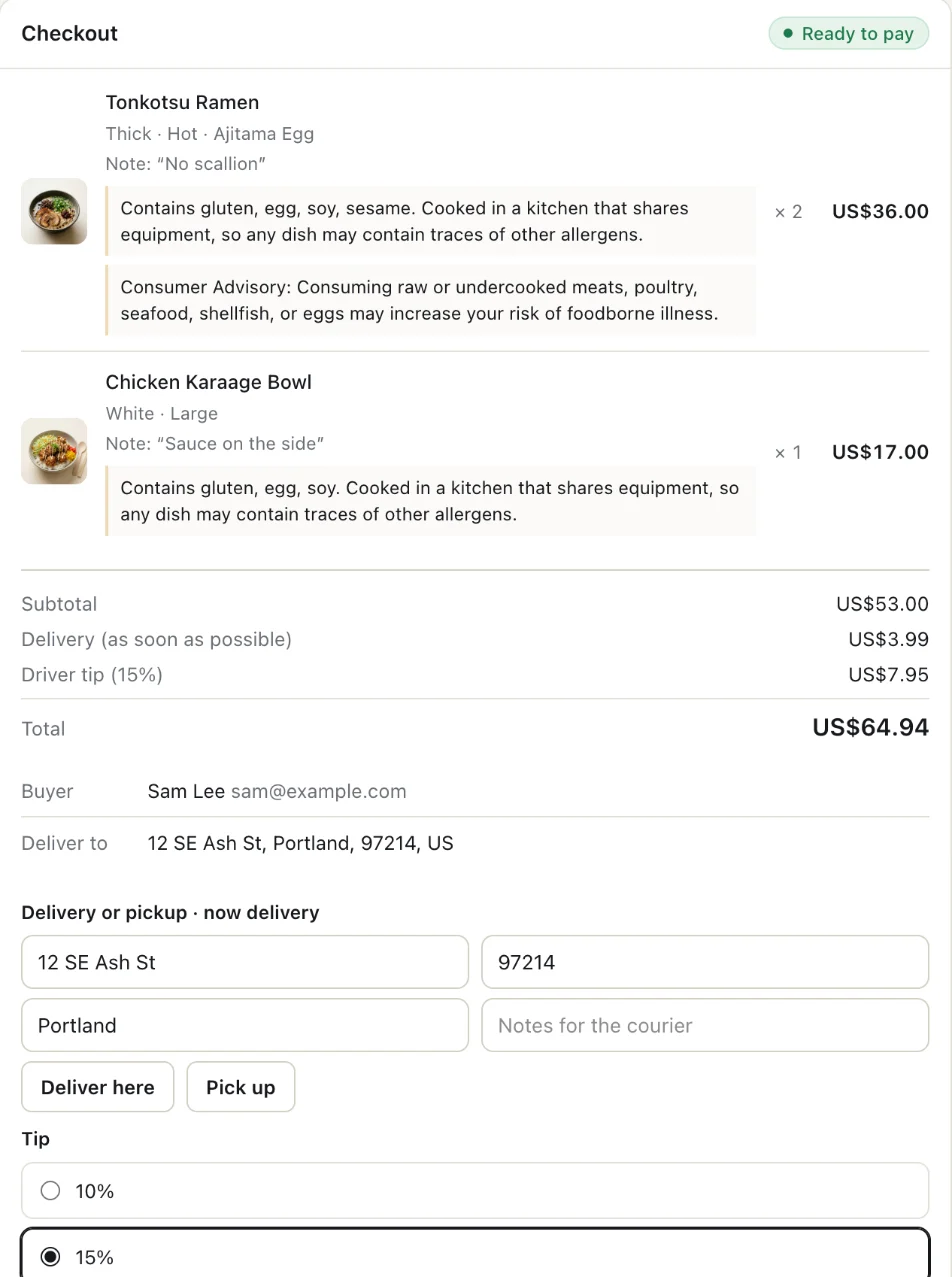
The first answer came back ready to pay at $56.99: the dishes, plus delivery. The fulfillment extension answered with when the restaurant can deliver, the options for the chosen method and the handoff preferences; the tip extension listed the restaurant's suggested tips. The agent then sent one update_checkout: the whole order again, each line by the id the restaurant gave it, with the buyer's 15% chosen from those options:
{
  "food_establishment": { "id": "loc_division" },
  "line_items": [
    { "id": "li_1", "dish": { "id": "ramen_tonkotsu" }, "quantity": 2, "modifications": ["…"] },
    { "id": "li_2", "dish": { "id": "bowl_karaage" }, "quantity": 1, "modifications": ["…"], "note": "sauce on the side" }
  ],
  "fulfillment": { "methods": [{ "type": "delivery", "destination": { "…": "…" },
    "selected_option_id": "delivery-asap", "selected_preference_option_ids": ["pref_hand_to_me"] }] },
  "tip": { "selected_option_id": "tip_15" }
}
An update replaces the checkout's writable state, so everything is sent again, not only the tip. The answer puts delivery and the tip on their own lines in the totals:
"fulfillment": { "methods": [{
  "type": "delivery",
  "options": [
    { "id": "delivery-asap", "title": "As soon as possible",
      "earliest_fulfillment_time": "2026-11-11T11:37:50+00:00",
      "latest_fulfillment_time": "2026-11-11T11:52:50+00:00",
      "totals": [{ "type": "total", "amount": 399 }] }
  ],
  "selected_option_id": "delivery-asap",
  "preference_options": [{ "id": "pref_leave_at_door", "label": "Leave at my door" }, { "id": "pref_hand_to_me", "label": "Hand it to me" }],
  "selected_preference_option_ids": ["pref_hand_to_me"]
}] },
"tip": { "selected_option_id": "tip_15", "options": [{ "id": "tip_10", "unit": "percentage", "amount": 10 }, "…"] },
"totals": [
  { "type": "subtotal", "display_text": "Subtotal", "amount": 5300 },
  { "type": "fulfillment", "display_text": "Delivery (as soon as possible)", "amount": 399 },
  { "type": "tip", "display_text": "Driver tip (15%)", "amount": 795 },
  { "type": "total", "display_text": "Total", "amount": 6494 }
]
The checkout also carries the food-safety notices, each pointing at its dish:
"messages": [
  { "type": "warning", "code": "allergens", "path": "$.line_items[0]", "presentation": "disclosure",
    "content": "Contains gluten, egg, soy, sesame. Cooked in a kitchen that shares equipment, so any dish may contain traces of other allergens." },
  { "type": "warning", "code": "consumer_advisory", "path": "$.line_items[0]", "presentation": "disclosure",
    "content_type": "markdown", "content": "**Consumer Advisory**: Consuming raw or undercooked meats, poultry, seafood, shellfish, or eggs may increase your risk of foodborne illness." }
]
The same order built by hand in Inspect shows each dish with its choices and note, the notices beside it, and delivery and the tip in the total.
Step 5: the agent shows the total and waits
The checkout was ready to pay and the buyer had given the card. The agent didn't complete. It listed each dish with its options, the kitchen note, the allergen notices and the consumer advisory, then the final totals with the tip, and asked for a yes.
Play the whole run below, or open it with the full trace.
One run with one model doesn't measure how agents handle food ordering. It shows the pieces arriving where the draft puts them, and one agent using them as intended.
Step 6: the order and its tracking link
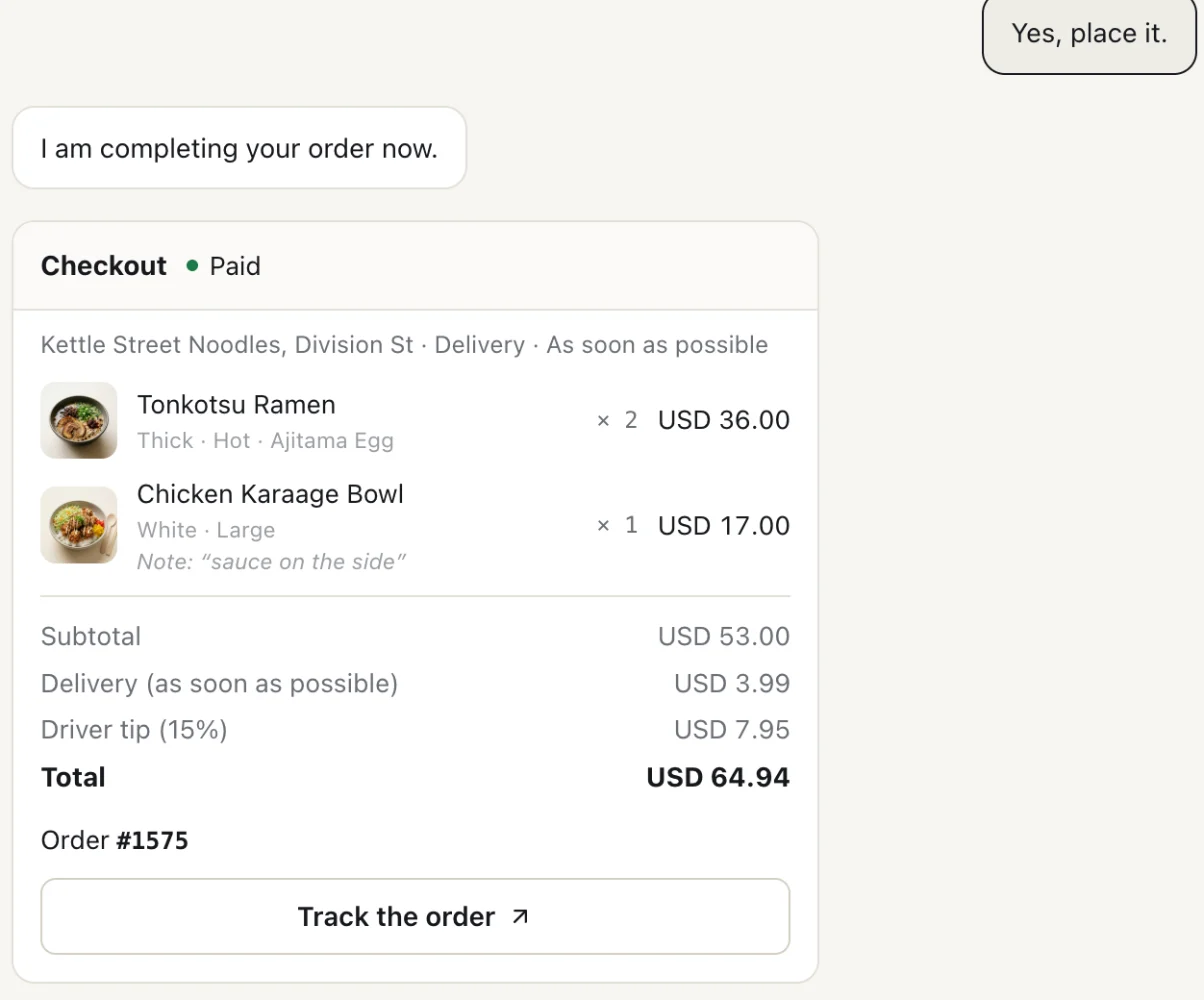
After the buyer said yes, the agent paid $64.94, the checkout's own total. The completed checkout carries the order confirmation: a short label to say at the counter or to the courier, the window it should arrive in, and the page to follow it on.
"order": {
  "id": "01a1ca3e-0f31-7025-bdb9-2be40e72a852",
  "label": "#1575",
  "tracking_url": "https://food.ucpsandbox.com/orders/01a1ca3e-0f31-7025-bdb9-2be40e72a852",
  "earliest_fulfillment_time": "2026-11-11T11:38:47+00:00",
  "latest_fulfillment_time": "2026-11-11T11:53:47+00:00"
}
The agent passed on the label and the link. Food checkout stops there: status updates after the order is placed aren't part of it.
An agent that hasn't adopted it
Ask the food endpoint as an agent whose profile doesn't declare food checkout, and the restaurant refuses it, pointing at the checkout every agent can use:
{
  "type": "error",
  "code": "capabilities_incompatible",
  "severity": "unrecoverable",
  "content": "dev.ucp.food.checkout is not in the capabilities negotiated with the platform's profile (it must declare it at version 2026-08-25). This store's shopping checkout (https://food.ucpsandbox.com/mcp, https://food.ucpsandbox.com/ucp) takes the same menu."
}
That agent can still order through shopping checkout, with dishes as products and add-ons as their own lines, the way the store worked before. A restaurant on more than one platform will meet both kinds of agent for a while.
What isn't in it yet
- The menu and the cart. Finding a restaurant, browsing its menu and building a cart come later in the council's charter. Until then, ids come from whatever discovery the platform and restaurant share.
- After the order. Status updates, changes, cancellations and refunds.
- Allergens as data. A proposal to add per-allergen status and dietary needs to checkout (#964) was closed; reviewers said allergens belong on the menu and the cart. For now they travel as disclosure text.
- Food discounts. A food discount extension (#992) is in Tech Council review.
- Several kitchens in one order. Food halls, multi-vendor baskets and group orders are out of scope.
- Age checks as data. Alcohol hands the buyer to the restaurant's own page (
requires_escalation); there's no structured age attestation.
What it means for restaurants and ordering platforms
- Publish food checkout as its own service, with its own endpoints, if you also offer shopping checkout. The two use the same tool names.
- Make your menu ids stable and shared: the agent orders by the ids your discovery gives it.
- Model required choices as modifier groups, and warn when a note asks for something you sell.
- Send
display_texton thetipline, and food-safety notices as disclosures beside each dish. - Return a
tracking_urlon every completed order.
What it means for agent builders
- Declare
dev.ucp.food.checkout(and the extensions you can render) only if you can follow the note and disclosure rules. Declaring it is how you accept them. - Ask the buyer for a required choice rather than guessing it, and send each modification once, with its quantity per dish.
- Keep the buyer's free-text requests in
note, and never tell them a note was applied as a change. - Choose a suggested tip on update, from the options the checkout returned; only a set amount can go on create.
- Re-read totals after every update, show the final total with delivery and the tip, and get a yes before completing.
- After completing, give the buyer the label and the tracking link.
What we'll watch
Food checkout is planned for the 2026-12-08 release. Once it's tagged, we'll watch for restaurants and ordering platforms declaring dev.ucp.food.checkout, how they publish it beside shopping checkout, and whether completed orders carry a tracking link. Until it's in a release, it doesn't change any of our published figures. You can follow what's merged, and what's planned for which release, on our Changes to UCP tracker, and the food vertical on UCP for Food.
FAQ
Does UCP support food ordering?
Yes, in draft. Food Checkout (dev.ucp.food.checkout) was merged into the spec's main branch on 10 November 2026 and is planned for the 2026-12-08 release, a plan that can move. Neither 2026-08-25 nor 2026-04-08 has it.
How is UCP food checkout different from shopping checkout?
A line is a dish with modifications and a note for the kitchen, not a product. A session is bound to one restaurant, fulfillment is delivery or pickup at a time, tips have their own extension, and a completed order returns a label and a tracking link.
How does an AI agent add extras or choices to a dish?
It sends the dish's id with modifications: one id per choice or add-on, each once, with quantity per dish. The restaurant prices them and says when a required choice is missing.
Can an agent use the note field to ask for changes?
Only for requests the menu doesn't model, such as "sauce on the side". A note never changes the price or the modifications, and the restaurant can warn when a note asks for something it sells.
How do tips work in UCP food checkout?
The restaurant lists suggested tips. The agent picks one on an update, once the checkout has returned them, or sends a set amount (custom_amount), which can also go on create. The tip appears as its own line in the totals.
Does UCP food checkout cover menus and restaurant search?
No. Discovery and the menu come before checkout and are left out of this capability. The council's charter puts the menu and the cart in a later phase.
Where can I test an agent against UCP food checkout?
Our test restaurant at food.ucpsandbox.com speaks the draft beside its shopping checkout. You can run any agent against it in UCP Playground, or order by hand in Inspect.
About UCP Checker
UCP Checker is the independent validation and observability layer for the Universal Commerce Protocol. We crawl, validate and grade every public UCP manifest we can find, run the merchant directory, the UCP Score, live adoption stats, the vertical guides and the authority-bound vendor map, and track the spec as it evolves so you don't have to — measured from two vantages (what a business declares, and what actually happens when an agent transacts), the same way for everyone, without picking winners.
Sources
- Food Checkout capability. UCP specification, draft (main branch).
- Food Checkout schema. UCP, draft (main branch).
- PR #897: Food Checkout capability, fulfillment and tip extensions. Merged 10 November 2026.
- PR #1053: update ucp.dev for the Food Checkout launch. Merged 11 November 2026.
- PR #964: per-allergen status and dietary restrictions. Closed.
- PR #992: food discount extension. Open, in Tech Council review.
- Food Tech Council announcement. UCP discussion #593, 16 July 2026.
- Milestone 2026-12-08. UCP spec repo, a plan that can move.
- The recorded run in Steps 2 to 6. UCP Playground, Gemini 3.6 Flash, 11 November 2026.
Related coverage: UCP for Food Ordering just got a charter · UCP for restaurants: an operator's guide · UCP subscriptions explained, step by step · UCP list_price explained, step by step