


Food is the next errand AI agents are being pointed at. Google says UCP on its surfaces is expanding to food ordering, for pickup and for delivery. The UCP Food Domain Tech Council has a checkout proposal in review. Most people building for this still haven't watched a food order move through UCP, call by call.
This guide follows one pickup order from start to finish. We searched a test noodle shop for "ramen", added a bowl and an egg to go with it, gave the shop a made-up buyer, picked a shop and a pickup time, paid with a test card and looked the order up. Every step below shows what the store actually returned. You can repeat the whole thing in about ten minutes with no sign-in and no model cost.
What is a UCP food pickup order?
A UCP food pickup order is an ordinary UCP checkout whose fulfillment method has type: "pickup". The store lists the shops you can collect from, the platform picks one by its id, and the store offers pickup times as options. Nothing about it needs a food-specific capability today: the 2026-08-25 release already has catalog search, cart, checkout, order and the fulfillment extension, whose method types include pickup.
What the release doesn't have is anything made for kitchens: dishes with priced modifications, tips, allergens or a "ready at" promise. Those are proposed, not released (see Released vs proposed below).
What you need
- The store: Kettle Street Noodles at food.ucpsandbox.com, a test store on the UCP Sandbox. Its UCP profile declares release 2026-08-25 over MCP and REST, with catalog search and lookup, cart, checkout, order, discount, fulfillment and buyer consent. Every payment there uses a test instrument; no money moves and nothing is cooked.
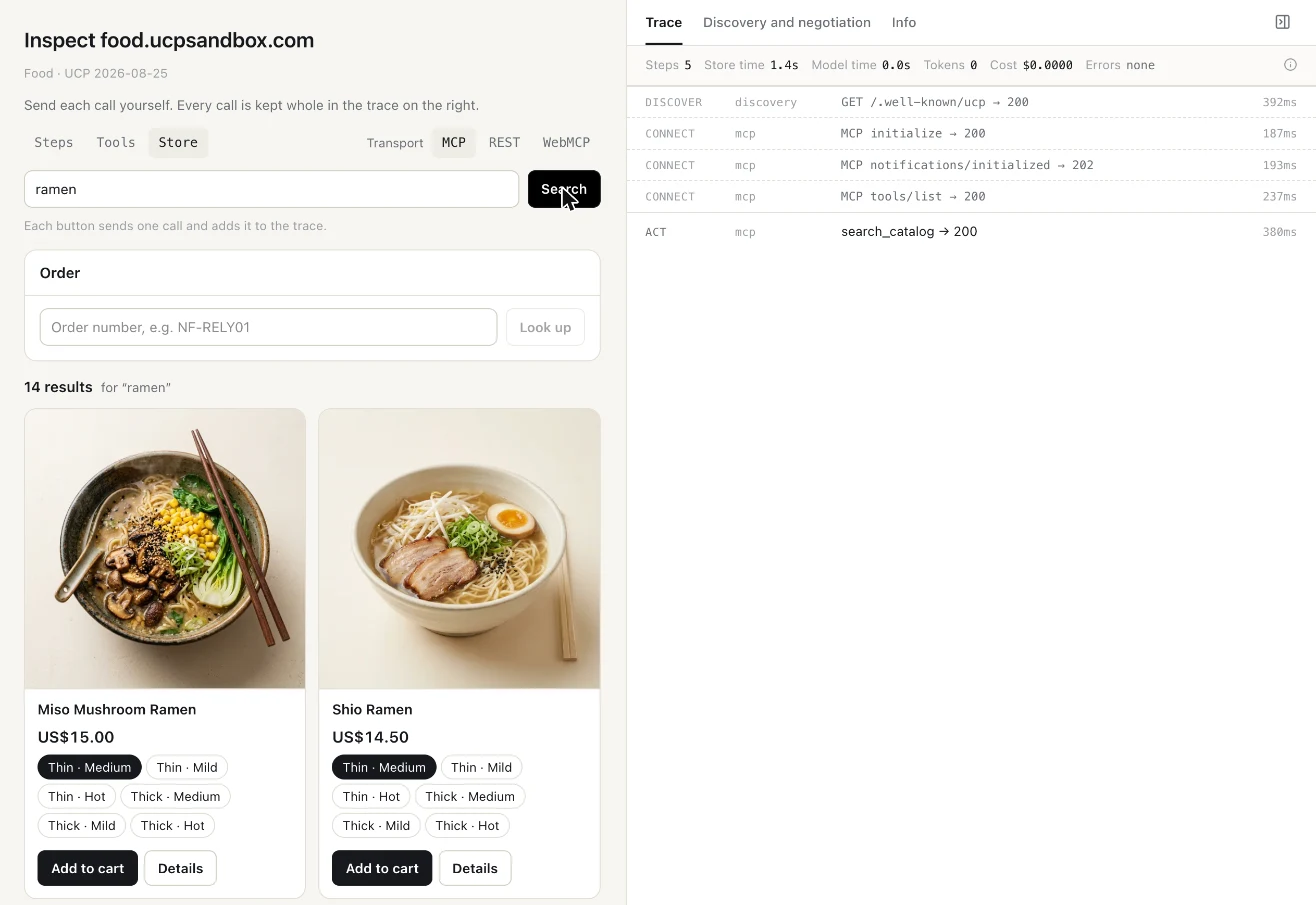
- The client: UCP Playground's Inspect, opened on that store. Choose Store and MCP, then Start. Each button sends one UCP call, and the trace on the right keeps every request and response whole.
UCP Playground and the UCP Sandbox are built by the team behind UCP Checker. Any UCP client will do; the calls are the same.
Step 1: Search the menu
Type "ramen" and press Search. Inspect calls search_catalog. The shop returned 14 results: seven bowls and seven add-ons. Each bowl comes in six variants (thin or thick noodles, mild, medium or hot). Here is the first result's first variant, trimmed:
{
  "id": "ramen_miso",
  "title": "Miso Mushroom Ramen — Thin · Medium",
  "price": { "amount": 1500, "currency": "USD" },
  "options": [
    { "name": "Spice", "label": "Medium", "id": "medium" },
    { "name": "Noodles", "label": "Thin", "id": "thin" }
  ],
  "fulfillment": {
    "methods": [
      { "type": "pickup",
        "description": { "plain": "Ready in about 20 minutes. Free." },
        "availability": { "available": true } },
      { "type": "shipping",
        "description": { "plain": "30 to 45 minutes within three miles of Division St. $3.99." },
        "availability": { "available": true } }
    ]
  }
}
Two things to note. Amounts are in minor units, so 1500 is $15.00. And the variant already says how you can get it: the fulfillment extension lets a catalog result advertise its methods before there is a cart. Delivery here uses the generic shipping type, because the two method types the released spec names are shipping and pickup.
Step 2: Add a dish and an add-on
Press Add to cart on Shio Ramen (Thin · Medium), then on Ajitama Egg. Inspect calls create_cart and then update_cart. The cart holds two flat lines, $14.50 and $2.00, total $16.50.
Now press Check out. Inspect calls create_checkout, and the store links the egg to its bowl:
"line_items": [
  { "id": "li_10598", "item": { "id": "ramen_shio" } },
  { "id": "li_10599", "item": { "id": "addon_ajitama" },
    "parent_id": "li_10598" }
]
parent_id is a released line-item field ("Parent line item identifier for any nested structures"). The platform never sent it: the schema says platforms omit it when they create a checkout. Kettle Street sets it on the checkout and on the order (Sandbox 0.8.2, 29 October), so an agent can show "Ajitama Egg" under the bowl it belongs to, not as a separate order. The cart response doesn't carry it.
Step 3: See the pickup method
The same create_checkout response picks pickup for the whole order and lists the one shop you can collect from:
"fulfillment": {
  "methods": [{
    "id": "pickup",
    "type": "pickup",
    "line_item_ids": ["li_10598", "li_10599"],
    "destinations": [{
      "type": "business_location",
      "id": "loc_division",
      "name": "Kettle Street, Division St",
      "address": { "street_address": "418 Division St",
                   "address_locality": "Portland", "address_region": "OR",
                   "postal_code": "97214", "address_country": "US" }
    }],
    "selected_destination_id": null
  }]
},
"messages": [{
  "type": "error", "code": "missing", "severity": "recoverable",
  "path": "$.fulfillment.methods[0].selected_destination_id",
  "content": "Choose a pickup location."
}]
The status is incomplete, and the message says exactly what is missing and where. A recoverable error is one the platform can resolve in band, by sending the missing field, without handing the buyer off.
![The checkout in Inspect's Store view: Shio Ramen and Ajitama Egg, subtotal and total US$16.50, "Pick up at Kettle Street, Division St, 418 Division St, Portland", and the store's recoverable error "Choose a pickup location" at $.fulfillment.methods[0].selected_destination_id.](https://ucpchecker.s3.eu-west-1.amazonaws.com/blog/ucp-food-pickup-test/checkout-pick-up-at.webp)
Step 4: Add the buyer (no address)
Press Add the buyer's details. Inspect fills in a made-up buyer (Sam Lee, [email protected], a 555 number); change anything you like, then Save to the checkout. Inspect sends one update_checkout:
"buyer": { "first_name": "Sam", "last_name": "Lee",
           "email": "[email protected]", "phone_number": "+14155550100" },
"fulfillment": {
  "methods": [{
    "id": "pickup",
    "type": "pickup",
    "line_item_ids": ["li_10598", "li_10599"],
    "selected_destination_id": "loc_division",
    "groups": [{ "id": "group_1", "selected_option_id": null }]
  }]
}
There is no address and no destinations[] in that request, and that is the rule. The fulfillment extension says pickup destinations appear only in the store's responses: the platform must not write a business location into destinations[], and selects one by sending its id as selected_destination_id. Only a shipping method lets the platform write an address. Playground 0.24.143 (29 October) made Inspect follow this to the letter: adding the buyer keeps the order's method, and asks for an address only when the order ships.
The store accepts the shop, echoes "selected_destination_id": "loc_division" with that shop in destinations[], as the spec requires, and moves on to the next missing thing.
Step 5: Choose a pickup time
The response now offers three times as options in the method's group, each with its own price and an earliest time:
"options": [
  { "id": "pickup-asap", "title": "As soon as possible",
    "totals": [{ "type": "total", "amount": 0 }],
    "earliest_fulfillment_time": "2026-10-29T12:18:10+00:00" },
  { "id": "pickup-45", "title": "In about 45 minutes",
    "totals": [{ "type": "total", "amount": 0 }],
    "earliest_fulfillment_time": "2026-10-29T12:43:10+00:00" },
  { "id": "pickup-60", "title": "In about an hour", ... }
]
and a new message: "Choose a pickup time." at $.fulfillment.methods[0].groups[0].selected_option_id.
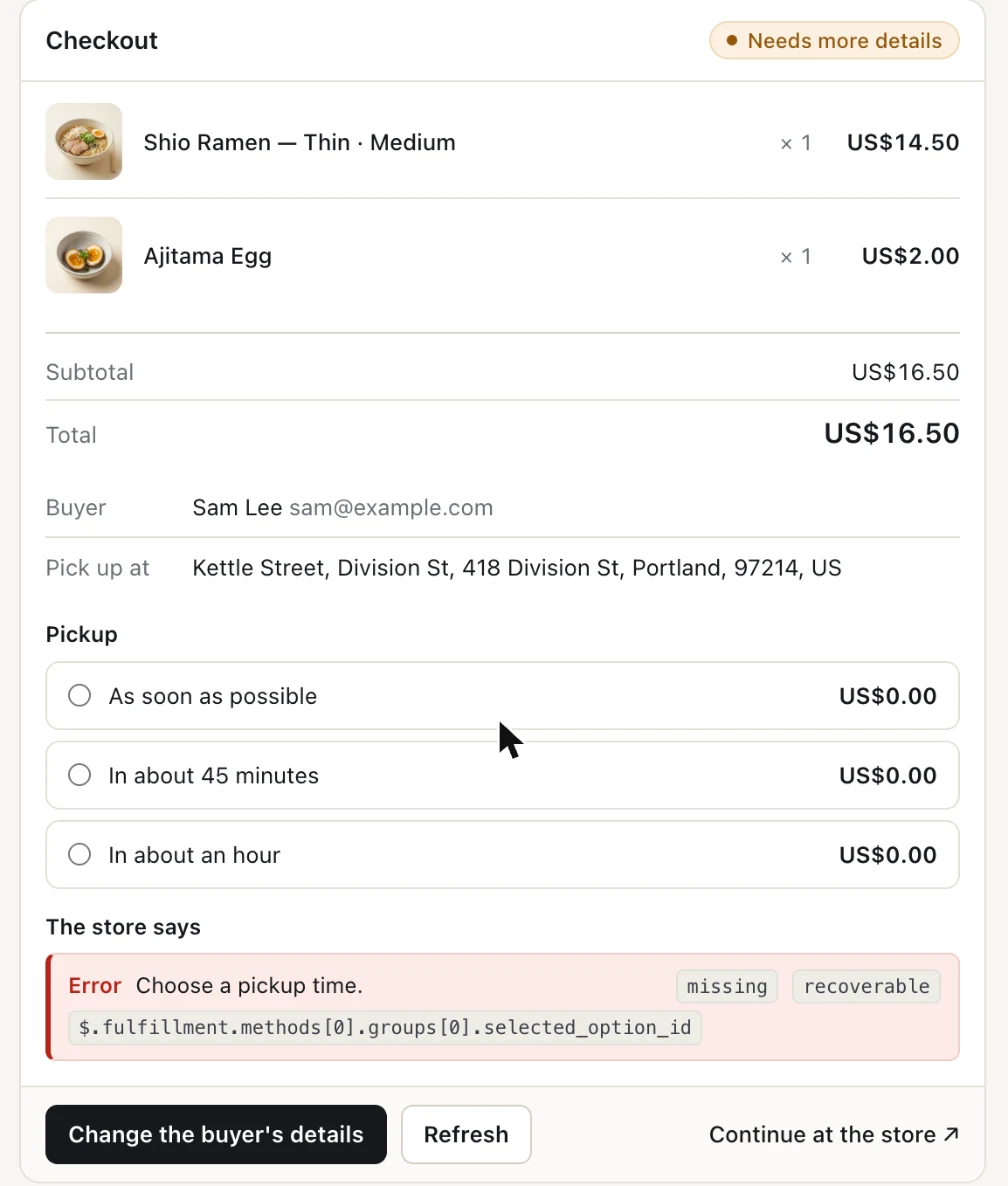
This is the released spec's way of saying "when": a pickup time is a fulfillment option, like "Standard" or "Express" for shipping, and earliest_fulfillment_time is a released option field. Pick In about 45 minutes. Inspect sends selected_option_id: "pickup-45", and the checkout comes back ready_for_complete.
Step 6: Read every totals line
"totals": [
  { "type": "subtotal", "amount": 1650 },
  { "type": "fulfillment", "amount": 0, "display_text": "Pickup" },
  { "type": "total", "amount": 1650 }
]
The store decides what lines appear and in what order. The checkout spec's rendering contract says platforms must render every top-level entry in the order given, use display_text when it's there, and must not filter, reorder or recompute. That's why the second line reads "Pickup", not the default label for a fulfillment entry, "Shipping". Since 0.24.143, Inspect's checkout and order list every totals[] entry the store sends. This order had three; a store that adds tax, a fee or a tip would show those too.
Step 7: Pay with a test card
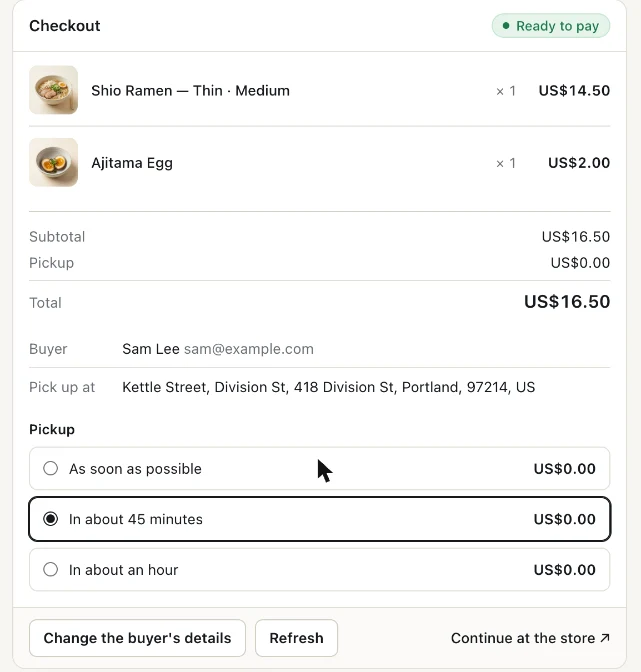
Inspect's Store view stops at Ready to pay: it has no pay button. To finish, switch to Tools, open complete_checkout, choose JSON and send the checkout id with one of the Sandbox's published test instruments (instr_1 approves, instr_fail always declines):
{
  "id": "01a18849-83a4-7161-8f15-4f0fb06de953",
  "checkout": {
    "payment": {
      "instruments": [{ "id": "instr_1",
                        "handler_id": "mock_payment_handler", "type": "card" }]
    }
  }
}
Over MCP, complete_checkout must carry an idempotency key in meta, so a retry can't pay twice. The MCP binding requires it, and the Playground adds it for you (since 0.24.144). Each Send is a new attempt with a new key. To retry the same attempt, put your own meta["idempotency-key"] in the arguments, and it's kept. A client that leaves the key out gets idempotency_key_required from the store.
The checkout came back completed with an order:
"status": "completed",
"order": {
  "id": "01a1884a-a37a-72a5-b3f7-b7dcb5e651dd",
  "label": "KS-WS7Y7D",
  "permalink_url": "https://food.ucpsandbox.com/orders/01a1884a-…"
}
Only this status means the order was placed. Playground 0.24.143 now marks a run as Paid only when a checkout reaches completed with an order, not when an agent merely reads an existing order.
Step 8: Look the order up
Back in Store, paste KS-WS7Y7D into the Order box and press Look up. Inspect calls get_order:
"line_items": [
  { "id": "li_10598", "item": { "id": "ramen_shio" },
    "quantity": { "original": 1, "total": 1, "fulfilled": 0 },
    "status": "processing" },
  { "id": "li_10599", "item": { "id": "addon_ajitama" },
    "quantity": { "original": 1, "total": 1, "fulfilled": 0 },
    "parent_id": "li_10598", "status": "processing" }
],
"fulfillment": {
  "expectations": [{
    "method_type": "pickup",
    "description": "In about 45 minutes",
    "destination": { "street_address": "418 Division St",
                     "address_locality": "Portland", "address_region": "OR",
                     "postal_code": "97214", "address_country": "US" }
  }],
  "events": []
}
The egg still points at its bowl. The order's fulfillment expectation says pickup, at that address, in about 45 minutes. There are no events yet, because nobody has collected the bowl.
Released vs proposed
Everything above uses the released 2026-08-25 spec. The food capability itself is not released. Here is where it stands on 29 October 2026:
| Piece | Status |
|---|---|
Fulfillment extension, pickup method, business_location destinations, selected_destination_id |
Released, 2026-08-25 |
Line item parent_id, totals[] rendering contract, checkout statuses |
Released, 2026-08-25 |
#897: dev.ucp.food.checkout and dev.ucp.food.fulfillment (dishes and modifications, tips, ASAP or scheduled pickup and delivery, food-safety disclosures) |
Open, opened 3 October on behalf of the Food Domain Tech Council; changes requested in review on 22 October |
| #964: per-allergen status on dishes, buyer dietary restrictions | Open, builds on #897 |
#992: dev.ucp.food.discount |
Open, stacked on #897 |
#607: an optional note on line items ("no onions") |
Open, for all line items, not only food |
Kettle Street doesn't implement #897. It is a 2026-08-25 shopping store with a food menu, which is what a restaurant could ship today. As #897 is drafted, a dish's add-ons would be priced modifications on the dish rather than separate lines linked by parent_id, and pickup would sit in a food fulfillment extension that supports scheduled times. Our food vertical page summarises the proposal.
What it means for restaurants and agent builders
- You can take a pickup order on the released spec now. Shops as
business_locationdestinations, pickup times as options, add-ons linked withparent_id, and a recoverable message for each missing step cover a simple order. - Agents should let the store lead. Select a shop by its id and never write it into
destinations[]; fix recoverable messages by sending the field named inpath; show every totals line as sent. When a checkout returnsrequires_escalationwith acontinue_url, hand the buyer to the store. - Expect the shapes to move for food. Watch #897's next revision before you build modifications, tips or allergens into your own extension.
FAQ
Does UCP support food ordering?
Yes, through the shared shopping capabilities. Release 2026-08-25 has catalog, cart, checkout, order and a fulfillment extension whose method types include pickup. A food-specific capability, dev.ucp.food.checkout (#897), is proposed and still in review.
How does a UCP agent choose a pickup location?
The store lists its shops in the pickup method's destinations[] as business_location entries. The agent sends the chosen shop's id as selected_destination_id. It must not write the location into destinations[] itself.
How do you pick a pickup time in UCP?
In the released spec, pickup times are fulfillment options in the method's group. Each has an id, a title, totals and optional earliest_fulfillment_time. The agent sends selected_option_id. Scheduled times are part of the #897 proposal.
How are add-ons like an extra egg linked to a dish?
Kettle Street sends the add-on as its own line item with parent_id set to the dish's line item id, on the checkout and the order. In the #897 draft, add-ons would instead be priced modifications on the dish.
Can I test agentic food ordering without a real restaurant?
Yes. Kettle Street Noodles on the UCP Sandbox is a test store; payments use published test instruments and no food is made. Inspect sends each call for you, with no sign-in and no model cost.
Why would complete_checkout fail with idempotency_key_required?
Over MCP, complete_checkout and cancel_checkout need meta["idempotency-key"], a unique key that stops a retried request from paying twice. The store refuses a call without one. The Playground adds a key for you; another client has to send its own.
About UCP Checker
UCP Checker is the independent validation and observability layer for the Universal Commerce Protocol. We crawl, validate and grade every public UCP manifest we can find, run the merchant directory, the UCP Score, live adoption stats, the vertical guides and the authority-bound vendor map, and track the spec as it evolves so you don't have to — measured from two vantages (what a business declares, and what actually happens when an agent transacts), the same way for everyone, without picking winners.
Sources
- Fulfillment Extension. UCP specification, release 2026-08-25.
- Checkout Capability (statuses, totals rendering contract). UCP specification, release 2026-08-25.
- Checkout Capability: MCP Binding (
meta["idempotency-key"]). UCP specification, release 2026-08-25. - Order Capability. UCP specification, release 2026-08-25.
- PR #897: Introduce Food Checkout Capability and Fulfillment Extension. Open; changes requested 22 October 2026.
- PR #964: per-allergen status on dishes and buyer dietary restrictions. Open.
- PR #992: food discount extension. Open.
- PR #607: optional note field on line items. Open.
- Expanding Universal Commerce Protocol on Google to Food Ordering. Google for Developers, Actions Center.
- UCP Playground changelog, release 0.24.143, 29 October 2026.
- UCP Sandbox changelog, release 0.8.2, 29 October 2026; Sandbox docs (test instruments).
- The order in this guide was placed on 29 October 2026 at food.ucpsandbox.com over MCP.
Related coverage: UCP for Food Ordering Just Got a Charter · UCP for Restaurants: An Operator's Guide · UCP Is Growing a Fulfillment Layer · How UCP works: a real agent buys flowers, step by step