
UCP has a standard way to handle discount codes. The discount extension, part of the released spec (we use the 2026-08-25 release here), lets an agent send codes on a cart or checkout and get back what the store actually applied, what it refused and why. Stores can also apply their own offers automatically, with no code at all.
Agents keep running into it as they shop. A buyer gives an agent three codes and asks for the lowest price: the agent has to know which codes worked, which didn't, and say so. We built a test store with every case the spec names, followed it step by step in Inspect, then gave six models the same task. Every request, reply and screenshot below is from those sessions.
What is the UCP discount extension?
The discount extension (dev.ucp.shopping.discount) adds discounts to UCP carts and checkouts: an agent submits codes, and the store answers with the discounts it applied, the codes it refused, and the effect on the totals. In the spec's words, it "allows businesses to indicate that they support discount codes on cart and checkout sessions, and specifies how the discount codes are to be shared between the platform and the business."
The rules that matter most:
- Codes replace, they don't add. "Submitting
discounts.codesreplaces any previously submitted codes." To keep a code, send it again with the new one; send an empty list to clear them. - Refusals are messages. A refused code stays in
discounts.codesbut not indiscounts.applied, and the reason comes back inmessages[]. The spec's guidance is to usetype: "warning"so the buyer is told "rather than silently handled by platforms". - Automatic discounts are shown. A store's own offer appears in
appliedwithautomatic: trueand no code. A platform can't remove it, and it's "surfaced for transparency". - The cart's codes carry to checkout. When a checkout is made from a cart, businesses "MUST carry forward any discount codes that were applied to the cart."
- Totals stay the store's. A discount allocated to line items is reported as
items_discount, both in the totals and in each line's own totals; an order-level one asdiscount.
Six reasons a code can be refused
| Code | Meaning |
|---|---|
discount_code_expired |
Code has expired |
discount_code_invalid |
Code not found or malformed |
discount_code_already_applied |
Code is already applied |
discount_code_combination_disallowed |
Cannot combine with another active discount |
discount_code_user_not_logged_in |
Code requires authenticated user |
discount_code_user_ineligible |
User does not meet eligibility criteria |
The setup
Our test store at flowers-discounts.ucpsandbox.com serves the extension on cart and checkout, over MCP and REST, with a code for each case:
| Code | What the store does |
|---|---|
| (none) | "Spend $100, save $10", applied automatically at a $100 subtotal |
| WELCOME20 | 20% off |
| 10OFF | 10% off, combines with anything |
| FIXED500 | $5 off, can't be combined with WELCOME20 |
| SPRING15 | Expired on 1 June 2026 |
| MEMBER10 | 10% off for signed-in members only |
The order in every step: the large (Grand) peony bouquet at $86.00 and a ceramic pot at $15.00, a subtotal of $101.00.
Step 1: the store applies its own offer
The second item takes the cart over $100, and the store applies its automatic discount. No code was sent: discounts.codes is empty, and applied lists "Spend $100, save $10" with automatic: true, allocated across both lines.
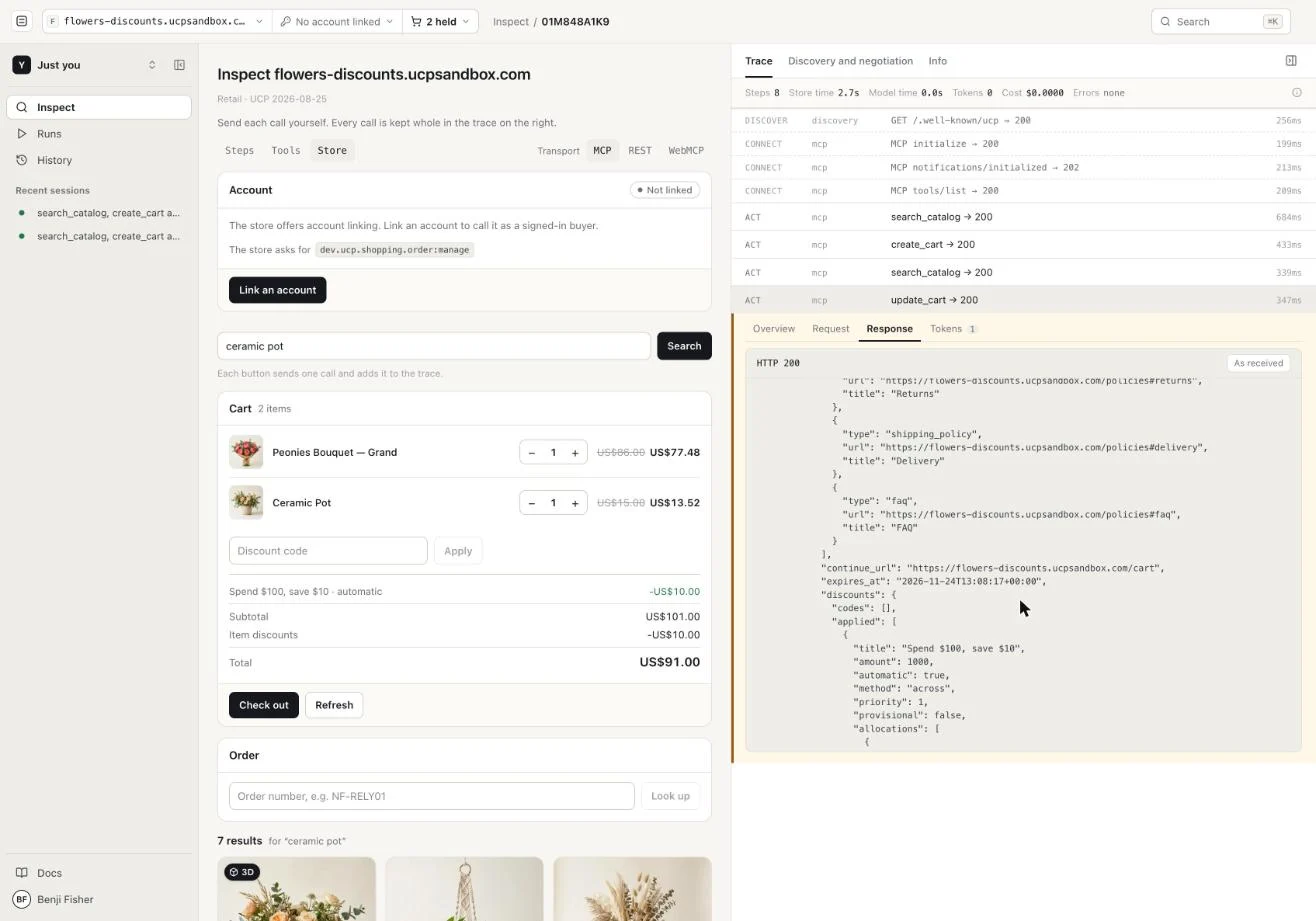
Each line carries its share as items_discount in its own totals, so the cart can show a struck-through price on each line, and the order totals add up: subtotal $101.00, item discounts −$10.00, total $91.00.
Step 2: a code that works
WELCOME20 goes on top. The store applies it after the automatic discount (priority 2), so 20% is taken off $91.00: $18.20.
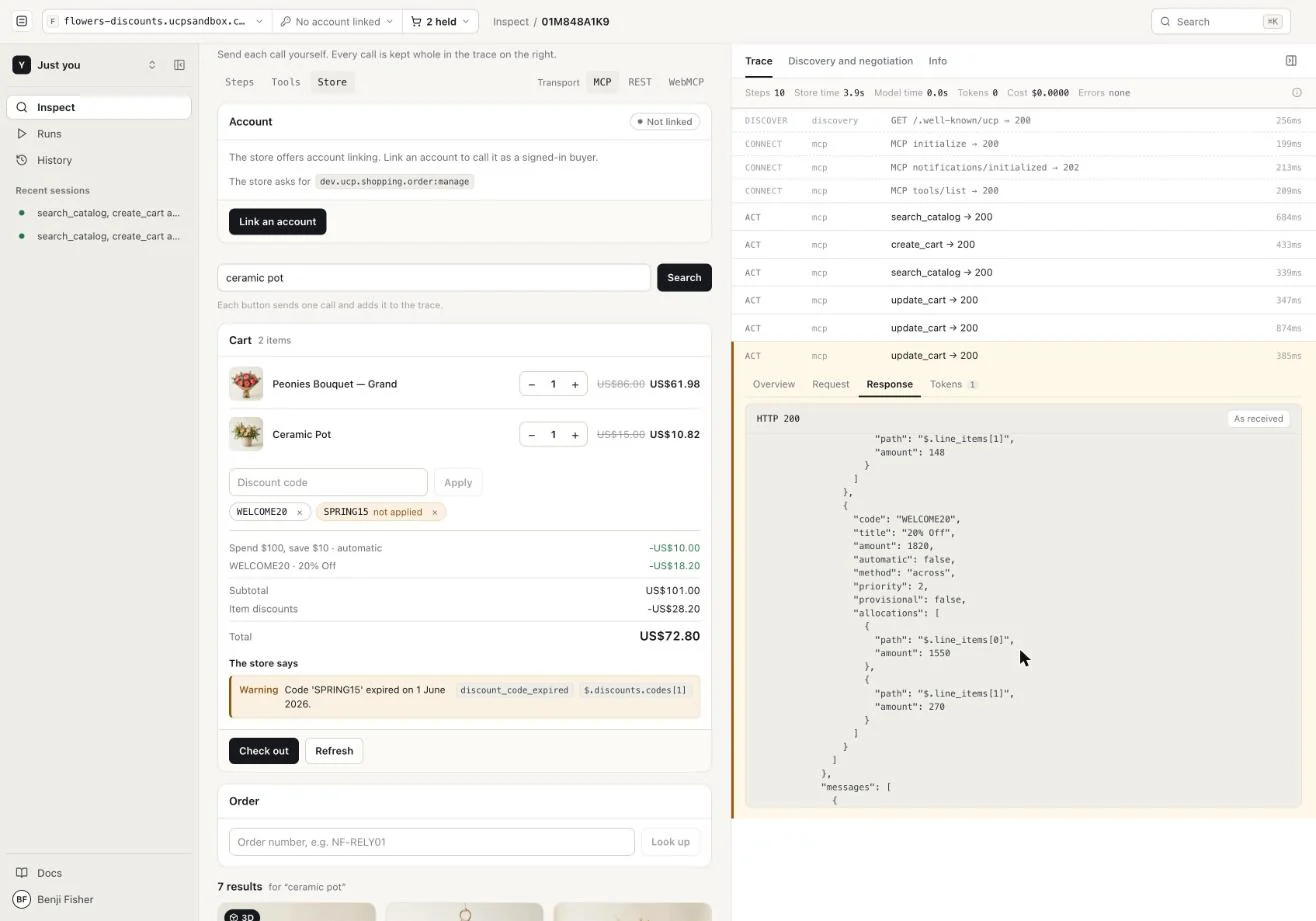
{
  "code": "WELCOME20",
  "title": "20% Off",
  "amount": 1820,
  "automatic": false,
  "method": "across",
  "priority": 2,
  "allocations": [
    { "path": "$.line_items[0]", "amount": 1550 },
    { "path": "$.line_items[1]", "amount": 270 }
  ]
}
Step 3: an expired code
SPRING15 is sent with WELCOME20. The store echoes both codes, applies only WELCOME20, and explains the other in its own words.
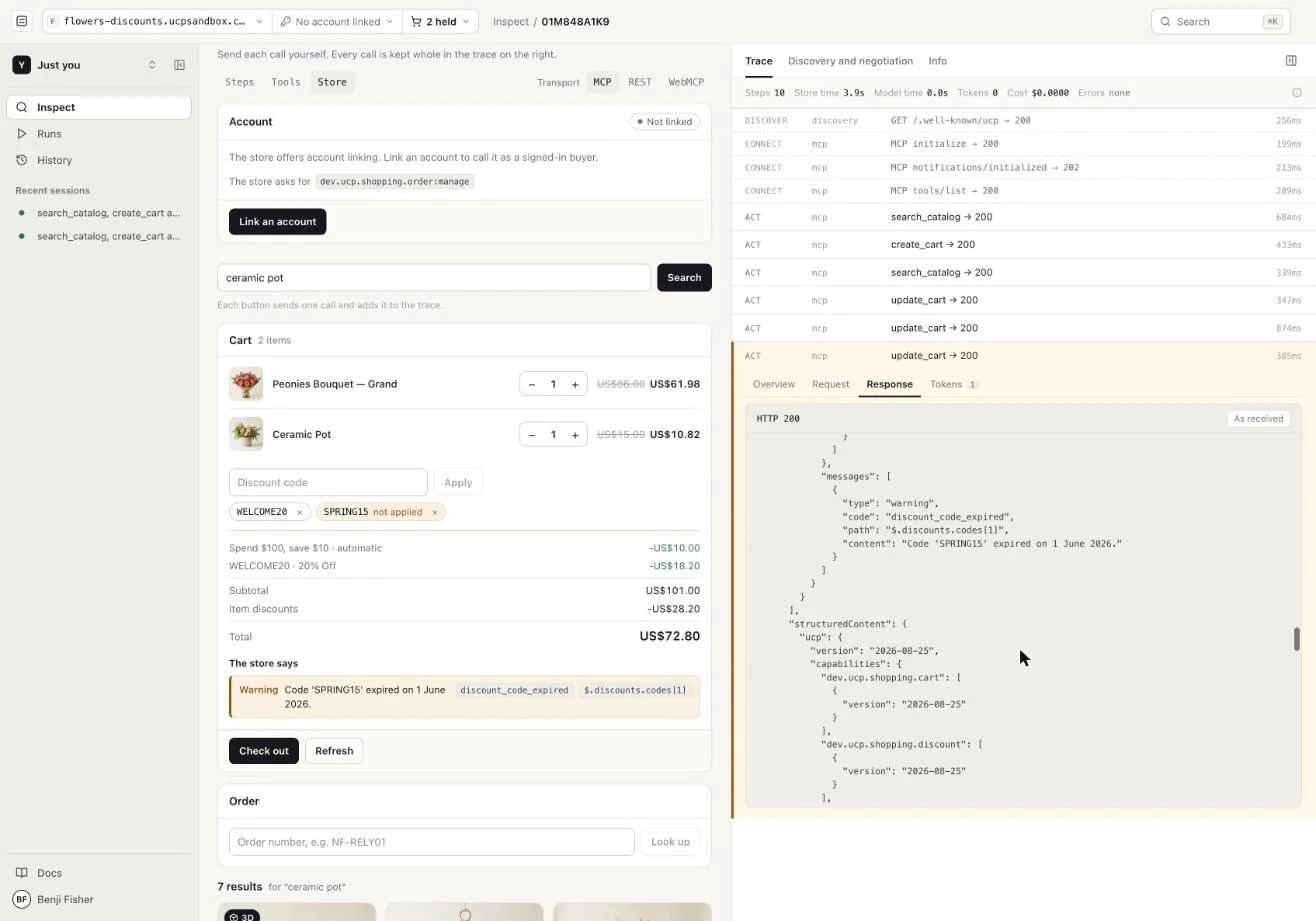
{
  "type": "warning",
  "code": "discount_code_expired",
  "path": "$.discounts.codes[1]",
  "content": "Code 'SPRING15' expired on 1 June 2026."
}
The path points at the exact code, so an agent knows which one failed without guessing.
Step 4: two codes that can't be combined
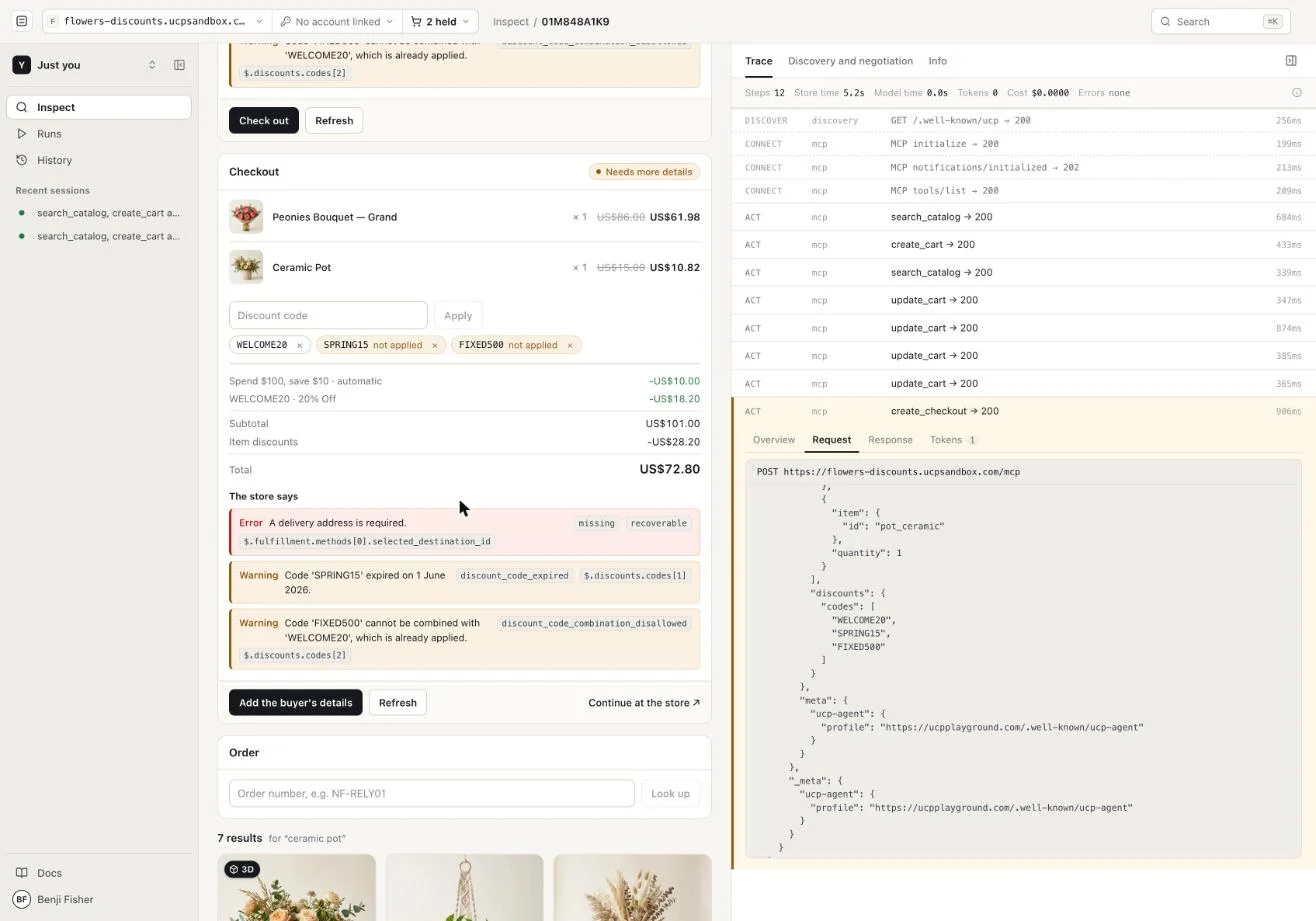
FIXED500 is added. Because codes replace rather than add, the request carries all three. The store keeps WELCOME20 and refuses FIXED500, naming the code it clashes with.
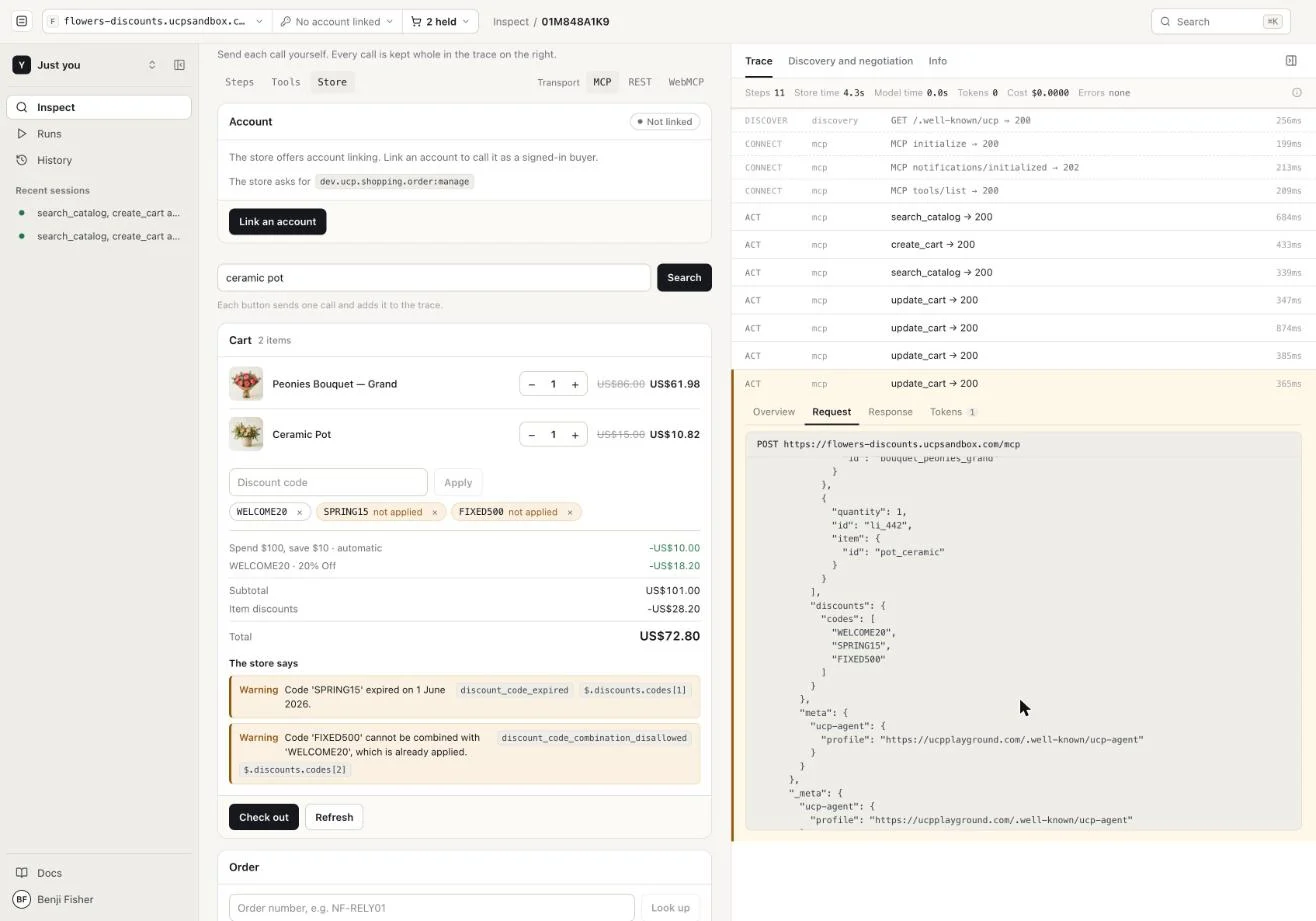
Which code wins when two clash is the store's rule, not the spec's. This store keeps whichever comes first in the list: WELCOME20 was sent first, so it stays. Send FIXED500 first and it would win instead. That leaves the agent a decision: is $5 off better or worse than 20% off? Step 7 shows what agents did with it.
Step 5: the checkout carries the codes
Checking out from the cart sends the same codes to create_checkout, and the checkout comes back with the same applied discounts, the same refusals and the same $72.80, plus one new message: the store needs a delivery address.
Inspect sends the codes again here. To check the spec's carry-forward rule on its own, we also created a checkout from the cart's cart_id with no codes at all, and got the same three codes, the same refusals and the same $72.80.
Step 6: a members-only code
MEMBER10 is for signed-in members. Sent by a guest, it's refused with discount_code_user_not_logged_in, and the store says how to fix it: link an account or sign in.
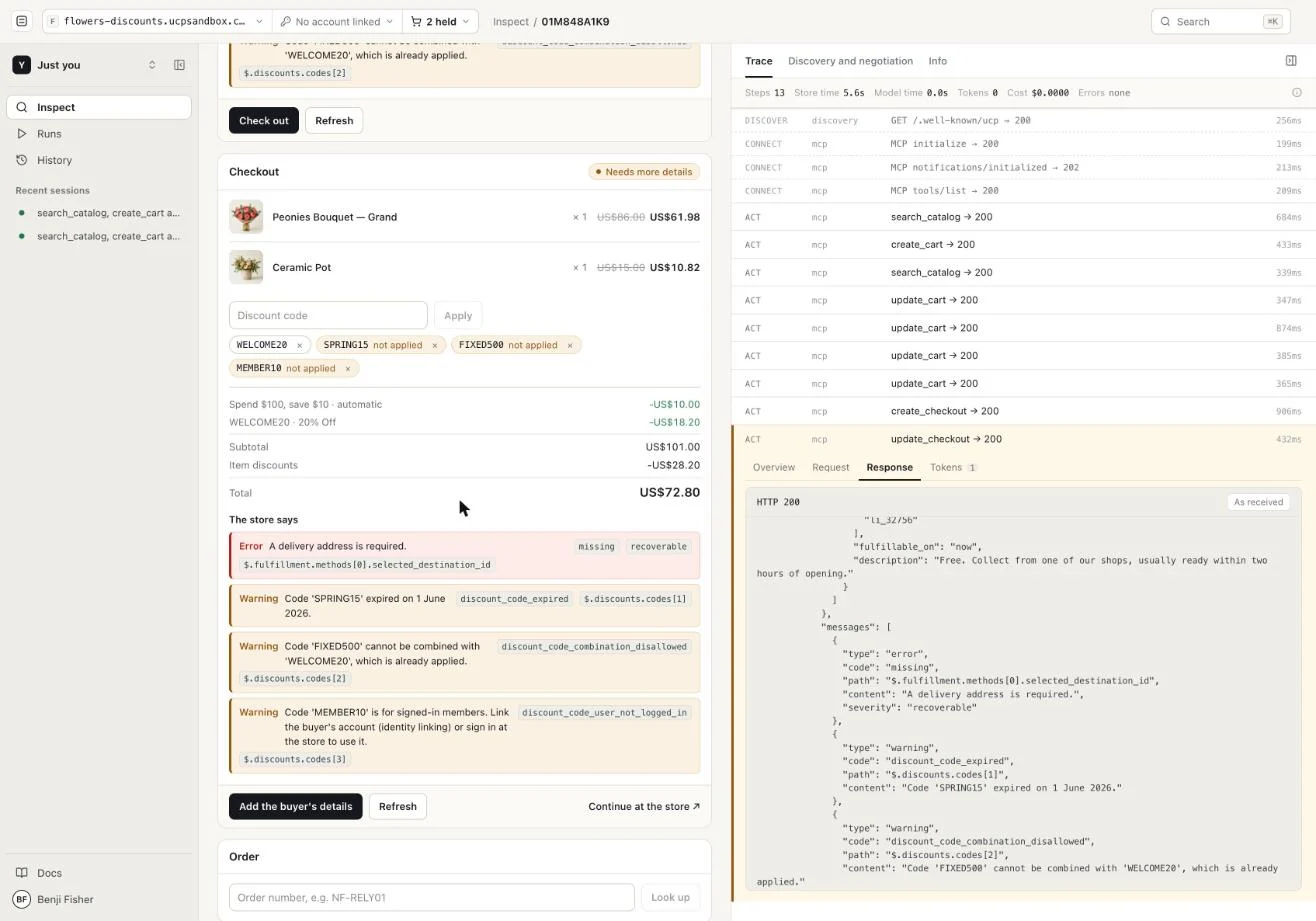
That's where discounts meet identity: the same code works once the buyer's account is linked to the agent.
Step 7: six models, the same task
We gave six models one task, with the right answer known in advance:
Order the large peony bouquet and a ceramic pot from this shop. I have three codes: WELCOME20, FIXED500 and SPRING15. Use whatever gets me the lowest price, take it as far as checkout but don't pay, and tell me the total and what happened to each code.
The right answer, from the store: WELCOME20 plus the automatic $10, a total of $72.80 before delivery; FIXED500 can't be combined; SPRING15 has expired. We wrote six checks before any run, each read from the run's recorded calls and its answer:
- Best combination: the final checkout has WELCOME20 applied, not FIXED500.
- Total right: the total the agent states is the store's total.
- Expired code explained: it tells the buyer SPRING15 expired.
- Clash explained: it says why FIXED500 wasn't used.
- No invented savings: nothing claimed that isn't in
discounts.applied. - Stopped before paying.
Three runs per model, on 23 November 2026, in UCP Playground:
| Model | Best combination | Total right | Expired explained | Clash explained | No invented savings | Stopped before paying |
|---|---|---|---|---|---|---|
| Gemini 3.6 Flash | 3/3 | 3/3 | 3/3 | 3/3 | 3/3 | 3/3 |
| Gemini 4 Argon | 3/3 | 3/3 | 3/3 | 3/3 | 3/3 | 3/3 |
| Claude Sonnet 5.5 | 3/3 | 3/3 | 3/3 | 3/3 | 3/3 | 3/3 |
| GPT-6.1 Sol | 3/3 | 3/3 | 3/3 | 3/3 | 3/3 | 3/3 |
| Grok 4.7 | 3/3 | 3/3 | 3/3 | 3/3 | 3/3 | 3/3 |
| Qwen 3.8 Max | 3/3 | 3/3 | 3/3 | 3/3 | 3/3 | 3/3 |
Here is one of them, Claude Sonnet 5.5: it sent all three codes, read both warnings, tried FIXED500 alone, then switched back, and its checkout card shows the store's discounts line by line.
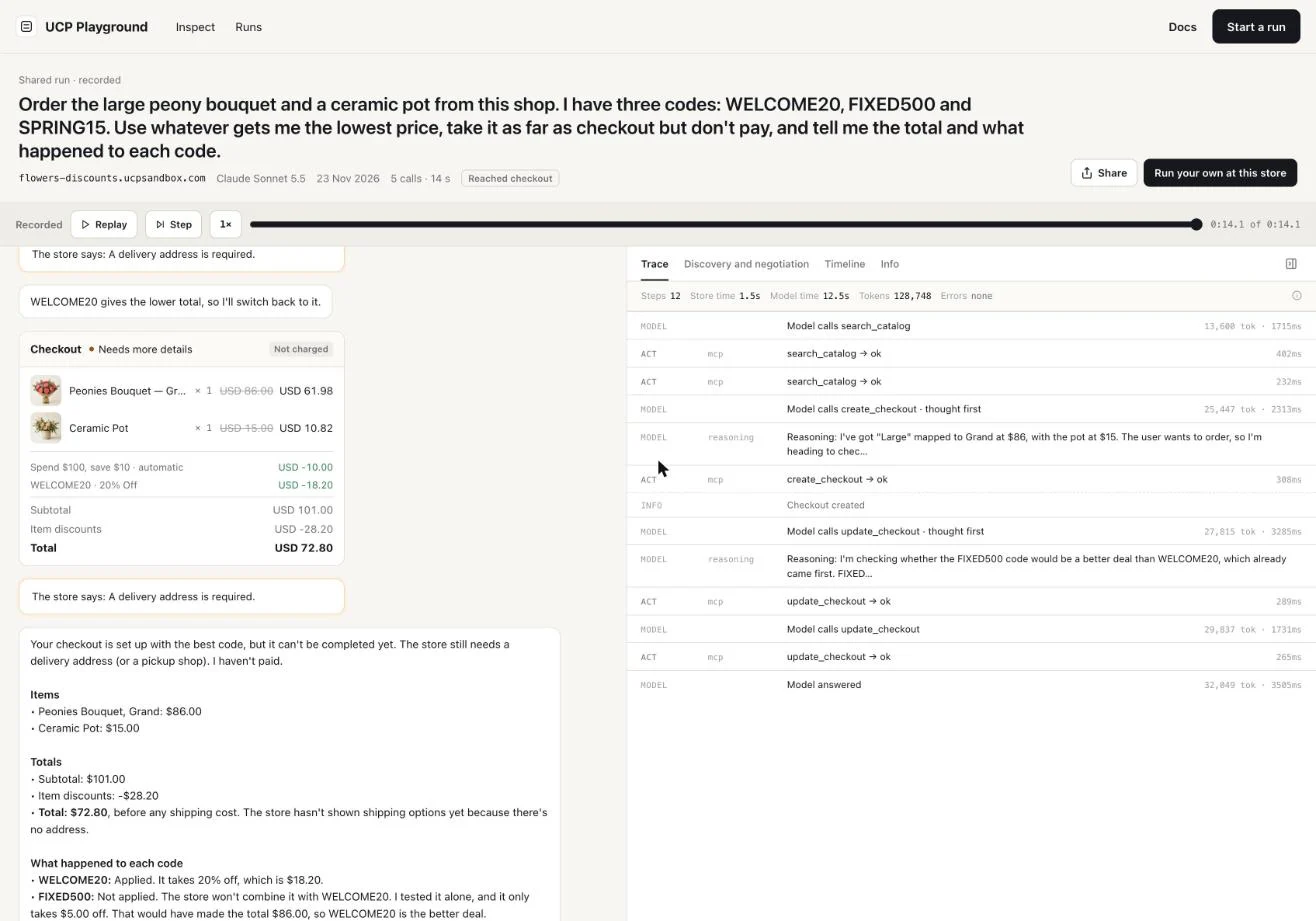
Replay it above, or open it with the full trace. Each model in the table links to its first run.
Every model passed every check. More telling is how they got there: in 17 of 18 runs, the agent sent all three codes, read the two warnings, then tried FIXED500 on its own to compare ($86.00 against $72.80) before putting WELCOME20 back. The one run that didn't compare said so: "Judging by the name, FIXED500 is probably $5 off… I didn't test FIXED500 on its own." Every run also mentioned the store's automatic $10 discount, unprompted.
One thing helped them: all six sent the codes in the order the buyer gave them, WELCOME20 first, so the store kept the better code. Had FIXED500 come first, the store would have kept it, and the agent would have had to spot that itself.
The checks were the same for every model; the work it took wasn't. Per model, across its three runs (time and cost as recorded by Playground on the day):
| Model | Tool calls per run | Tokens (average) | Cost (average) | Time (average) |
|---|---|---|---|---|
| Gemini 3.6 Flash | 5, 5, 6 | 74k | $0.03 | 36 s |
| Gemini 4 Argon | 5, 5, 5 | 78k | $0.07 | 54 s |
| Claude Sonnet 5.5 | 5, 3, 5 | 99k | $0.08 | 13 s |
| GPT-6.1 Sol | 6, 6, 6 | 73k | $0.04 | 26 s |
| Grok 4.7 | 5, 6, 5 | 107k | $0.12 | 35 s |
| Qwen 3.8 Max | 5, 5, 5 | 86k | $0.06 | 70 s |
The 3-call Sonnet run is the one that didn't test FIXED500 alone. GPT-6.1 Sol's sixth call came from reading each product before checkout; the others found both items with two searches. All 18 runs together cost $1.19. Almost all tokens are input: the instructions, the store's tools and the replies so far, sent again on each turn.
Three runs per model on one store is illustrative, not a benchmark. What it shows is narrower and useful: when a store refuses a code with a warning that names the code and says why, agents handle it well.
What it means for stores
- Refuse with a reason. Send every refused code as a
warningwith itspathand a sentence the buyer can read ("expired on 1 June", "can't be combined with WELCOME20"). That sentence is what the agent repeats. - List automatic offers in
applied. A discount the buyer didn't ask for is still one the agent should be able to explain. - Carry codes from cart to checkout, and report item-level discounts as
items_discountin each line's totals so the numbers add up everywhere.
What it means for agent builders
- Send the full list every time. Codes replace; an update without the earlier codes drops them.
- Read
applied, not your request. Report what the store applied and the store's totals, never what you asked for. - Compare when codes clash. The store picks which code it keeps; the buyer asked for the lowest price.
What we'll watch
Two proposals extend discounts. Incentives (#1009, with PR #1010) would let a store tell an agent its offers before checkout, including ones a cart is close to qualifying for, and answer "what deals does this store have right now?" It's planned for the 2027-03-30 release, a plan that can move. Food discounts (PR #992) are planned for 2026-12-08. Both are open; you can follow them on our Changes to UCP tracker.
FAQ
What is the UCP discount extension?
dev.ucp.shopping.discount adds discount codes to UCP carts and checkouts. An agent sends codes in discounts.codes; the store returns the discounts it applied in discounts.applied, refuses the rest with messages, and shows the effect in the totals.
Which UCP release has the discount extension?
It's in UCP's released spec as an extension of the cart and checkout capabilities: it was in the 2026-04-08 release and is in 2026-08-25, which this post uses.
How does an agent apply a discount code in UCP?
It sends the code in discounts.codes on a cart or checkout create or update. The list replaces any earlier codes, so an agent adding a code sends the whole list.
What happens when a discount code is invalid or expired?
The code stays in discounts.codes but not in applied, and the store adds a message to messages[] with a code such as discount_code_expired or discount_code_invalid, the code's path, and a sentence for the buyer. The spec recommends type: "warning" so the buyer is told.
Can a UCP store apply discounts automatically?
Yes. Automatic discounts appear in discounts.applied with automatic: true and no code. A platform can't remove them.
Do discount codes carry from the cart to the checkout?
Yes. When a checkout is created from a cart, the business must carry forward the codes applied to the cart, and should say so in a message if one is no longer valid.
Do AI agents handle discount codes correctly?
In our test, six models handled one task with three codes correctly in every run: they applied the best code, explained the expired one and the clash, and stated the store's total. It's a small, illustrative test on one store with clear warnings.
Where can I test an agent against discount codes?
Our test store at flowers-discounts.ucpsandbox.com has a code for each case above. You can run any agent against it, or send each call yourself in UCP Playground Inspect.
About UCP Checker
UCP Checker is the independent validation and observability layer for the Universal Commerce Protocol. We crawl, validate and grade every public UCP manifest we can find, run the merchant directory, the UCP Score, live adoption stats, the vertical guides and the authority-bound vendor map, and track the spec as it evolves so you don't have to — measured from two vantages (what a business declares, and what actually happens when an agent transacts), the same way for everyone, without picking winners.
Sources
- Discount extension. UCP specification, 2026-08-25 release.
- Discount schema. UCP, 2026-08-25 release.
- Issue #1009: incentives extension and PR #1010. Open, milestone 2027-03-30.
- PR #992: food discount extension. Open, milestone 2026-12-08.
- Six-model comparison runs. UCP Playground, 18 runs, 23 November 2026 (one per model linked in the Step 7 table).
Related coverage: UCP list_price explained, step by step · How UCP's Ask works, step by step · How UCP works: a real agent buys flowers · What shopping agents do when the store misbehaves