


On 22 October the UCP maintainers backported product media to both supported releases. Video, 3D models, alternate renditions and preview stills are now part of 2026-04-08 and 2026-08-25, not only the draft. A store on either version can now send them, and an agent can rely on them.
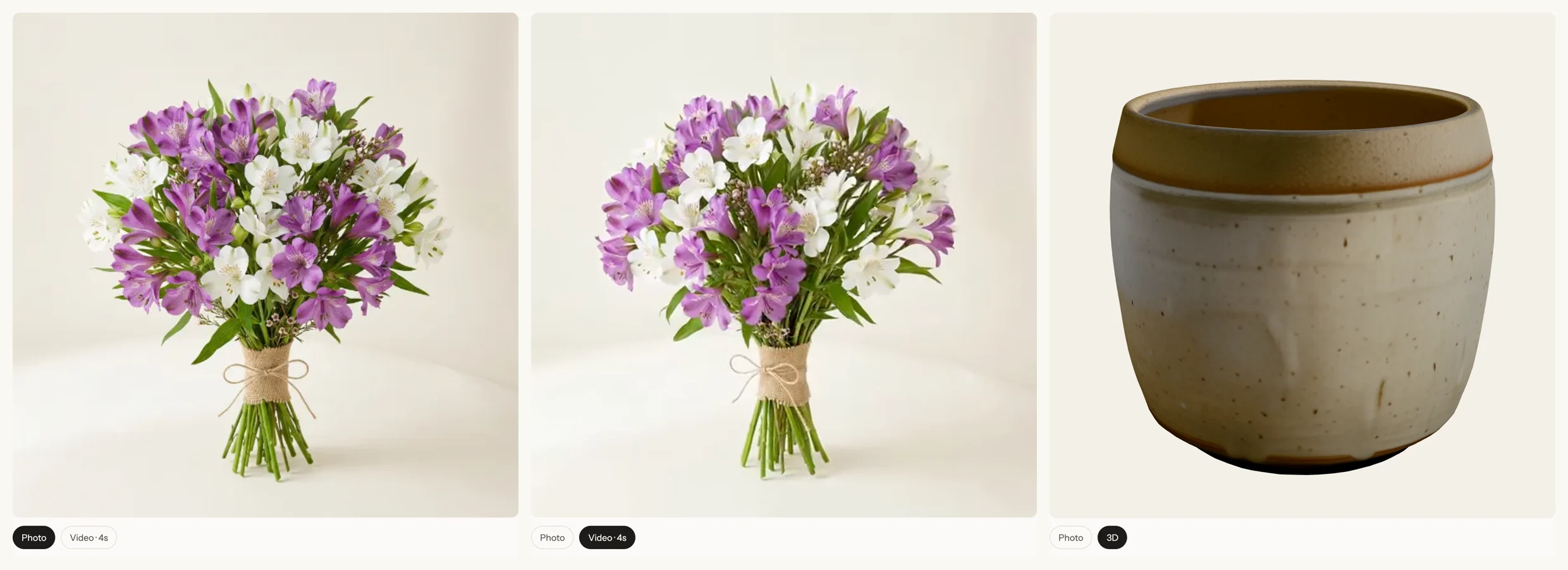
We added them to a test store the same day: 24 bouquet videos and one 3D model on Northlight Flowers, a UCP Sandbox store. Then we sent an AI agent to shop there. This guide walks through it step by step: what the backport changed, how to describe a video or a 3D model in your catalogue, the mistakes we found in our own tools, and what an agent does with the result.
What changed in the spec this week
Media variants arrived in PR #690 by Ilya Grigorik (Shopify), which merged to the main branch on 29 September. We covered what it adds in Video, 3D and image variants in UCP. Until this week it lived only in the draft.
On 22 October Federico D'Amato (Google) merged two backports:
- PR #941 into the 2026-08-25 release branch, at 07:09 UTC.
- PR #935 into the 2026-04-08 release branch, two minutes later.
We compared the schemas on all three branches. The six media files (media, media_image, media_video, media_external_video, media_model_3d, media_source) say the same thing on each. The one difference is location: on 2026-04-08 the files sit under shopping/types/, because the move to common/types/ came later, so their $id URLs differ.
Two things haven't caught up yet, as of 23 October:
- No new release tag. The latest tag is still v2026-08-25, from 25 August.
- The versioned docs are half updated. The 2026-04-08 catalog page on ucp.dev already shows
external_video,sourcesandpreview. The 2026-08-25 catalog page still shows the old list of three types. The release branch is the source of truth until the docs rebuild.
Every new field is optional, so nothing breaks for stores or agents that ignore them.
What is a UCP media item?
A UCP media item is one picture, video or 3D model attached to a product or variant in the catalogue. type says what it is and url says where the resource lives; both are required. Everything else is optional:
sources: alternate renditions, such as MP4 and WebM, or GLB and USDZ.preview: a still the agent can show before, or instead of, the resource.nameandalt_text: a title, and text for screen readers.width,heightandduration.
type is an open string with four well-known values: image, video, external_video and model_3d. An agent must not reject a product because it doesn't recognise a type. It may show the preview and name instead, or skip the item.
Step 1: Make the files
A test store doesn't need studio footage, so we generated ours from the product photos, and we say so on the store:
- Video. An image-to-video model turned each bouquet photo into a 4-second turn. We encoded each one twice, as 720×720 MP4 (H.264) and WebM, with no audio, at about 500 KB per file.
- 3D. We made the ceramic pot with TRELLIS, Microsoft's open image-to-3D model, from a picture of the empty pot. The result is a 1.5 MB GLB with about 20,000 triangles. Our first try used the store photo, with flowers in the pot, and the flowers came out as a black mass. Start from a clean picture of the object alone.
Keep the files small. An agent's interface may load them on a phone, and filesize lets it decide whether to fetch a large model at all.
Step 2: Describe each item
Here's the video item for the Alstroemeria Bouquet, exactly as the store returns it from search_catalog:
{
  "type": "video",
  "url": "https://flowers.ucpsandbox.com/videos/flowers/bouquet_alstroemeria.mp4",
  "name": "Alstroemeria Bouquet",
  "alt_text": "Alstroemeria Bouquet, turning slowly",
  "width": 720,
  "height": 720,
  "duration": 4,
  "preview": {
    "url": "https://flowers.ucpsandbox.com/images/flowers/bouquet_alstroemeria.webp",
    "width": 600,
    "height": 600
  },
  "sources": [
    { "url": "https://flowers.ucpsandbox.com/videos/flowers/bouquet_alstroemeria.mp4", "mime_type": "video/mp4", "format": "mp4", "width": 720, "height": 720, "filesize": 499938 },
    { "url": "https://flowers.ucpsandbox.com/videos/flowers/bouquet_alstroemeria.webm", "mime_type": "video/webm", "format": "webm", "width": 720, "height": 720, "filesize": 500026 }
  ]
}
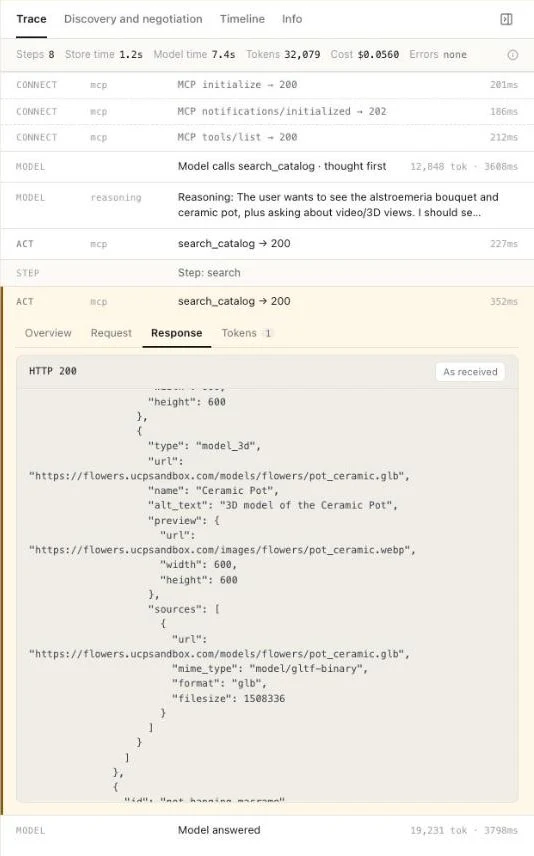
And here's the 3D item for the Ceramic Pot:
{
  "type": "model_3d",
  "url": "https://flowers.ucpsandbox.com/models/flowers/pot_ceramic.glb",
  "name": "Ceramic Pot",
  "alt_text": "3D model of the Ceramic Pot",
  "preview": {
    "url": "https://flowers.ucpsandbox.com/images/flowers/pot_ceramic.webp",
    "width": 600,
    "height": 600
  },
  "sources": [
    { "url": "https://flowers.ucpsandbox.com/models/flowers/pot_ceramic.glb", "mime_type": "model/gltf-binary", "format": "glb", "filesize": 1508336 }
  ]
}
Three rules from the spec shaped these items:
- Put the file at
urlinsourcestoo. The spec says a store that listssourcesshould include the rendition aturl. An agent that picks by MIME type then sees every option in one list. - Give every video and 3D model a
preview. The spec says stores should, unless no suitable still exists. We reuse the product photo. An agent that can't play video can still show something. - Leave out
widthandheighton a 3D model. The spec says a model has no pixel dimensions. They belong to the preview and to video renditions.
Don't use external_video for a video you host yourself. That type is for a third-party player, such as a YouTube embed. A video file served from your own site or CDN is video, even when the CDN is on another domain.
Step 3: Keep the photo first
media is an ordered list. Stores should put the featured item first, and agents should treat the first item they show as featured. We put the photo first and the video or model after it.
This matters more than it looks. When we checked our own tools against the backport, both UCP Playground and UCP Checker had places that took media[0] as "the product image". A store that led with its video would have had an MP4 dropped into an image tag. Our store led with the photo, so nothing broke, but the code was wrong. Both tools now pick the first item whose type is image (or has no type), and fall back to the first preview.
If you build an agent, check for the same assumption in your code. If you run a store, leading with the photo is the safer choice until agents catch up.
Step 4: Serve the files properly
Agents and their interfaces load media straight from your URLs. Video plays in an ordinary <video> tag, but a 3D viewer has to fetch the model file from another site with JavaScript, so the rules for that request apply. Check three things:
- HTTPS only. The spec lets an agent refuse any media URL that isn't
https. - A correct
Content-Type. We declaredmodel/gltf-binaryfor the GLB, but our server sentapplication/octet-stream, because nginx doesn't map.glbby default. - CORS on 3D files. Our first test in UCP Playground showed the photo and "The 3D model didn't load here". The model file had no
Access-Control-Allow-Originheader, so the browser blocked the viewer from fetching it from another site. Videos weren't affected.
Both fixes went in one nginx block:
location ~* ^/models/.+\.(glb|gltf|usdz)$ {
    types {
        model/gltf-binary   glb;
        model/gltf+json     gltf;
        model/vnd.usdz+zip  usdz;
    }
    add_header Access-Control-Allow-Origin "*" always;
    add_header X-Content-Type-Options "nosniff" always;
    try_files $uri =404;
}
If you serve media from a CDN, set the same headers there. Inside a location block, nginx drops the add_header lines from the server level, so repeat any security headers you rely on, as we did with nosniff.
Finally, a filesize that matches. We compared every declared filesize with the Content-Length the server actually sent.
Step 5: Validate against both releases
Since the backport, the same item has to pass on 2026-04-08 and on 2026-08-25. A store that negotiates the older version with one agent and the newer one with another sends the same media to both. We checked it from both sides:
- We called Northlight Flowers as an agent on 2026-04-08 and as one on 2026-08-25, over REST and over MCP. All four returned the video and 3D items.
- We validated every media item in the catalogue against the schemas on both release branches: 110 products, 285 items (260 images, 24 videos, 1 3D model), 0 errors.
- We validated the same items against the published v2026-04-08 and v2026-08-25 tags, which predate the backport. They pass there too, because the older schema doesn't forbid extra fields.
- We loaded every URL: 159 unique URLs, all
https, all returning 200.
To check your own store, the catalog validator runs the basic catalogue checks in your browser, including whether every product has an image and whether every media item has a type and a url.
Step 6: See what an agent does with it
We ran an agent against the store in UCP Playground: Claude Sonnet 5, connected over UCP. The buyer asked to see the alstroemeria bouquet and a ceramic pot properly, ideally as a video or a 3D view.
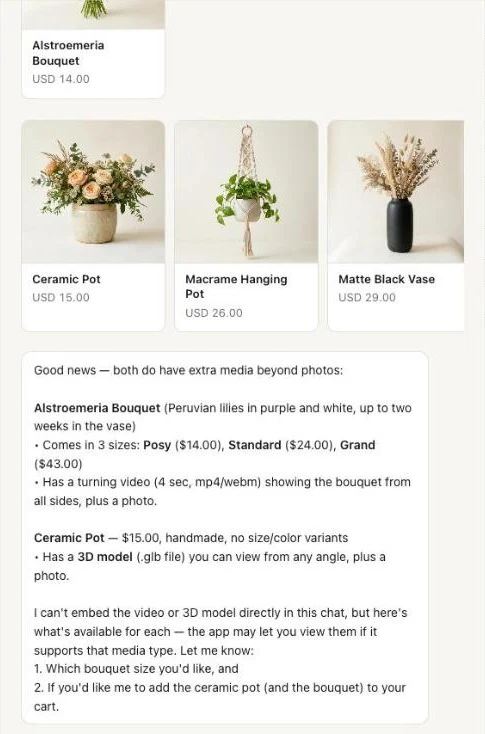
The agent called search_catalog twice and found both media items. It told the buyer the bouquet "has a turning video (4 sec, mp4/webm)" and the pot has "a 3D model (.glb file)". Then it said it couldn't embed either in the chat.
The trace shows exactly what the store sent, with the model_3d item, its preview and its single GLB source:
Play the whole run below, and click the Video or 3D label on a card to see the store's media. Or open it with the full trace.
The agent read the fields correctly. It also added one claim the data doesn't support: it described the video as showing the bouquet "from all sides", while the alt text only says "turning slowly". It's a small slip, and a useful reminder that alt_text and name are what an agent repeats to the buyer, so write them carefully.
The agent was right that it couldn't play anything inside a chat message. The interface around the agent can, though, using the same fields. So we added it to UCP Playground. Product cards now carry a Video or 3D label, and a video plays when you hover over the card. Opening a product shows Photo · Video · 3D tabs: the video plays from the store's own MP4 or WebM, with the photo as its poster, and the 3D tab loads the GLB into a viewer you can turn. In a run, the label on a product card in the chat opens the same viewer.
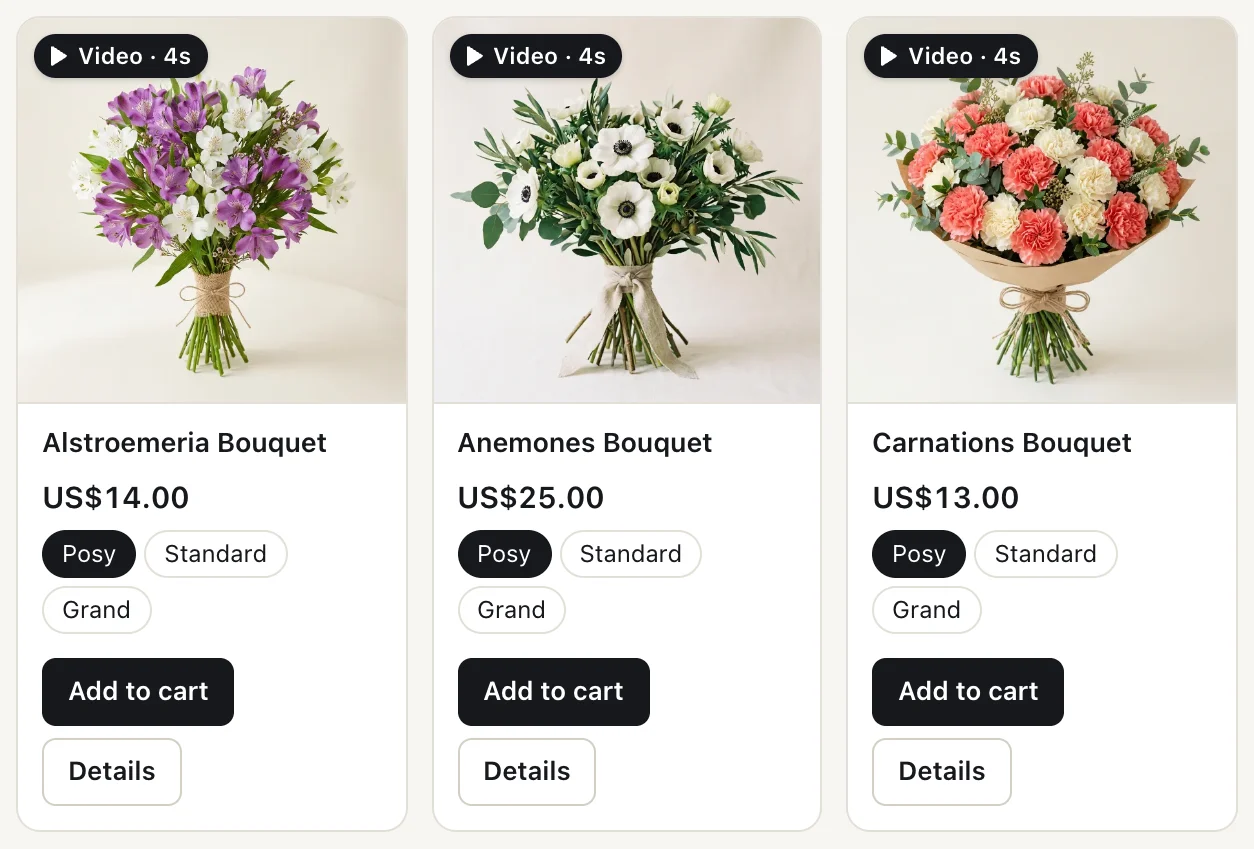
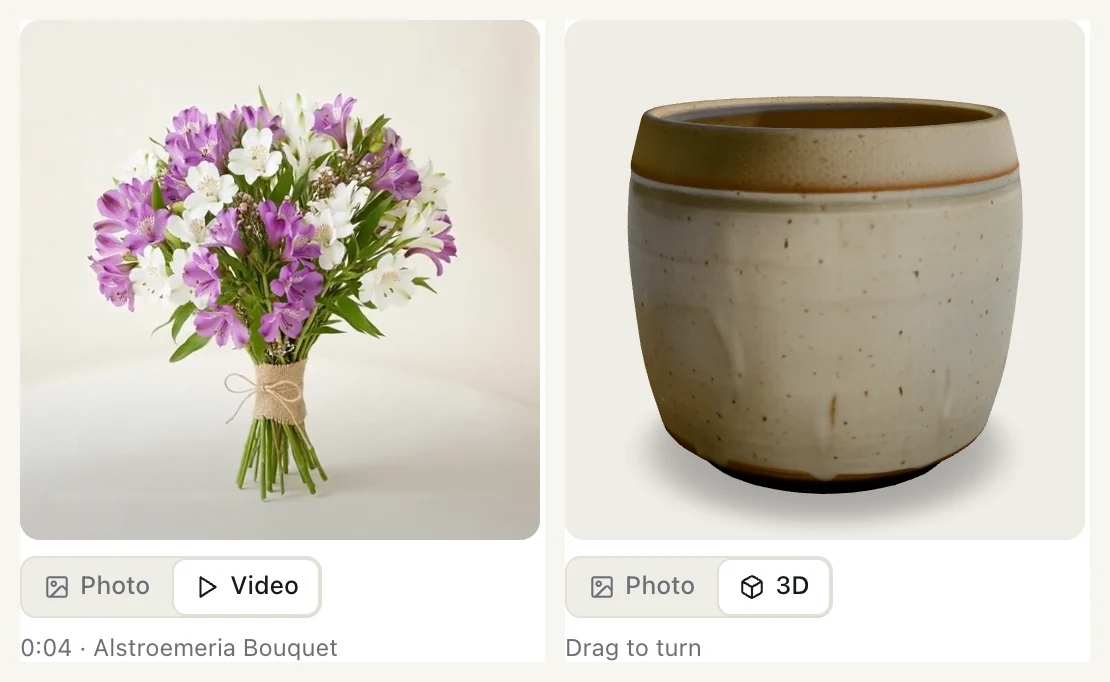
Playground follows the spec's rules for each item. It only loads https URLs and picks a rendition from sources by mime_type. It falls back to the preview when it can't play something. For an external_video it shows the preview and a link instead of embedding a third-party player, and it skips types it doesn't know rather than failing the product.
What it means for stores and agent builders
For stores: you can add video and 3D now, on either supported version, without waiting for a release tag. Send the photo first, give each item a preview and a clear alt_text, serve correct MIME types over HTTPS, and send Access-Control-Allow-Origin on 3D files. Stores that send nothing new lose nothing.
For agent builders: read type before you treat a URL as an image. Pick from sources by mime_type, show preview when you can't play the item, and skip types you don't know rather than failing. If you embed external_video players, the spec sets strict isolation rules: a sandboxed, credentialless iframe with no access to your credentials or tools.
What we'll watch
- A release tag that carries the backport, and the 2026-08-25 docs on ucp.dev catching up.
- Seller logos. PR #962 proposes an optional
seller.logoon variants that reuses the same media type. It's open. - Media on option values. PR #675, which would have put media on options such as a colour swatch, was closed without merging on 19 October.
FAQ
Can a UCP store send product videos?
Yes. Since 22 October, video media items with sources, preview and duration are part of both UCP 2026-04-08 and 2026-08-25. Before that they were only in the draft.
What's the difference between video and external_video in UCP?
video is a file you serve, such as an MP4 or an HLS stream, from any origin, including a CDN. external_video is a third-party player the agent embeds, such as a YouTube link. Agents that don't embed players show its preview or skip it.
What file format should a UCP 3D model use?
The spec gives GLB as the example primary file at url, with glTF and USDZ as alternate formats in sources. USDZ is the one Apple devices use for AR. Leave out width and height on the model. Put filesize on each source so an agent can decide whether to load it.
Will an agent reject my product if it doesn't support video?
No. The spec says an agent must not reject a product or a response because it doesn't recognise a media type. It may show the preview and name, or skip the item.
Why won't my 3D model load in an agent's interface?
Usually it's a missing CORS header. A 3D viewer fetches the GLB with JavaScript, and the browser blocks that unless your server sends Access-Control-Allow-Origin. Check the Content-Type too: GLB is model/gltf-binary. Ours had both problems at first.
Should the video come before the photo in media?
The spec lets you lead with whatever is featured. Today, leading with the photo is safer, because some agents still treat the first media item as the image. We found that assumption in our own tools and fixed it.
Do I need a new release tag to use the backported fields?
No. The fields are on both release branches and are optional, so you can send them now. We also checked our items against the published v2026-04-08 and v2026-08-25 tags. They pass, because the older schema doesn't forbid extra fields. An agent built on the tag just won't know what sources or preview mean, which is another reason to keep the photo first.
About UCP Checker
UCP Checker is the independent validation and observability layer for the Universal Commerce Protocol. We crawl, validate and grade every public UCP manifest we can find, run the merchant directory, the UCP Score, live adoption stats, the vertical guides and the authority-bound vendor map, and track the spec as it evolves so you don't have to — measured from two vantages (what a business declares, and what actually happens when an agent transacts), the same way for everyone, without picking winners.
Sources
- PR #690: feat(media): model image, video, external video, and 3D variants. Merged to main 29 September 2026.
- PR #941: backport #690 to release/2026-08-25. Merged 22 October 2026.
- PR #935: backport #690 to release/2026-04-08. Merged 22 October 2026.
- UCP catalog specification, Media. ucp.dev, 2026-04-08 docs.
- PR #962: feat(catalog): add optional seller logo. Open.
- PR #675: feat: add optional media to option_value. Closed without merging 19 October 2026.
- TRELLIS. Microsoft, MIT licence.
- The recorded run on UCP Playground, 23 October 2026. Store checks run 23 October 2026.
Related coverage: Video, 3D and image variants in UCP · How UCP works: a real agent buys flowers, step by step · Agent identity in UCP: Web Bot Auth interop · Two routes to checkout: UCP and WebMCP