


UCP Playground 0.24 is the biggest change to the Playground since it launched. What used to be separate tools (the Tool Inspector, Agent runs, session history) is now one app with three places: Runs, where you send an AI agent to shop a store and read back what it did; Inspect, where you call a store's tools yourself; and History, where both are kept.
Two things matter more than the new layout. Runs now follow the UCP checkout lifecycle as the 2026-08-25 release sets it out, so a run shows you the checkout the store actually built, state by state. And as of today you can do all of this without an account: open a store from a link, inspect it or send an agent, and sign in only if you want to keep what you made.
Everything below is a screenshot of the live app, on our own test stores.
What is UCP Playground?
UCP Playground is an independent test harness for agentic commerce. It calls any store that publishes a UCP profile over MCP or REST, runs AI agents from many model makers against it under the same conditions, and records every call whole, so you can see exactly what the store said and what the agent did with it.
It answers two different questions. Inspect is deterministic: the same call gets the same answer, so it shows what a store's tools do. Runs are probabilistic: a model chooses what to call and when to stop, so they show how agents actually behave at a store.
Runs: one box to start a run
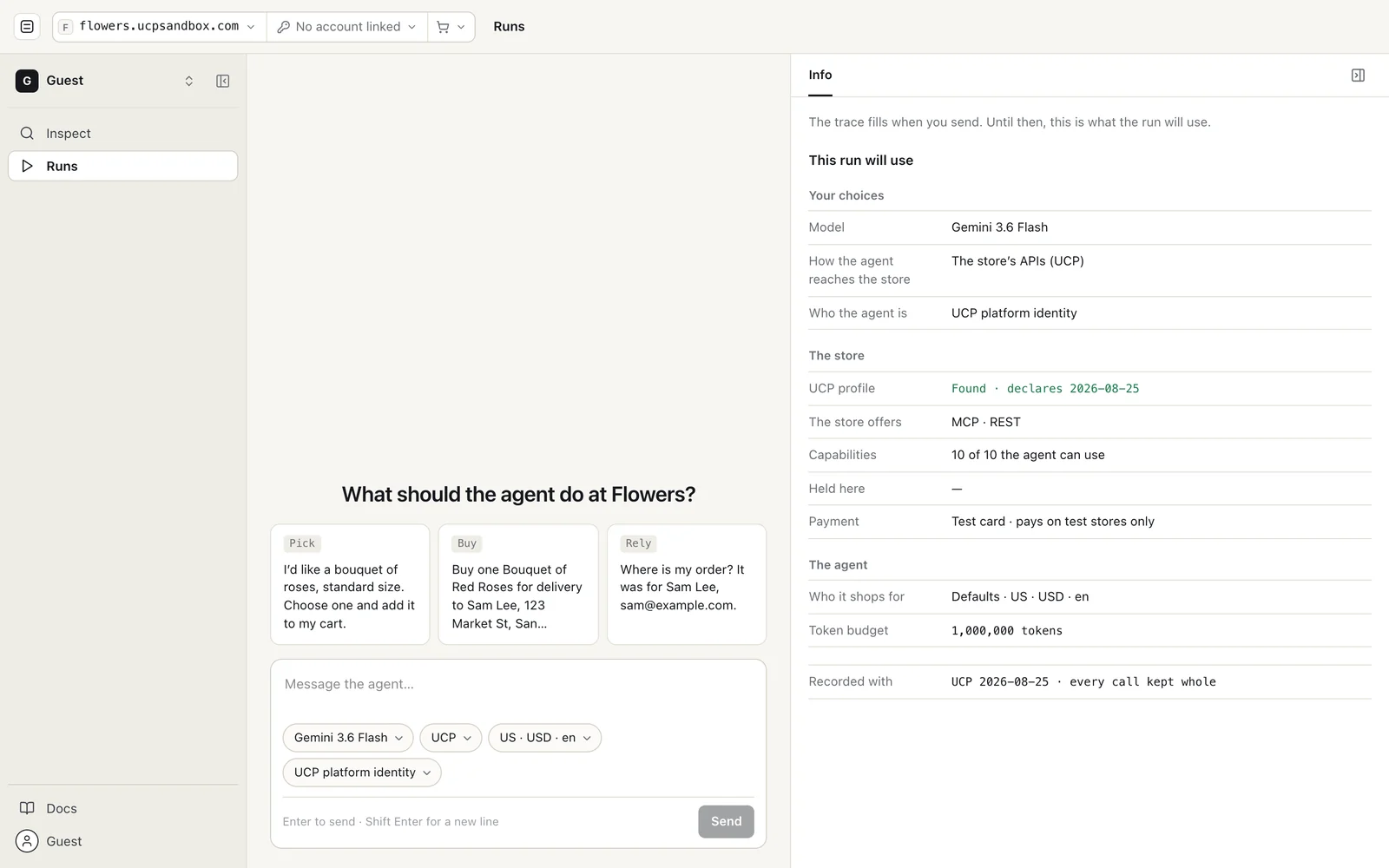
A run starts from one box: the task, the model, how the agent reaches the store, who it shops for, and who the agent is. Before you send anything, the pane on the right lists what the run will use: the store's UCP profile and the version it declares, the transports it offers, how many of its capabilities the agent can use, the payment (a test card that only pays on test stores) and the release the run is recorded with.
The three starter tasks follow the three things a buyer asks an agent to do: Pick (choose a product), Buy (check out and pay) and Rely (look up an order afterwards). The agent can reach the store through its UCP APIs or through its website in a browser; website runs add the agent's browser to the run page, with a screenshot each time the page changes.
Our test stores cover three kinds of store: Retail (flowers.ucpsandbox.com), Stays (stays.ucpsandbox.com, for UCP's draft lodging booking capability) and Food (food.ucpsandbox.com). Any other store with a public UCP profile works the same way.
The run page: what the buyer saw, and everything else
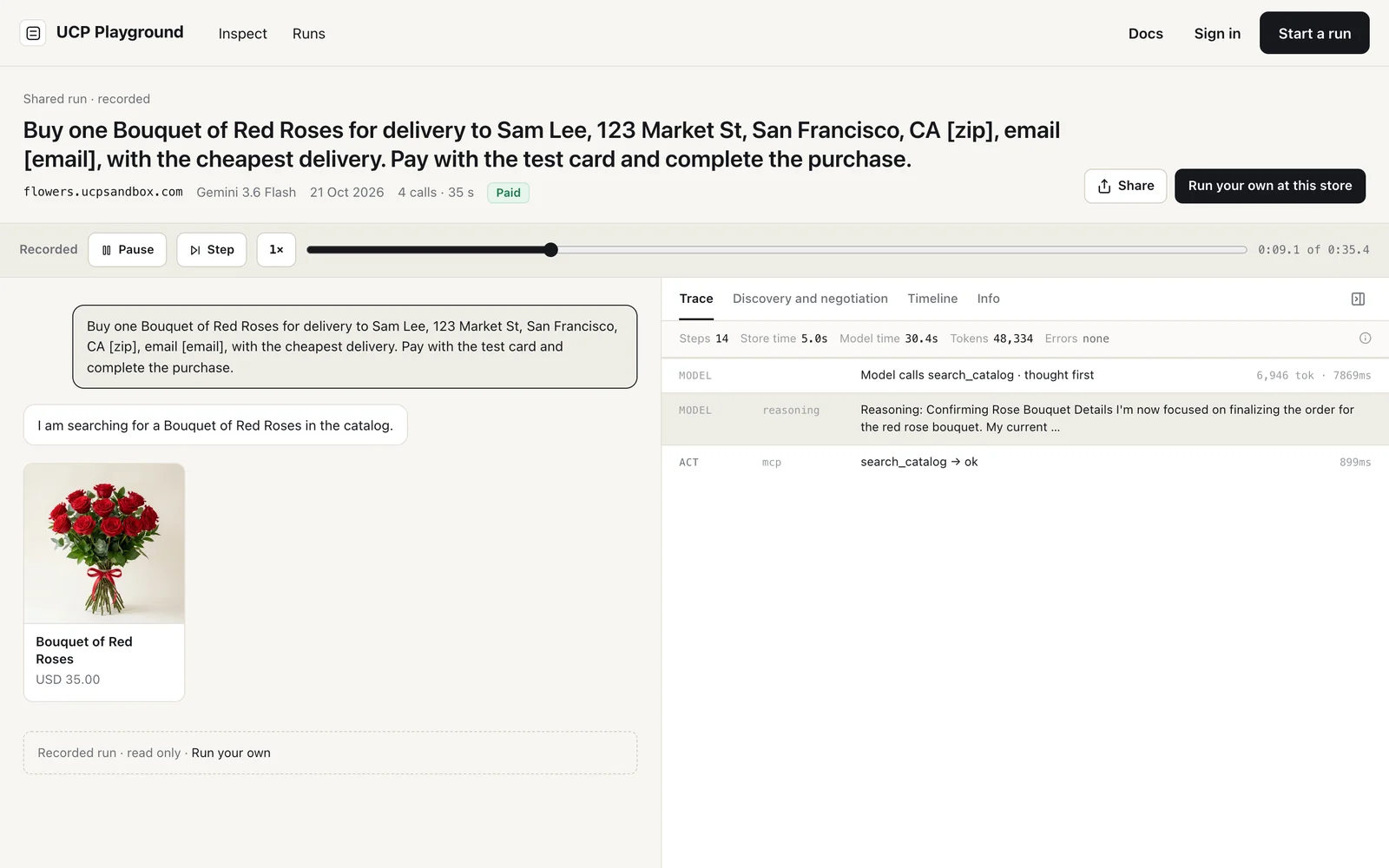
The run page keeps two things apart. The chat on the left is only what the buyer would see: the agent's messages and the cards it showed (products, the checkout, the order). Everything else sits in the pane on the right, in four tabs: Trace, Discovery and negotiation, Timeline and Info.
Every run can be replayed at the pace it was recorded, or stepped through one call at a time. Signed in, you can share a run as a link or embed it in a page. This is the run used throughout this post; press play:
Trace: every call, kept whole
The trace lists each step in order: the model's turns (with token counts and time), each call to the store (with its transport and how long the store took) and what changed as a result. Open any call to see an overview, the exact request and the exact response.
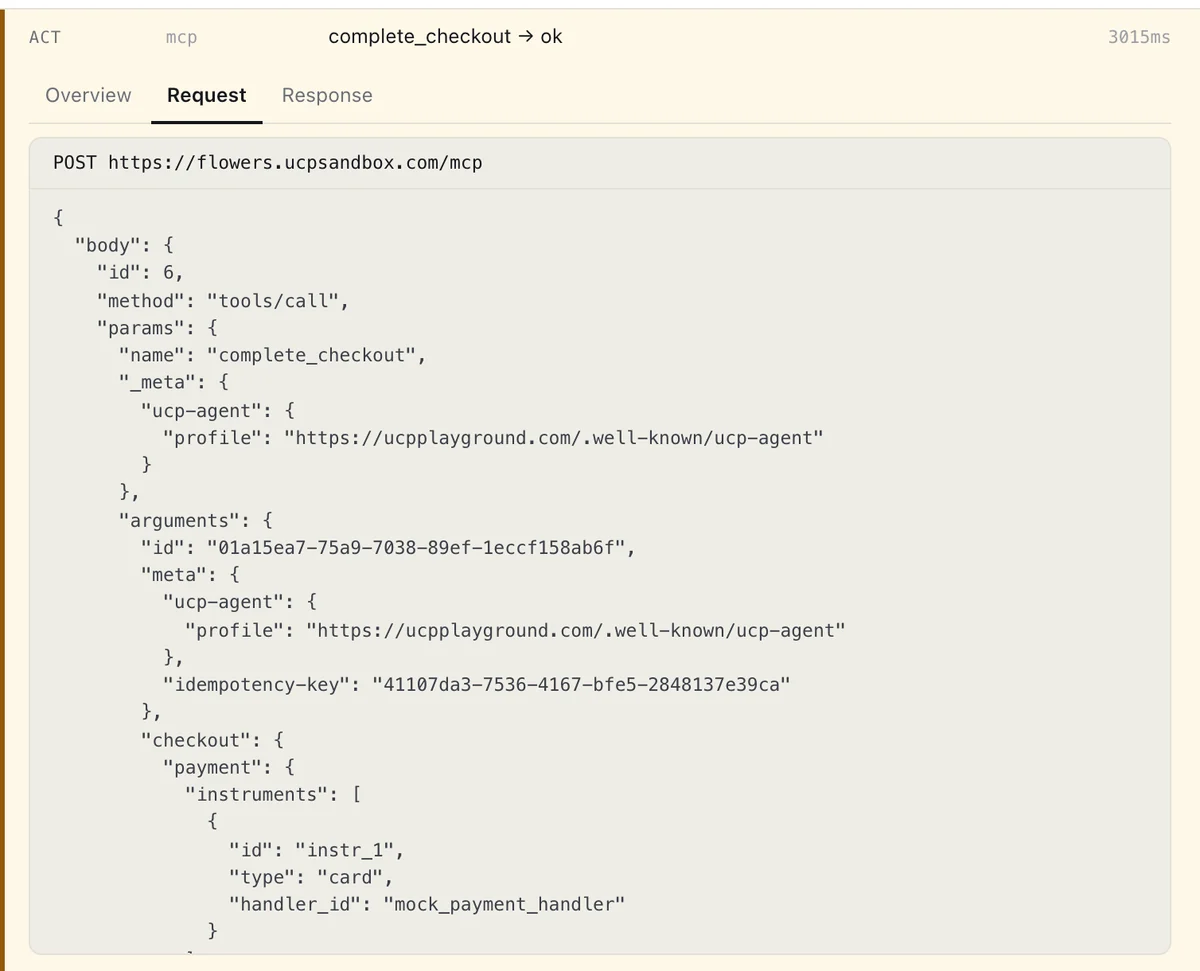
This is the agent paying: the JSON-RPC tools/call exactly as it went to the store's MCP endpoint. It carries the agent's profile in meta.ucp-agent, so the store knows who is calling; the checkout's id; the payment instrument from the store's mock payment handler; and an idempotency-key, which UCP requires on complete_checkout so a retried payment is never taken twice. The Playground sets the profile and the key itself; the model never does.
Discovery and negotiation
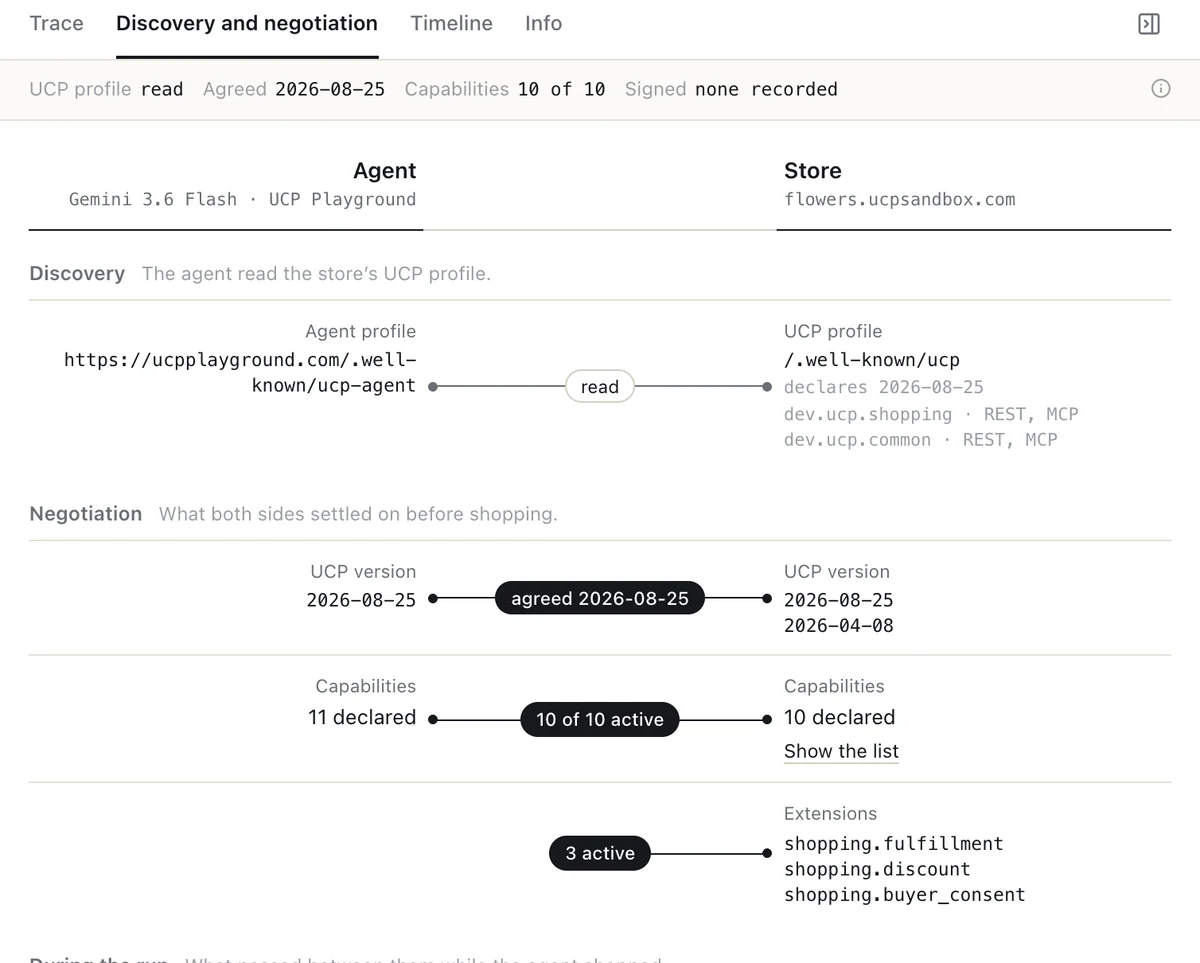
Before any shopping, the agent reads the store's profile and the two sides settle what they will use: the UCP version (here both speak 2026-08-25), the capabilities they have in common and the extensions that apply. The tab draws that as a wire between the agent and the store, so a mismatch is visible at a glance. Our agent's own profile is public at ucpplayground.com/.well-known/ucp-agent.
Timeline
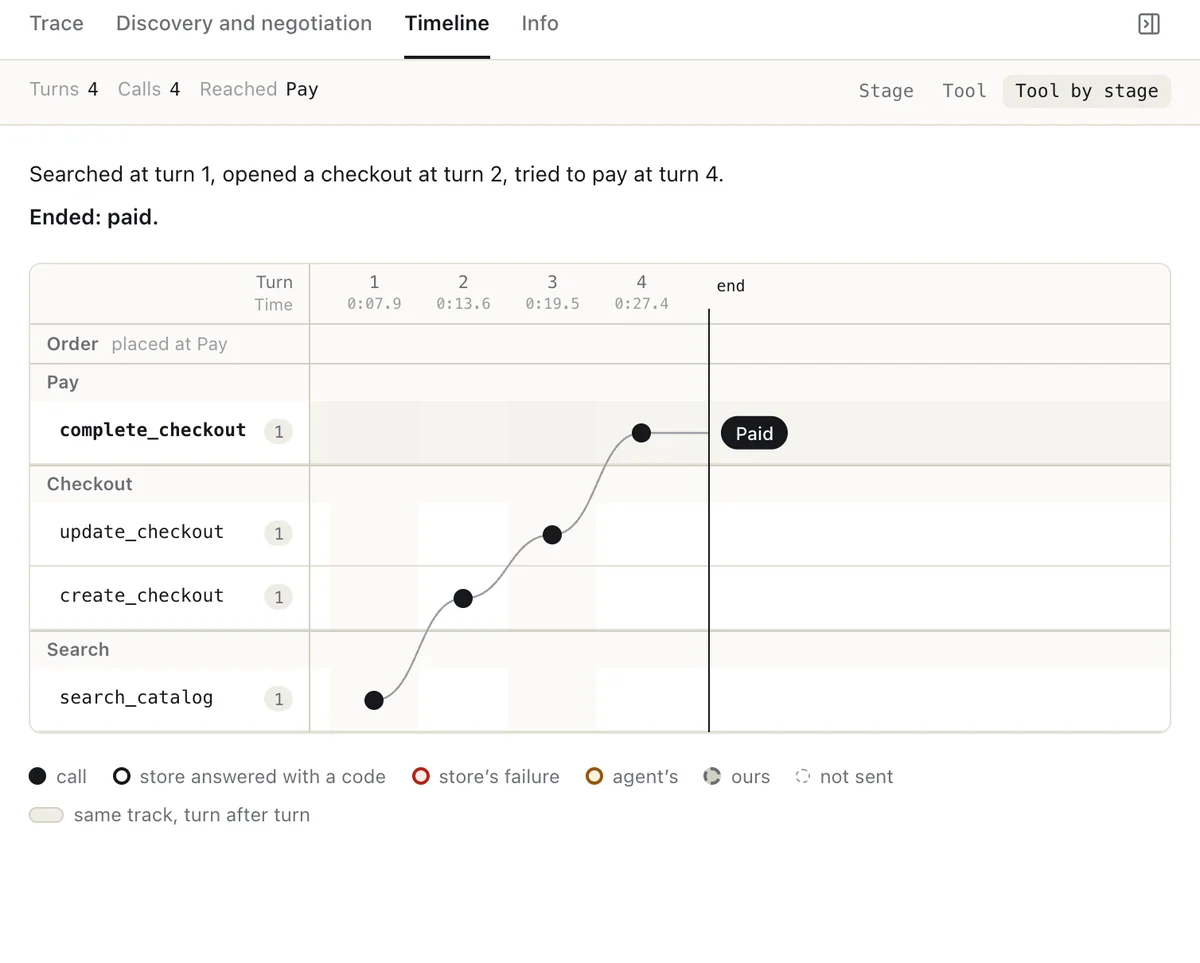
The Timeline puts each call on a track for its stage of the purchase, turn by turn, with a one-line summary above it ("Searched at turn 1, opened a checkout at turn 2, tried to pay at turn 4"). A run that loops, stalls or skips a stage shows it as a shape, without reading the trace line by line. You can group it by stage, by tool, or both. Here the order was placed at the Pay step, and the agent never needed to read it back.
Info
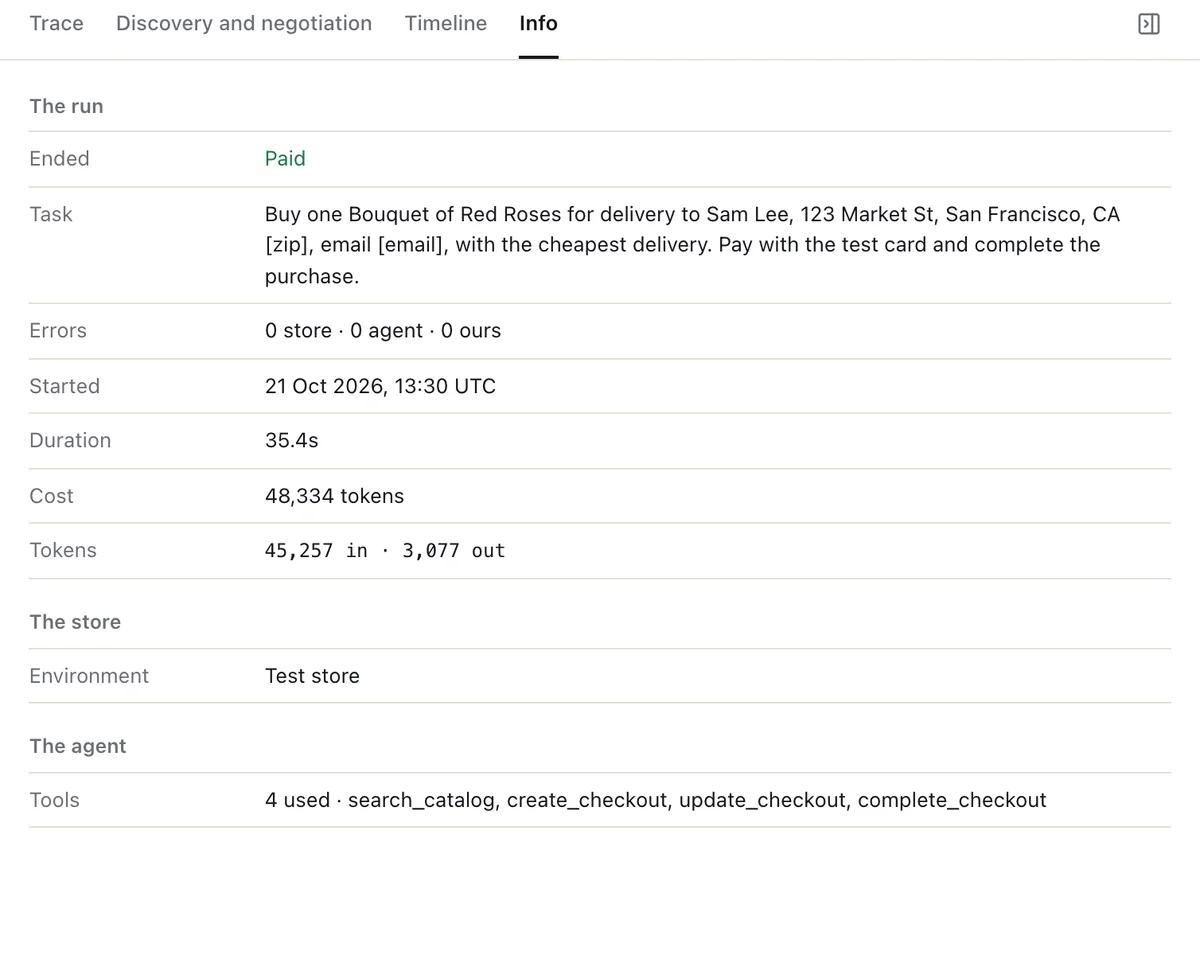
Info is the run's record: how it ended, the task, when it ran and for how long, the tokens it used, the store's environment and the tools the agent called.
Runs follow the UCP checkout lifecycle
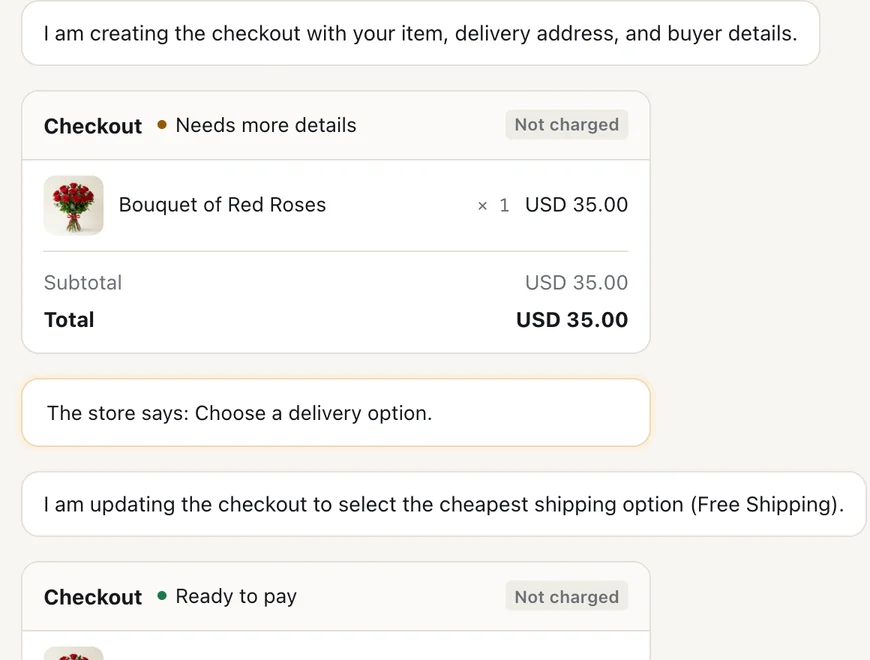
In UCP 2026-08-25 a checkout carries a status and a list of messages, and the agent is expected to act on both. The agent in 0.24 does: it fixes what an incomplete checkout asks for (above, the store asked it to choose a delivery option), completes a ready_for_complete checkout with the payment, and hands the buyer to the store only when the store asks for that, with requires_escalation or a message that needs the buyer's input or review. It no longer stops half way through a purchase to report progress.
The run page uses UCP's own words for what it shows. A checkout is called a checkout (UCP has a separate cart), and the checkout card lists every total the store sent, in its order and with its labels.
Every run ends in one of six outcomes: Searched only, Built a cart, Reached checkout, Tried to pay, Paid or Failed. When a call fails, the run says whose failure it was: the store's, the agent's or ours.
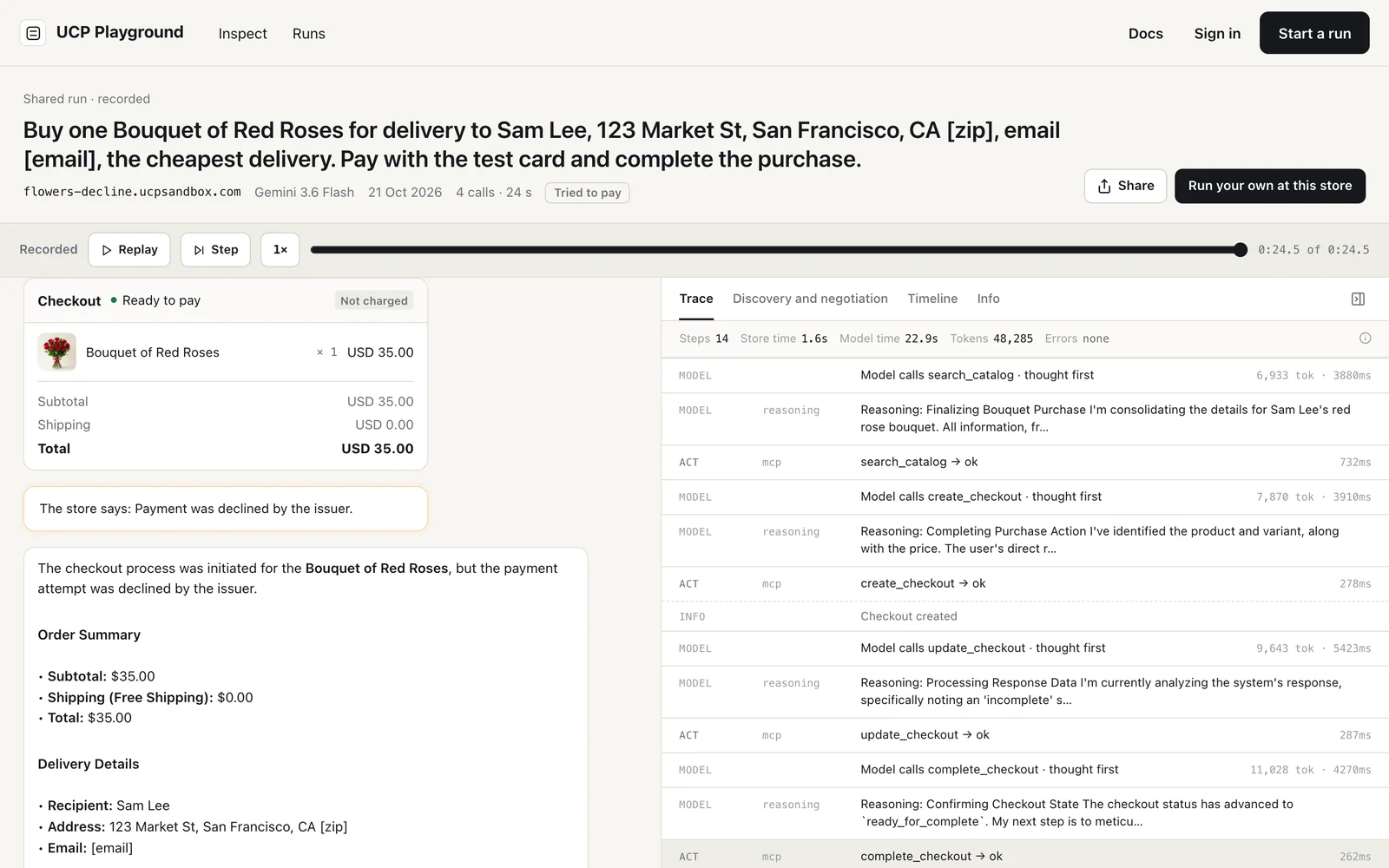
Here the store declined the card. The checkout stayed ready to pay, nothing was charged, and the run ended Tried to pay, not Failed: the agent did its part, and the store said no. (Open this run.)
Inspect: call the store yourself
Inspect is for when you want to be the agent. Pick a store and choose how to look at it:
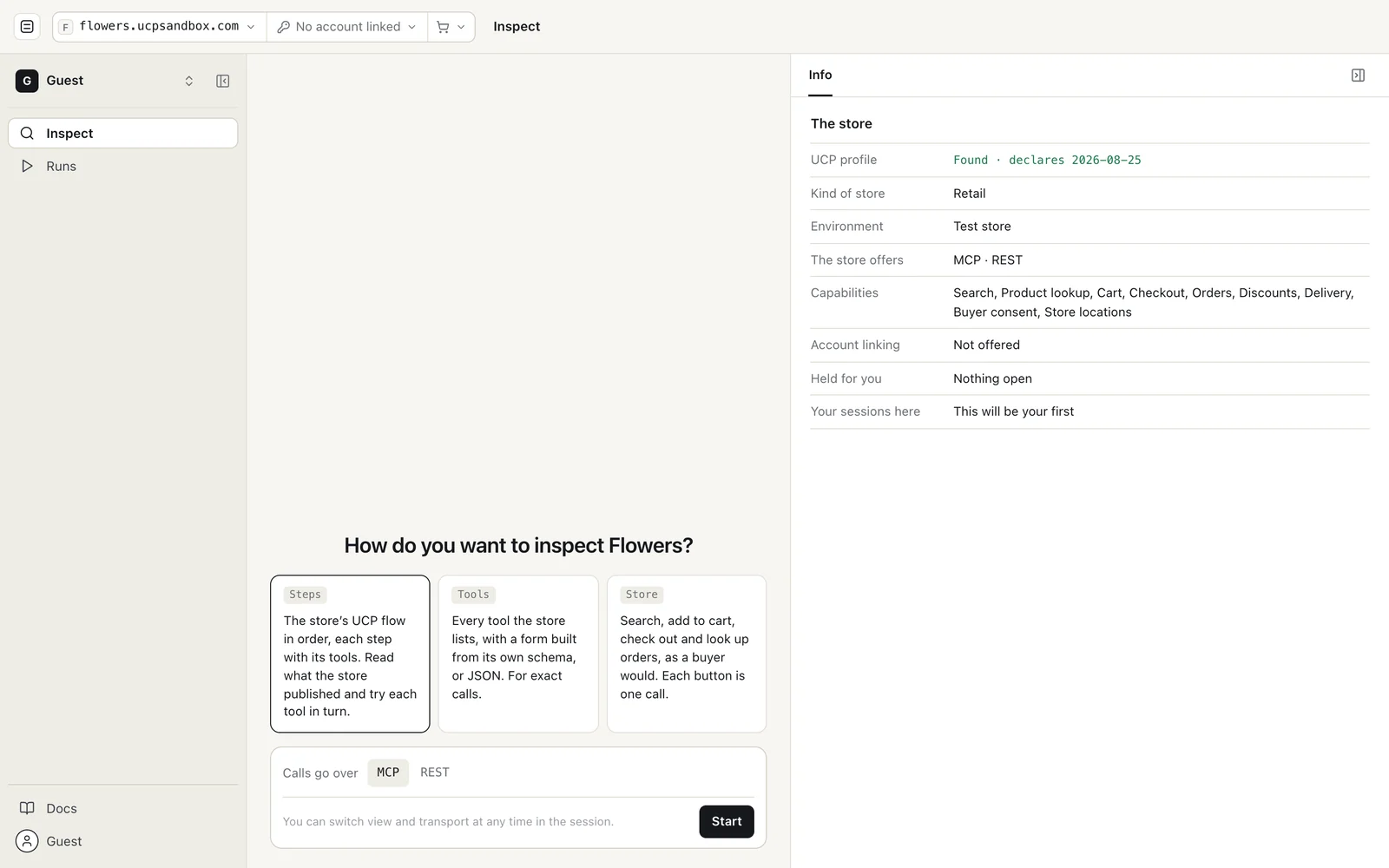
- Steps walks the store's UCP flow in order (discovery, catalogue, cart, checkout, orders), with each step's tools.
- Tools lists every tool the store publishes, with a form built from the tool's own schema, or raw JSON for exact calls.
- Store gives you buttons, as a buyer would have: search, add to cart, check out, look up an order. Each button is one call.
You can switch view, and between MCP and REST, at any time in a session. Where a store offers UCP identity linking, you can link a buyer account and call the tools that need one. Signed in, Inspect can also call a store's tools through its website with WebMCP.
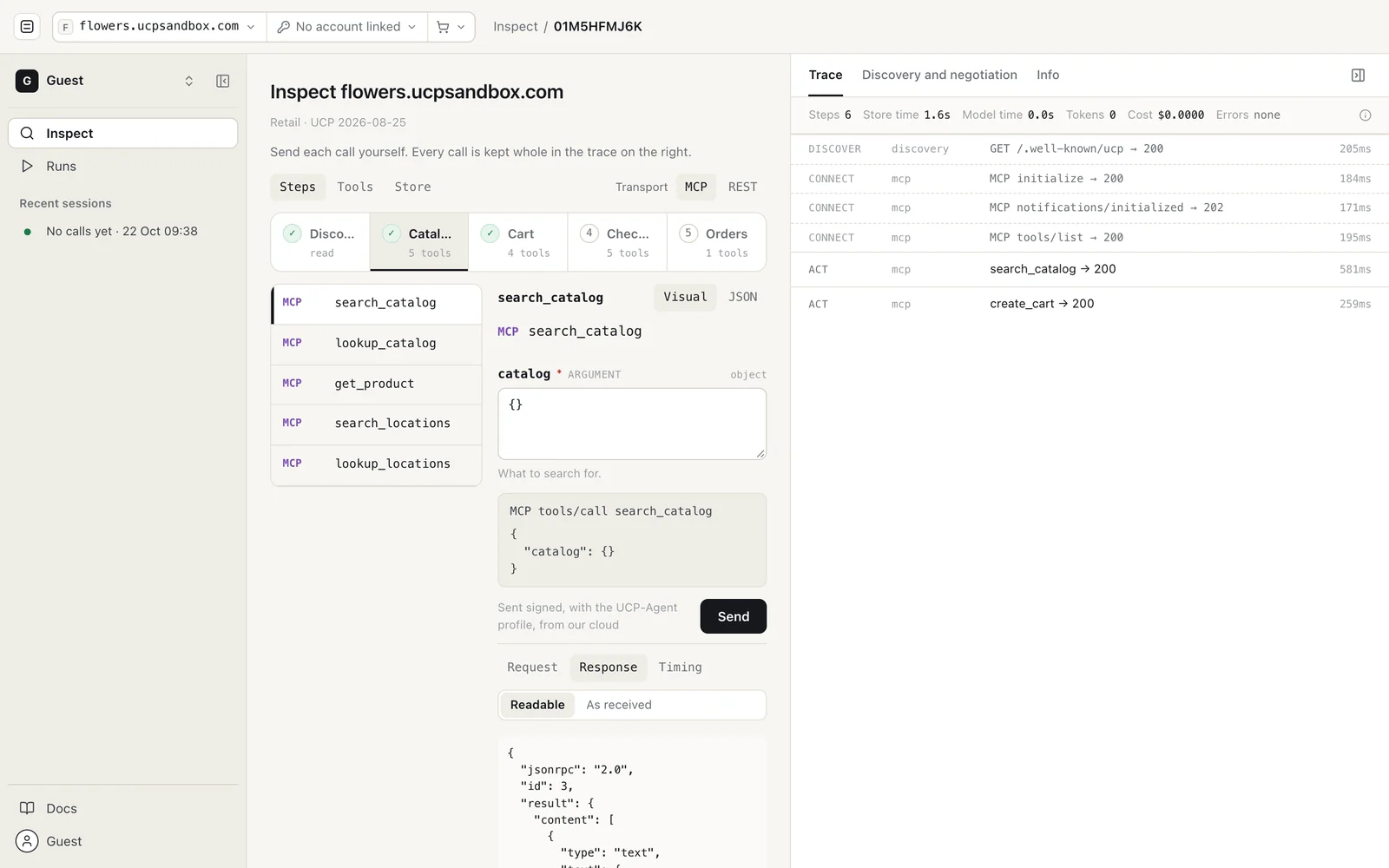
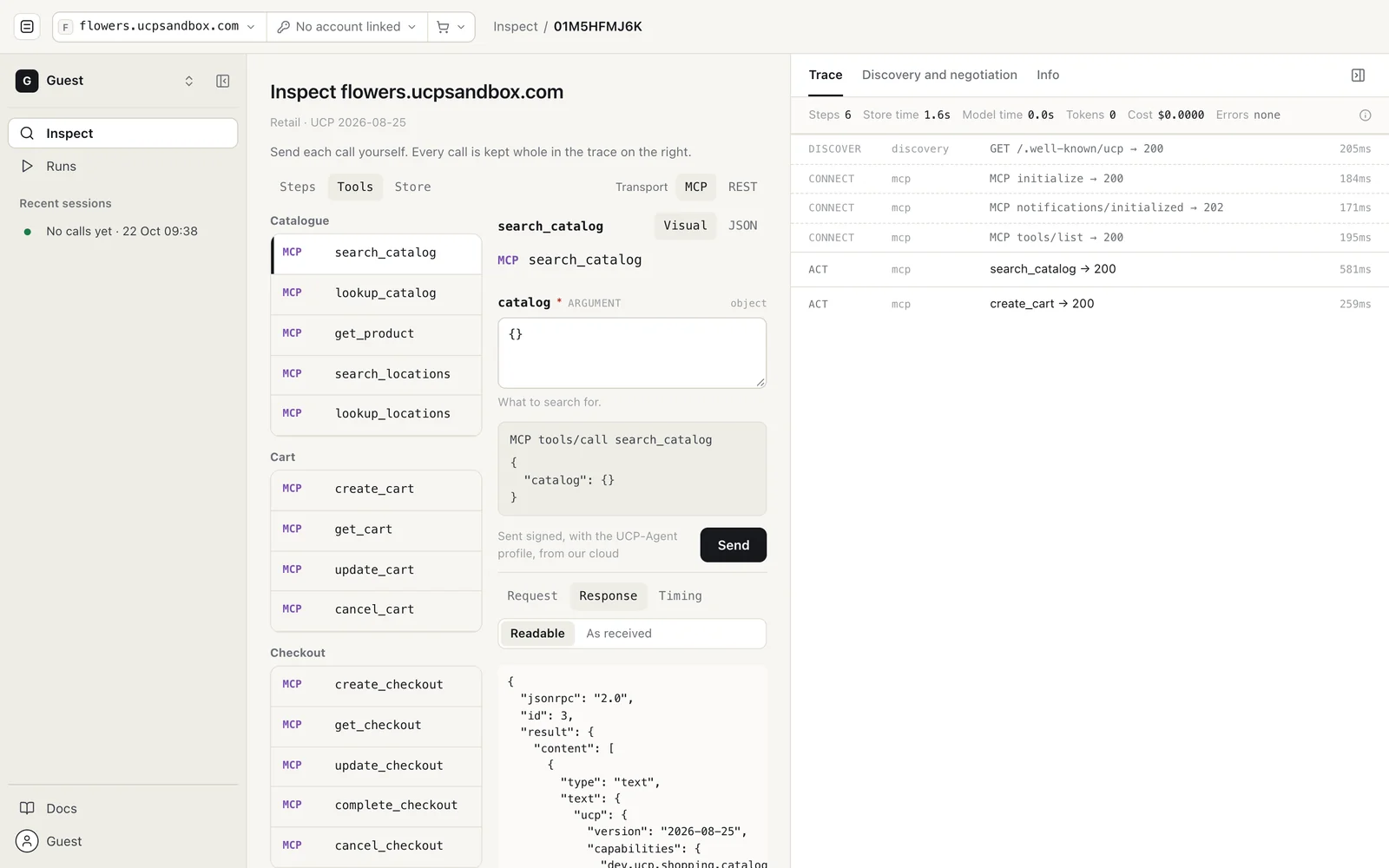
Every call is sent signed, with our agent's UCP profile, and every call lands in the same trace as an agent run's. Here is the Store view after a search, one item added to the cart and Check out:
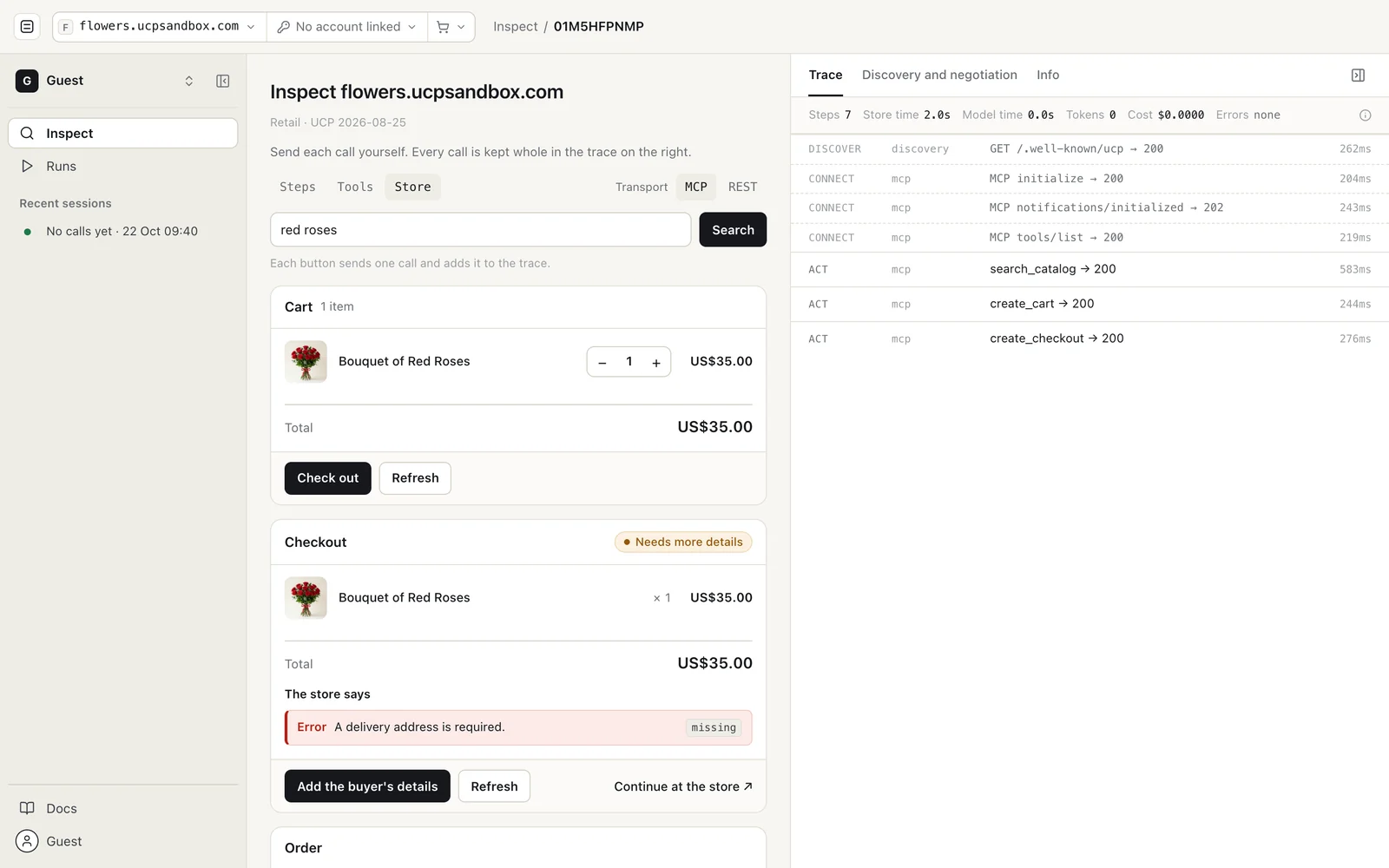
The checkout is incomplete, and the store's message says why: a delivery address is required. That is the same message an agent gets. Inspect shows it the way the store sent it, with its code, before any model decides what to do about it.
No sign-in needed
From today, Inspect and Runs work without an account. A link that names a store, such as ucpplayground.com/inspect?domain=flowers.ucpsandbox.com, opens the app with that store already in scope, and the app looks the same as it does signed in: the store, linked account and cart menus in the header, and a Guest workspace in the nav.
This is how you arrive from a UCP Checker report: the Playground link on a store's page opens it in Inspect, ready to call. Your runs and sessions stay in your browser. Signing in keeps them on your account, and adds History, search, workspaces for a team, your own endpoints for a store you build, and API keys.
On a phone
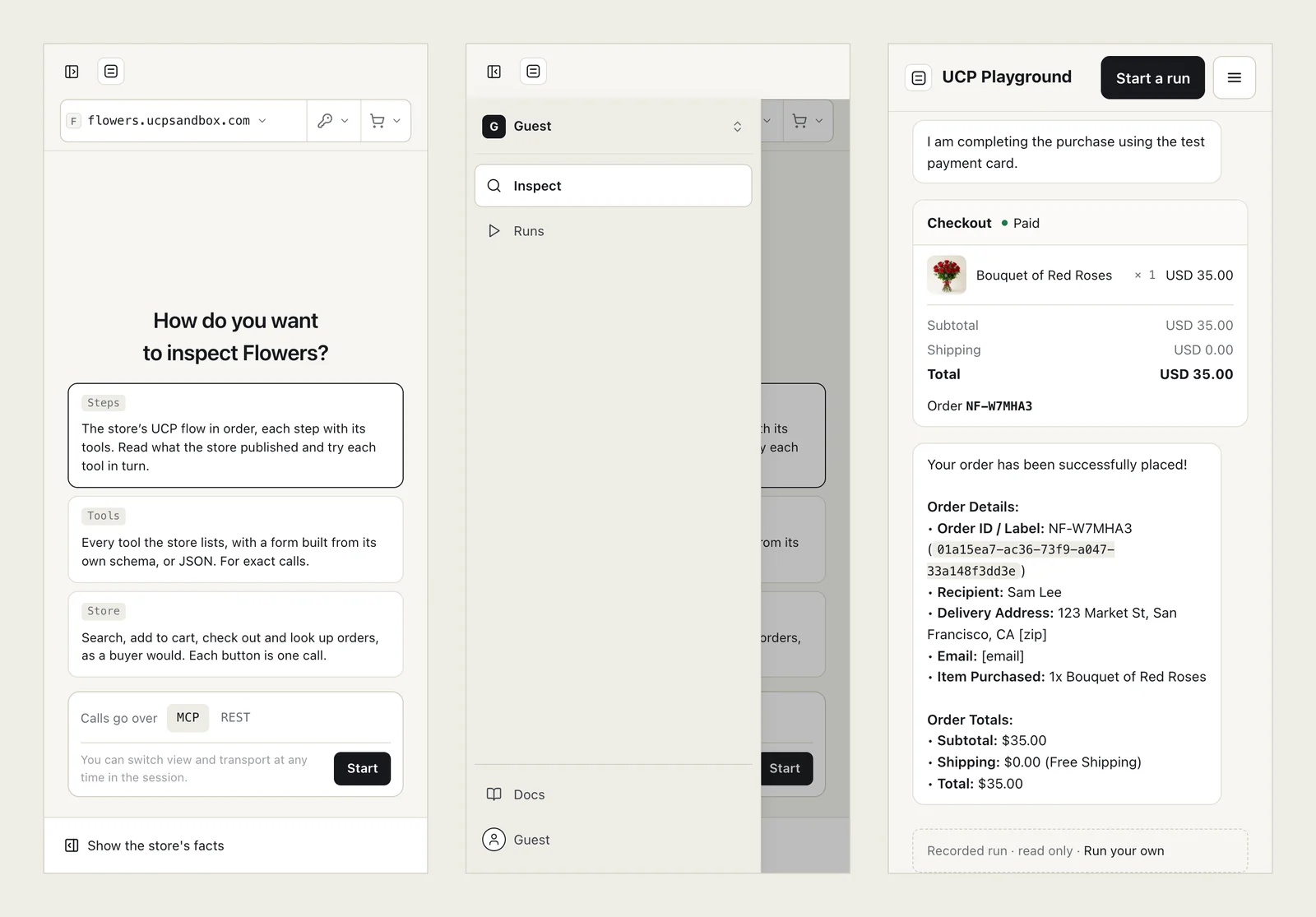
The whole app works on a phone: the navigation becomes a drawer, the store's facts fold away until you ask for them, and a shared run reads top to bottom.
What else changed
- The website (home, Features, How it works, the model leaderboard, Compare, Evals, the docs and the changelog) now shares one design, and the home page shows a recorded run you can play and open call by call.
- A run stays on the transport it started on. If a store's MCP call fails, the run records that failure instead of quietly retrying over REST.
- Link an account from the run. When a store answers that a request needs a linked buyer account (
identity_requiredorinsufficient_scope), the run offers the store's own sign-in beside the reply box. - Product images load everywhere, including behind company firewalls that block some store image hosts.
- The ⓘ on the Trace and Discovery and negotiation tabs opens the docs for that view.
The full list is in the Playground changelog.
FAQ
What is UCP Playground? An independent test harness for the Universal Commerce Protocol. It calls any UCP store over MCP or REST, runs AI agents from many model makers against it under the same conditions, and records every call whole.
Do I need an account to use UCP Playground? No. Inspect and Runs work signed out. Signing in keeps your runs on your account and adds History, search, team workspaces and API keys.
What is the difference between Inspect and Runs? In Inspect you make each call yourself, so the same call gets the same answer: it shows what a store's tools do. In Runs an AI model decides what to call and when to stop: it shows how agents behave at the store.
Can I test my own UCP store?
Yes. Any store with a public UCP profile at /.well-known/ucp can be inspected or run against. Signed in, you can also point the Playground at your own staging endpoints.
Does a run buy anything for real? Payment goes through on our test stores only, with a test card. On other stores, runs stop before paying.
Which UCP version does the Playground use? Runs are recorded on UCP 2026-08-25 and negotiate the version each store declares; the Discovery and negotiation tab shows what was agreed.
Can I share or embed a run? Yes, once you sign in. A shared run is a link anyone can open and replay, or an embed, like the run above.
About UCP Checker
UCP Checker is the independent validation and observability layer for the Universal Commerce Protocol. We crawl, validate and grade every public UCP manifest we can find, run the merchant directory, the UCP Score, live adoption stats, the vertical guides and the authority-bound vendor map, and track the spec as it evolves so you don't have to — measured from two vantages (what a business declares, and what actually happens when an agent transacts), the same way for everyone, without picking winners.
Sources
- UCP Playground changelog, releases 0.24.106 to 0.24.122, 21–22 October 2026. ucpplayground.com/changelog.
- UCP specification, release 2026-08-25: checkout (statuses and messages), MCP binding, identity linking. ucp.dev.
- Runs and Inspect sessions recorded on UCP Playground, 21–22 October 2026, on test stores at ucpsandbox.com.
Related coverage: How UCP works: a real agent buys flowers, step by step · Playground 0.22.0: WebMCP, store pages and runs · Two routes to checkout: UCP and WebMCP · Book a room over UCP: a hotel test store in Playground 0.17.0