


An AI agent can reach a UCP store in two ways. It can call the store's UCP endpoint over MCP or REST, from anywhere, without opening a page. Or it can open the store's website in a browser and use the tools the page registers through WebMCP. UCP Playground has run agents both ways since 0.22, and the run page now shows a website run the way it happened: what the buyer saw, every call the agent made, and the store's website as the agent's browser saw it, side by side.
This guide walks through one recorded website run on our flowers test store, from the search to a paid order, pane by pane.
What is a website run?
A website run is a run in which the agent shops a store through its web page instead of its UCP endpoint. The Playground opens the store in Chrome in our cloud, reads the tools the page registers through WebMCP, and gives those tools to the AI model. Each call the model makes runs inside the page, and the Playground keeps a screenshot whenever a call changes what a shopper would see.
WebMCP is not a UCP transport. A UCP profile declares versions and capabilities for agent and store to negotiate; a page simply registers the tools it offers. On many stores, though, the page tools carry the same UCP checkout: Shopify says its "Checkout WebMCP and Checkout MCP share the checkout object, statuses, and messages." Two routes to checkout covers why the two routes behave differently, and Playground 0.22.0 is where website runs started.
Starting one
In Runs, pick the store and set How the agent reaches the store to Website. Everything else is the same as a UCP run: the model, who the agent shops for, and the task. The Info pane lists what the run will use before you send.
The run in this guide asked Claude Sonnet 5 to buy one Bouquet of Red Roses on flowers.ucpsandbox.com, for delivery to a test address, with the cheapest delivery, paid with the test card. The agent made four calls through the page (search, create the checkout, update it, complete it) and paid in 39 seconds.
Three panes: the buyer, the calls, the browser
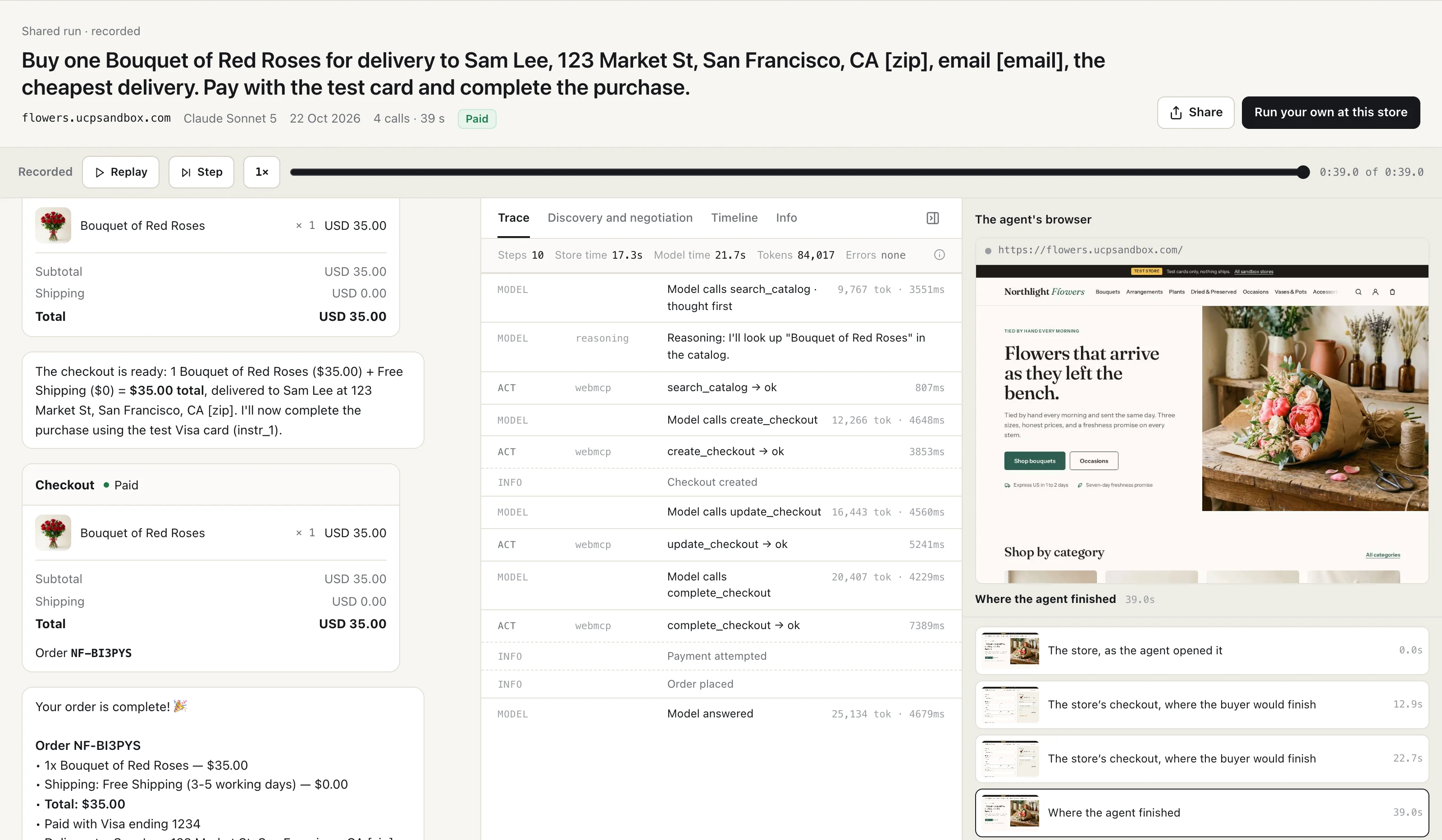
A run on the store's APIs has two panes: the chat and the details. A website run adds a third, The agent's browser, so the page is open alongside the calls that changed it.
- The chat shows what the buyer saw: the agent's messages, a card for the checkout as it changed, and the order once it was placed.
- The trace lists every model turn and every call, each marked
webmcp, with how long the store took. - The agent's browser shows the page at the moment you're looking at, its address, and a strip of every screenshot the run kept.
Replay moves all three together. Press Replay, or drag the bar, and the chat, the trace and the browser each show the run as it stood at that second.
A screenshot for each call that changed the page
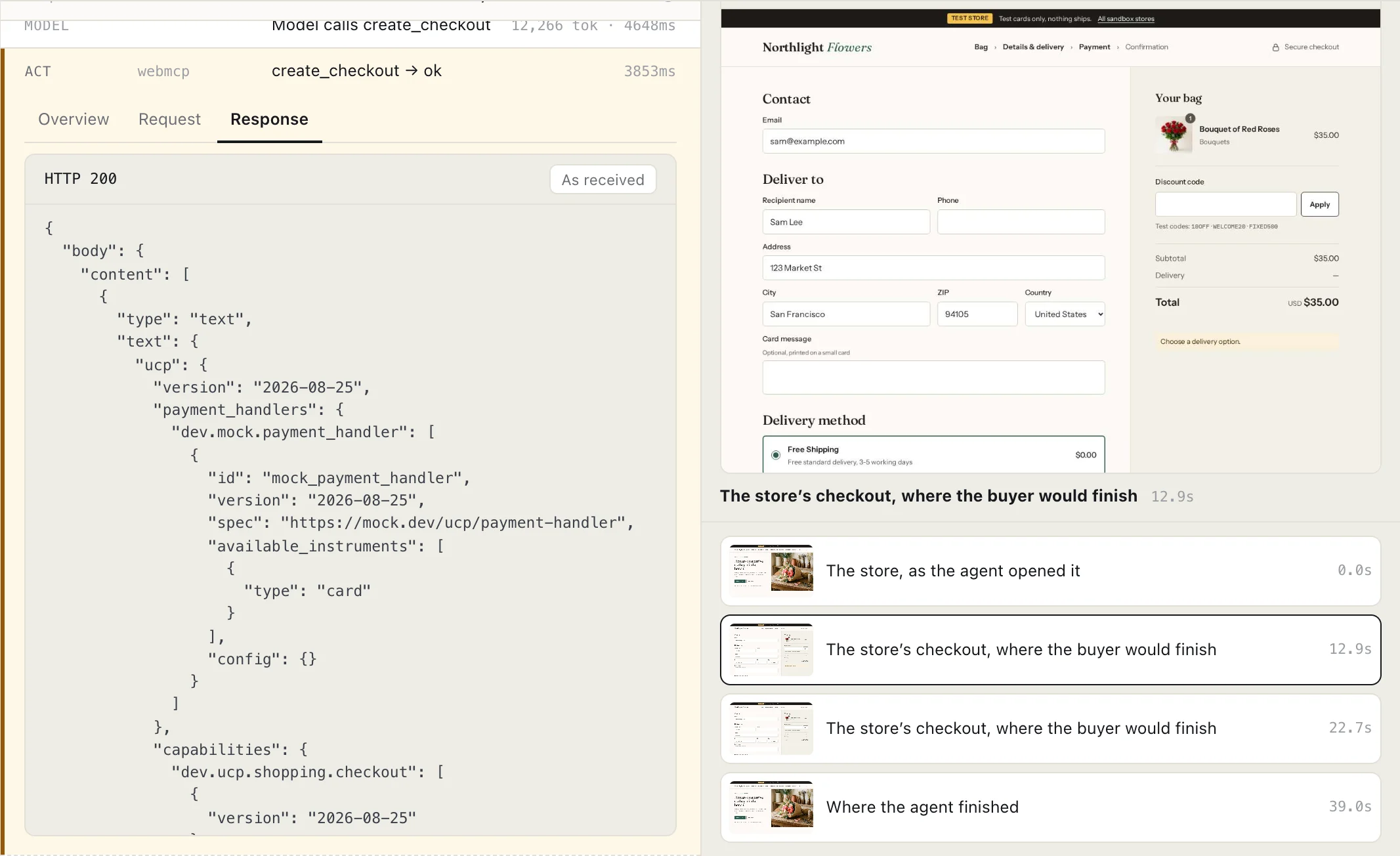
The strip under the browser holds every screenshot the run kept, each with the moment it was taken. Click one and the trace opens the call that produced it. Here, after create_checkout, the page answered with a link to the store's own checkout, and the Playground photographed that checkout as the buyer would see it if they finished there.
A call that changes nothing on the page gets no new screenshot, and the pane says so: "No new picture for this step: the page didn't change."
Every call, as the page answered it
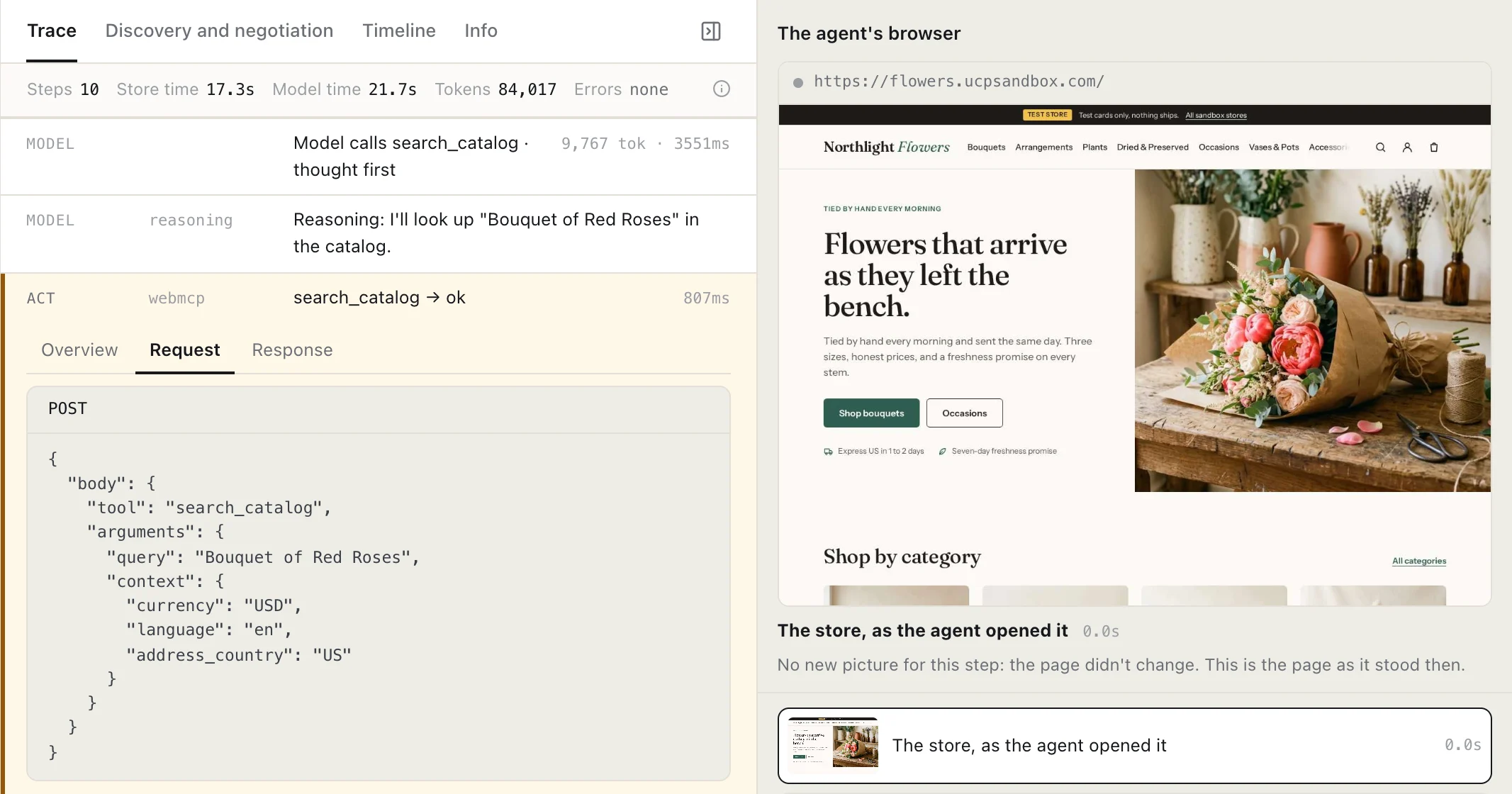
Open a call in the trace and it has the same three tabs as a call to the store's APIs. Request has the tool and the arguments the model gave it. Response has the page tool's answer exactly as it came back. Overview says the call ran in the browser and which page it left the browser on.
On this store the answers are UCP: the search result carries the UCP version, 2026-08-25, and the capabilities the store declares, and complete_checkout came back with the checkout's status set to completed and the order. That is the shared checkout in practice: the page's tools and the store's UCP endpoint hand back the same object.
Discovery: the page's tools, not a negotiation
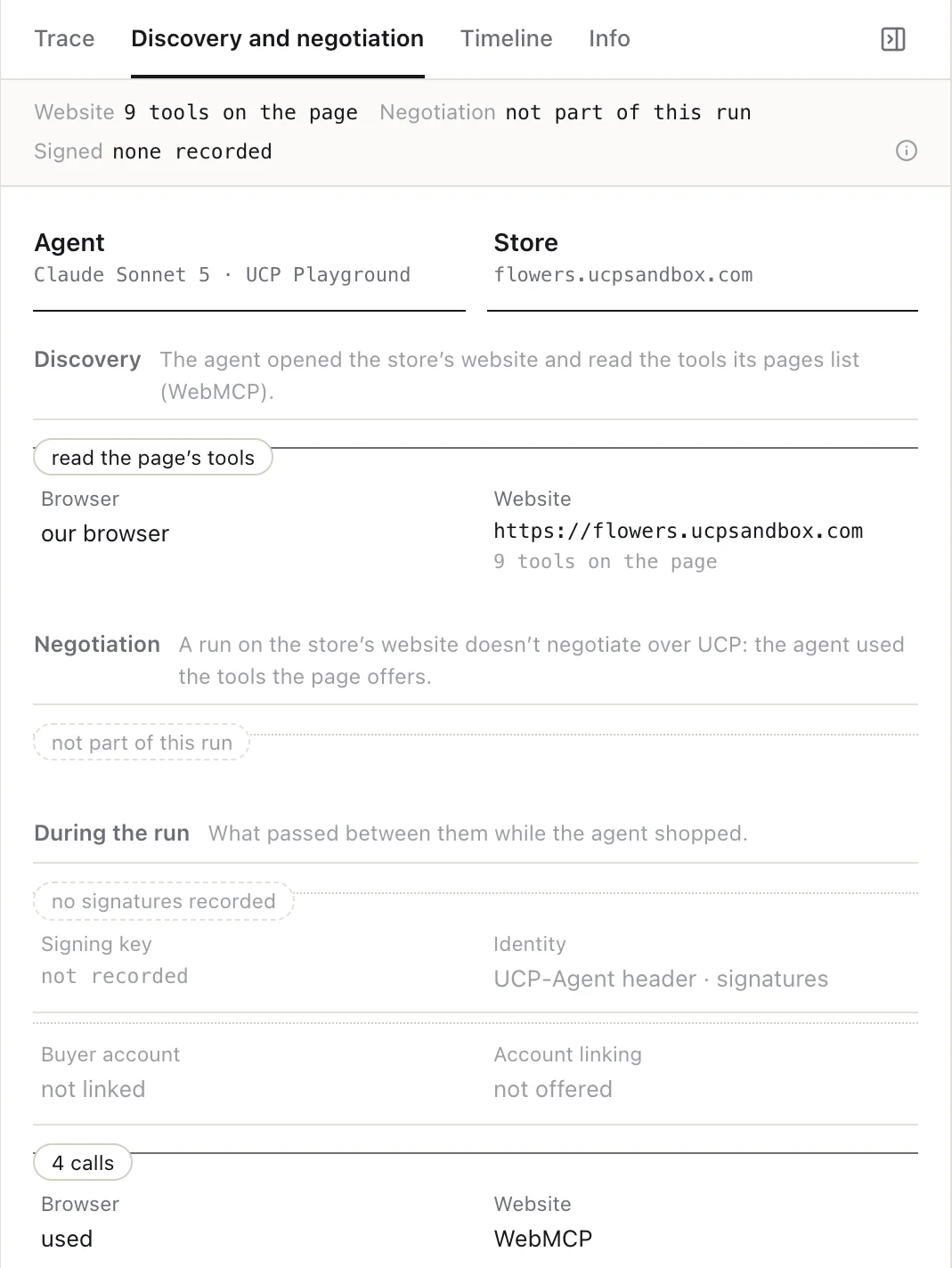
On a UCP run, Discovery and negotiation shows the agent reading the store's UCP profile and the two sides agreeing a version and capabilities. A website run skips that: the agent opens the page and reads the tools it registers, nine on this store. The tab says so, and marks negotiation as not part of the run, so the two kinds of run are never compared as if they had done the same thing.
Timeline and Info
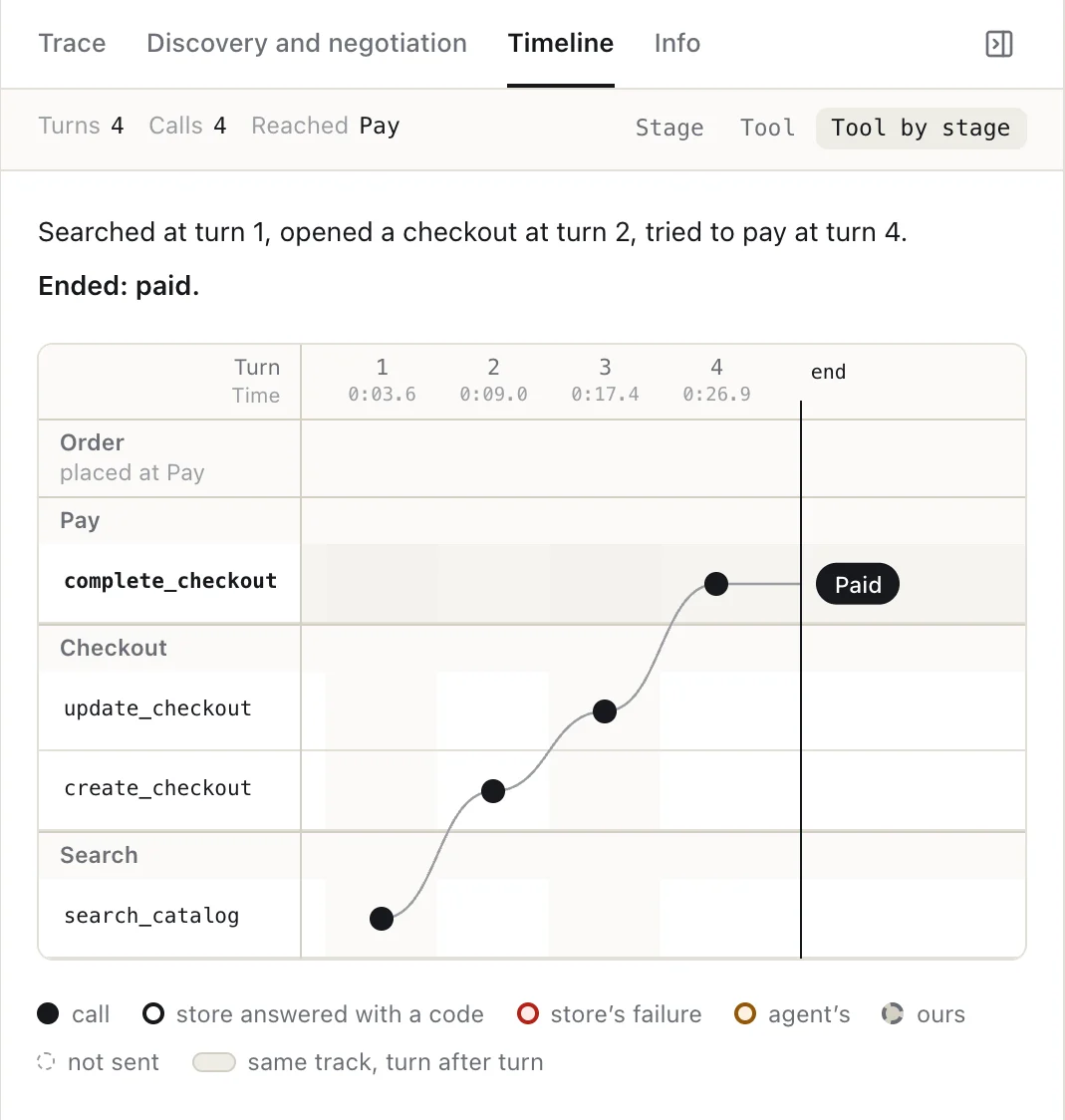
The Timeline plots each call by stage (Search, Checkout, Pay, Order) and by turn, and sums the run up in a line: "Searched at turn 1, opened a checkout at turn 2, tried to pay at turn 4. Ended: paid." Because the agent never read the order back, the Order row notes that the order was placed at the Pay step.
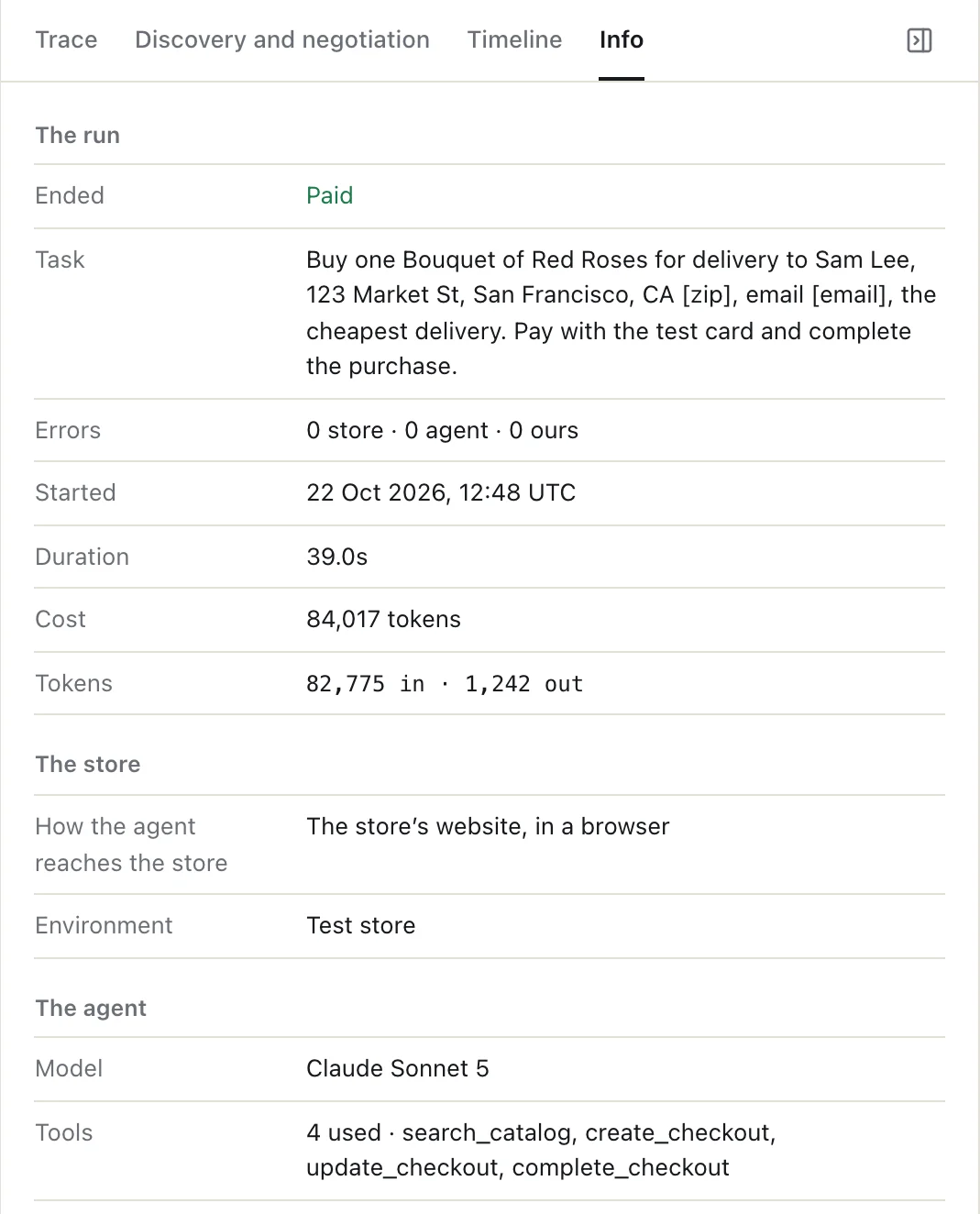
Info has the facts of the run: how it ended, the task, errors counted by whose they were (the store's, the agent's, or ours), when it started, how long it took, the tokens, how the agent reached the store, the model, and the tools used.
Errors say whose they are
A website run has one more party than a UCP run: our browser. When a call fails before it reaches the store, the trace marks it ours and says so, for example "our browser could not run the tool". A store is never blamed for a failure in our browser.
What a website run can and can't do
- It pays only on our test stores. On ucpsandbox.com stores the agent can pay with the test card, and nothing ships. On every other store, a website run stops at checkout: tools that pay or place an order never run, and the run ends when the page hands the buyer to its checkout.
- It is one task. The agent can't ask you a question and wait for the answer. If the model stops to ask "Shall I go ahead?", the run ends there, at checkout.
- It needs an account. Website runs use our shared browsers, so they are for signed-in users. Runs and Inspect over the store's APIs work without signing in.
FAQ
What is a website run in UCP Playground? A run in which the AI agent shops a store through the tools its web page registers with WebMCP, in a browser in our cloud, instead of through the store's UCP endpoint. The run is recorded with every call and a screenshot each time the page changed.
Is WebMCP part of UCP? No. WebMCP is a browser standard for a page to offer tools to an agent; UCP is the commerce protocol. On stores whose page tools carry the UCP checkout, both routes reach the same checkout object.
Does my store need WebMCP for a website run? Yes. A website run uses the tools the page registers; a page that registers none gives the agent nothing to call. Shopify storefronts register WebMCP tools, and so do our test stores.
Does a website run buy anything? Only on our test stores, with a test card, and nothing ships. Elsewhere it stops at checkout.
Can I share or embed a website run? Yes, signed in, like any run. The share includes the screenshots; the system prompt, the cost and the buyer's details are never shown.
Can I call a page's tools one at a time? Yes. In Inspect, pick WebMCP under Calls go over and each call goes through the store's page in our browser, so you can try the tools one by one. It needs an account.
About UCP Checker
UCP Checker is the independent validation and observability layer for the Universal Commerce Protocol. We crawl, validate and grade every public UCP manifest we can find, run the merchant directory, the UCP Score, live adoption stats, the vertical guides and the authority-bound vendor map, and track the spec as it evolves so you don't have to — measured from two vantages (what a business declares, and what actually happens when an agent transacts), the same way for everyone, without picking winners.
Sources
- UCP Playground changelog, 22 October 2026. ucpplayground.com/changelog.
- WebMCP, W3C Web Machine Learning Community Group draft. webmachinelearning.github.io/webmcp.
- Shopify, Checkout WebMCP documentation, September 2026 ("share the checkout object, statuses, and messages").
- A website run recorded on UCP Playground, 22 October 2026, on flowers.ucpsandbox.com (a test store).
Related coverage: UCP Playground 0.24: Runs, Inspect and History in one app · Two routes to checkout: UCP and WebMCP · Playground 0.22.0: WebMCP, store pages and runs · Is my store WebMCP and UCP ready?