


UCP Playground can now run a personal agent. Pick one under Where it runs on Runs and an open-source agent, Goose by default or Hermes Agent, shops the store from its own machine in our cloud. It carries Anthropic's five shopping skills from commerce-agents, it reaches the store only through the store's UCP APIs, and every model call and store call goes through Playground, so each one is recorded as a normal run. It shipped on 4 November 2026 in Playground 0.24.161.
Why it matters: a buyer's agent doesn't arrive at a store empty. It brings its own memory of the buyer, its own instructions and its own skills. Until now a run in Playground used one agent set up the same way every time. With a personal agent you set those files yourself, run it against a store, and read what it started with and what changed in its files afterwards.
Try it: sign in to UCP Playground, pick a personal agent under Where it runs, and send it a task at any UCP store, or at one of our test stores.
How it differs from a normal run
In a normal run, Playground's own agent shops the store: a model with the store's tools, set up the same way every time, with nothing carried from one run to the next. A personal agent brings its own files, and the run shows how it used them.
| Normal run | Personal-agent run | |
|---|---|---|
| The agent | Playground's agent | Goose or Hermes, on its own machine |
| Skills | None of its own | Anthropic's five shopping skills, each with its own switch, plus any you add |
| Memory | None between runs | A memory file you set; a saved agent keeps it from run to run |
| Instructions | Playground's | The agent's own file (.goosehints or SOUL.md), yours to edit |
| What the run shows | Model and store calls | Those, plus each skill it read, each memory it wrote, and what changed in its files |
The two work together when you change your store. A normal run is your baseline: the same agent set up the same way each time, so if its result changes, the change came from your store. A personal-agent run shows how an agent that carries a buyer's memory and skills meets the same store, before and after the change.
What is a personal agent?
A personal agent is an AI agent that acts for one person and carries that person's memory, instructions and skills from one task to the next. Some come from large companies as consumer apps; others are open source. Playground runs two open-source ones on their own machines in our cloud, and they shop at a store over UCP. In Playground a personal agent has four parts:
- The agent. Goose (the default) or Hermes, each on its own machine. The machine sleeps when the agent is idle and starts when a message arrives.
- Its skills. Anthropic's five shopping skills (
customer-care,memory-personalization,planning-goals,purchase-researchandsearch-discovery), beside any skills the agent ships with. - What it can reach. Only the model and the store, both through Playground. It reaches the store through its UCP APIs, never its website. Terminal, file tools, web and browser are off.
- The record. Store calls carry Playground's signed UCP agent profile, as on every run, and each call shows in the run's Trace.
Personal agents are for signed-in personal accounts. A team workspace doesn't have them.
Fresh each run, or a saved agent
The Where it runs pill under the message box has two groups.
Fresh each run (Goose (fresh) and Hermes (fresh)) gives a new install every run. Pick it and press Send; there is nothing to set up. Its memory and files are cleared after the run, and the run itself is kept.
A saved agent keeps what it learns from one run to the next: its memory and files carry over. You can have up to three at a time. Set one up from Runs (Set up a personal agent…) or from Settings › Personal agents (New agent…), give it a name and pick Goose or Hermes. Before its first run, the Info pane shows what the agent will start with and what is off.
Starting files
Start from picks the files the agent begins with: its defaults (the files as the agent ships), one of your saved file sets, or an Example buyer, which is the defaults with an example buyer profile in memory. A Starts with row sums it up, for example "SOUL.md changed · 4 of 5 shopping skills · 58 of its own · memory empty".
Review and change… opens the files, grouped as Instructions, Memory, Shopping skills, Its own skills and Yours. There is one file per slot:
| Slot | Hermes | Goose |
|---|---|---|
| Instructions | SOUL.md |
.goosehints |
| Memory (starts empty) | memories/USER.md |
memory/user.txt |
You can edit a file in place, replace it with your own, reset it, or fill the memory slot from an example profile. Each shopping skill has its own switch; a skill that is switched off isn't there for the agent to read. Add a skill… adds one of your own, and the Changes from default tab shows every difference as a diff.
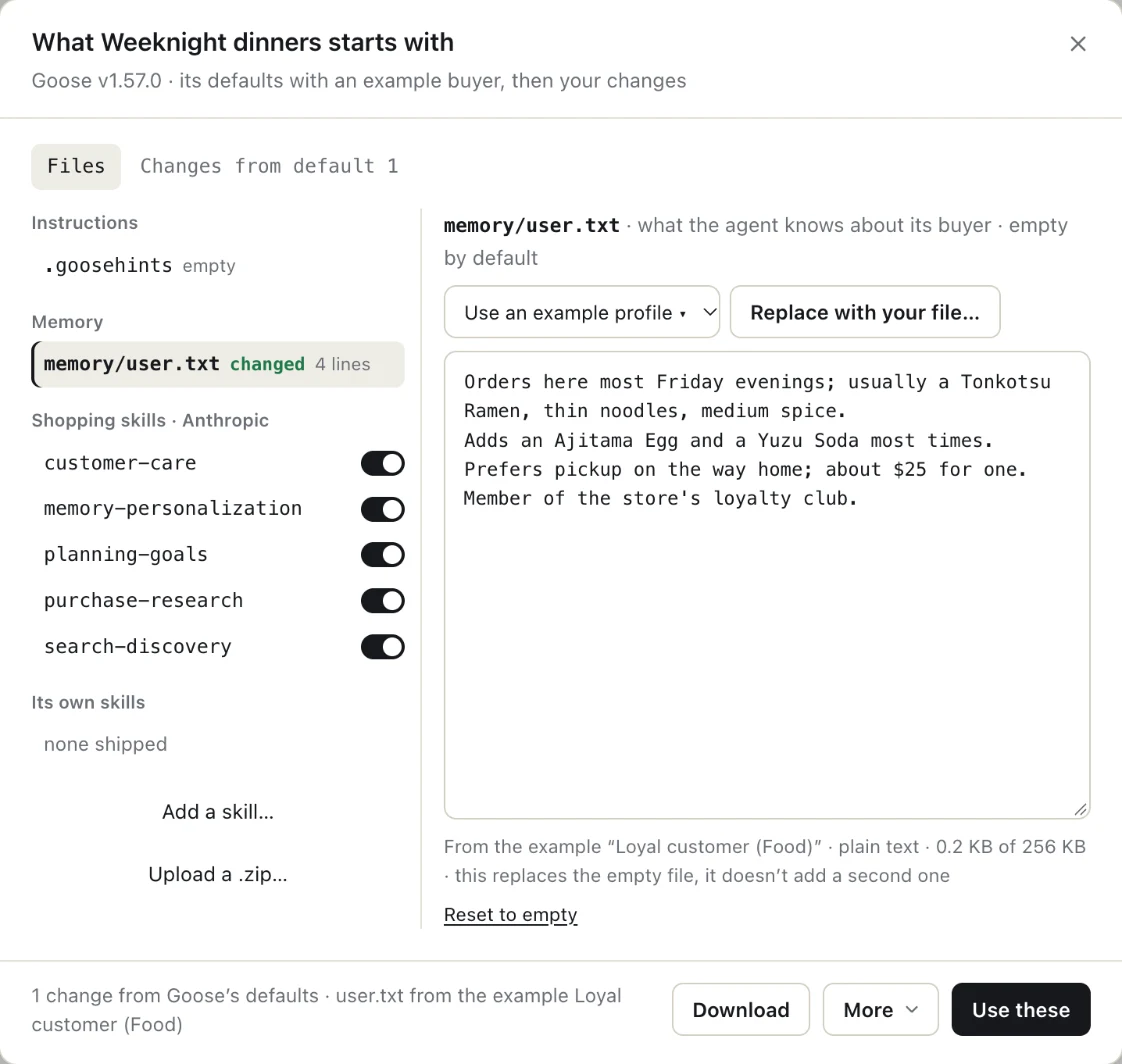
The example profiles come in four kinds of buyer for each store type, Retail, Food and Stays: Loyal customer (what Example buyer uses), First-time buyer, Strict budget and Whatever you suggest. We wrote all of them; none is a real person. The run records which one it started with, for example "Loyal customer (Food)".
Every file is checked before it reaches the agent. Only the names the agent reads are added, text only, up to 256 KB a file and 1 MB in all. A file that looks like it holds an API key, token, password or private key is refused, and the check names the line. A file with an email address or phone number is added with a note that the agent will read them.
Download, edit, upload again
Download gives a .zip of the files as the agent keeps them, with a manifest.json naming the agent, its release, the version of the files, where they came from, and each file's path and hash. Edit the files on your machine, then use Upload a .zip… in Review and change…. Each file goes back to its slot, and the dialog opens on the changes against the version the download came from. A Goose download won't go into a Hermes agent, or the other way round.
Saved file sets, with versions
A saved file set is starting files you can pick when you set up an agent: SOUL.md, memories and your own skills. Make one in Settings › Personal agents (New file set…), or with Save as a file set… from any files dialog, including the files of a finished run. A set keeps your files only, never the shopping skills.
Editing a set makes a new version. Agents that started from the old one keep it, and Info's Starting set row names the set and the version a run used.
Reading a personal-agent run
A personal-agent run has the same page as any run (chat, Trace, Timeline and Info), with a few lines of its own:
- The START line, one per message, says how the agent began: "Your agent started · it was asleep · files restored", "Your agent was awake · files ready", or for a fresh agent "Your agent started · new install". If the agent didn't start, the line says why.
- Agent files lines, one per message, say what changed in its files, such as "Agent files: changed memories/USER.md · 2 lines", or "Agent files: no change". Opened, a line shows the diff.
- The files dialog has three tabs: Changes (a diff for the whole run or one message), At start and After this run.
- Info has Started with, such as "Goose defaults + 1 change · user.txt from the example Loyal customer", and Memory calls, plus where it ran, the agent, store calls, files changed, skills read and the profile it sent.
- The Timeline gets a Memory and a Skills track when the agent used them. They sit outside the shopping funnel and don't count as progress towards an order.
The agent's own calls on its memory and skills get their own Trace lines, apart from store calls.
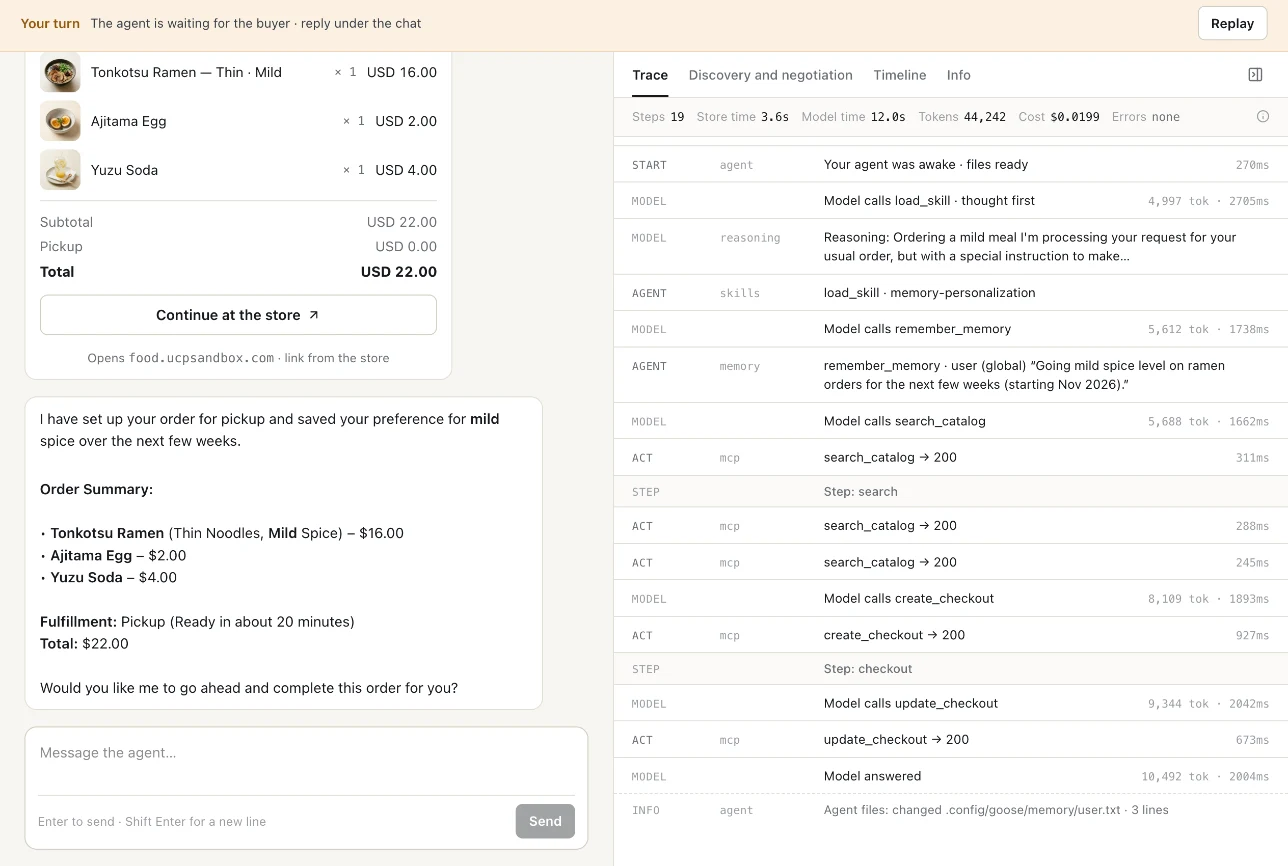
Here is one run on our Food test store. A saved Goose agent started with the Loyal customer (Food) profile in its memory (Tonkotsu Ramen most Fridays, an Ajitama Egg and a Yuzu Soda, pickup on the way home), and all five shopping skills switched on. The buyer wrote: "Get my usual ready for pickup tonight, but make it mild this time and remember I'm going mild for the next few weeks."
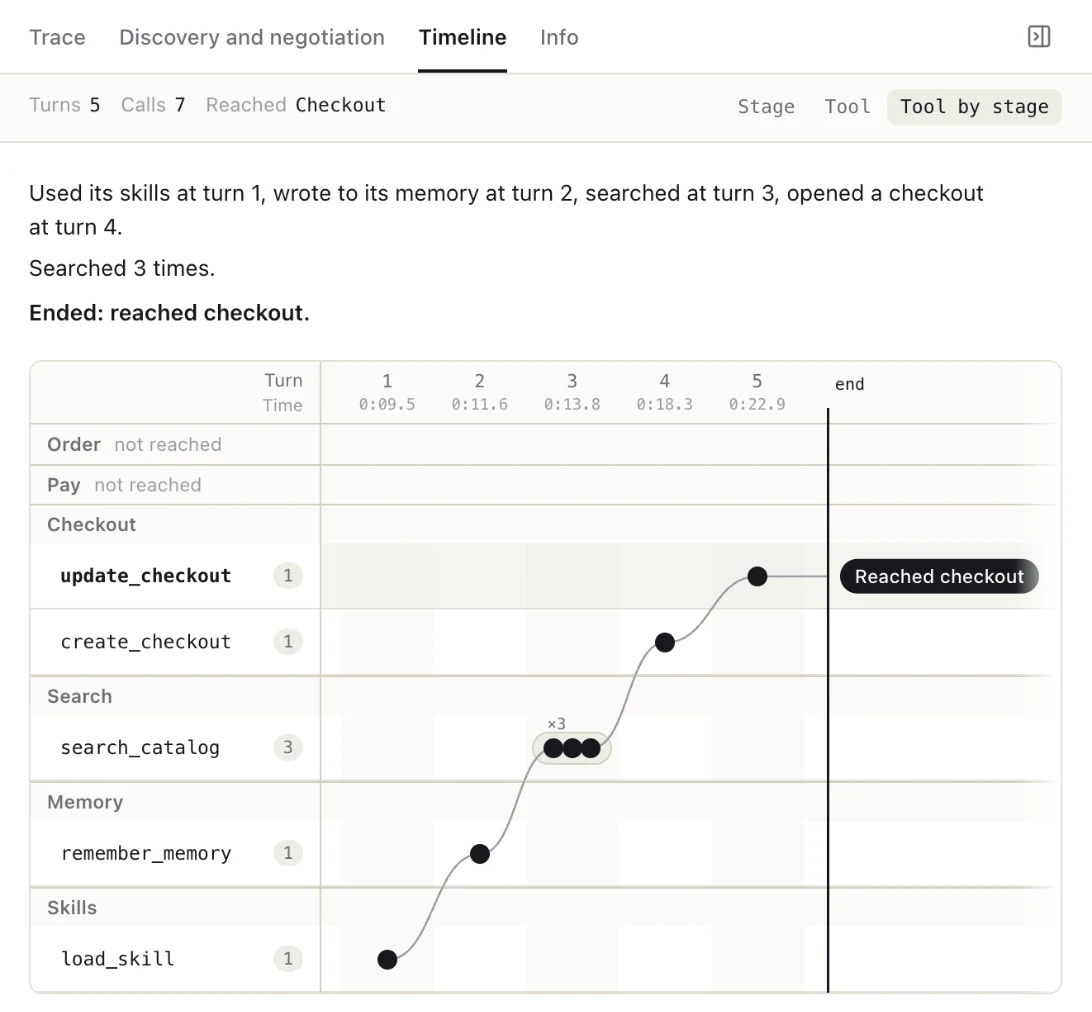
- The Timeline sums it up: "Used its skills at turn 1, wrote to its memory at turn 2, searched at turn 3, opened a checkout at turn 4." Its Skills and Memory tracks sit under the shopping stages.
- The Trace has the lines: "Your agent was awake · files ready", "load_skill · memory-personalization", then
remember_memorywith the note it kept ("Going mild spice level on ramen orders for the next few weeks"), then the store'ssearch_catalog,create_checkoutandupdate_checkout. - The cart came back as the usual order, with the ramen set to mild.
- The last line says what changed: "Agent files: changed .config/goose/memory/user.txt · 3 lines". The next run with this agent starts from that memory. In a new run, asked only "What would you get me for pickup tonight?", it picked the usual with the spice set to mild, "to reflect your recent preference update".
Who sees what
Agent files are the account owner's only: you see their names, text and diffs, and can download them. Shared runs and teammates see how many files changed, never the files' names or contents, and get no files dialog or download. The system prompt is never shown, on any run.
A saved agent's files are kept until you delete the agent. Deleting it removes its files, every version of them and its machine. Its runs keep their calls, answers and the names and counts of what changed.
For stores and agent builders
A personal agent can shop at any store with a UCP MCP service, your own included. On our test stores (any *.ucpsandbox.com store, such as flowers.ucpsandbox.com) it can finish an order with a test card, and nothing ships. On any other store it stops before payment: it can search, build a cart and open a checkout, but a call that pays or places an order is held back and never sent. What you can do with that today:
- Agent builders can start from Goose's or Hermes's defaults, write their own instructions and skills, upload them as a .zip, and read each run's diff to see what the agent wrote to its own memory and which skills it read.
- Saved file sets let you run the same starting files across Retail, Food and Stays test stores, and the version on each run says exactly which files it used.
- Store teams can point a personal agent at their own store and see the calls an off-the-shelf open-source agent makes there, over the same signed UCP agent profile as every other run, next to a normal run as the baseline.
The full guide is in the Playground docs: Personal agents.
FAQ
Can I test a personal AI agent against a UCP store?
Yes. In UCP Playground, sign in with a personal account, pick a personal agent under Where it runs on Runs, and send a task. The agent shops the store through its UCP APIs and the run is recorded like any other. It works on any store with a UCP MCP service; outside our *.ucpsandbox.com test stores it stops before payment.
How is a personal-agent run different from a normal Playground run?
A normal run uses Playground's own agent, set up the same way every time. A personal-agent run uses Goose or Hermes with its own skills, memory and instructions, which you set. Its Trace and Timeline show each skill it read and each memory it wrote, and the run ends with what changed in its files.
Which open-source agents does UCP Playground support?
Two: Goose (the default, Apache-2.0) and Hermes Agent by Nous Research (MIT). Both are installed unchanged from their releases (v1.57.0 and v0.22.5) with Playground's settings.
What shopping skills does the agent have?
Anthropic's five shopping skills from commerce-agents (Apache-2.0), copied as published: customer-care, memory-personalization, planning-goals, purchase-research and search-discovery. Each can be switched off, and you can add skills of your own.
Can I give the agent my own memory and instructions?
Yes. Each agent has one instructions file (SOUL.md for Hermes, .goosehints for Goose) and one memory file. You can edit them, replace them, start from an example buyer profile for Retail, Food or Stays, or download them as a .zip, edit and upload again.
Does a personal agent remember between runs?
A saved agent does: its memory and files carry over, and each run shows what changed as a diff. Fresh each run starts from a new install every time and clears its memory and files after the run.
Can other people see my agent's files in a shared run?
No. Shared runs and teammates see how many files changed, never their names or contents. The system prompt is never shown on any run.
About UCP Checker
UCP Checker is the independent validation and observability layer for the Universal Commerce Protocol. We crawl, validate and grade every public UCP manifest we can find, run the merchant directory, the UCP Score, live adoption stats, the vertical guides and the authority-bound vendor map, and track the spec as it evolves so you don't have to — measured from two vantages (what a business declares, and what actually happens when an agent transacts), the same way for everyone, without picking winners.
Sources
- Personal agents. UCP Playground docs, 4 November 2026.
- The agent. UCP Playground, 4 November 2026.
- Changelog, 0.24.161. UCP Playground, 4 November 2026.
- Goose. Open-source agent, Apache-2.0.
- Hermes Agent. Nous Research, MIT.
- commerce-agents. Anthropic, Apache-2.0.
Related coverage: How the Personal Agent Protocol and UCP fit together · Personal Agent Protocol (Poppy) v0.1: what the spec says · How UCP's Ask works, step by step · UCP for B2B: an agent buys on Net 30 terms, step by step