


Just over a month ago we launched UCP Checker. The idea was simple: scan the open web for UCP manifests and tell you what's there. Within a few weeks we'd crawled over a thousand stores, published the data, and confirmed something we suspected — Shopify had quietly made every store on their platform agent-ready.
But checking manifests only tells you what's in the shop window. We wanted to go inside.
So we built UCP Playground.
From manifest to conversation
The jump from UCP Checker to UCP Playground happened faster than planned. Once you can read a store's manifest, the natural next question is: what happens when an agent actually tries to shop there? Does the search work? Do the product cards render? Can it get to checkout?
We drew up the scope in a weekend. Within a few weeks, developers were using it to iterate on their UCP deployments, Shopify store owners were testing how agents interacted with their catalogs, and we were learning things about agentic commerce that no amount of manifest scanning could reveal.
I have to pinch myself sometimes. We have AI agents browsing real stores, comparing products, building carts, and reaching checkout — across five different models, three transports — MCP, REST, and Embedded — and across the thousands of stores crawled by UCP Checker. It's a remarkable time to be building.
Let me walk you through what we've built.
How it works
Point UCP Playground at any domain. It reads the .well-known/ucp manifest, connects to the store's MCP server, and gives you a chat interface where an AI agent can shop — for real.
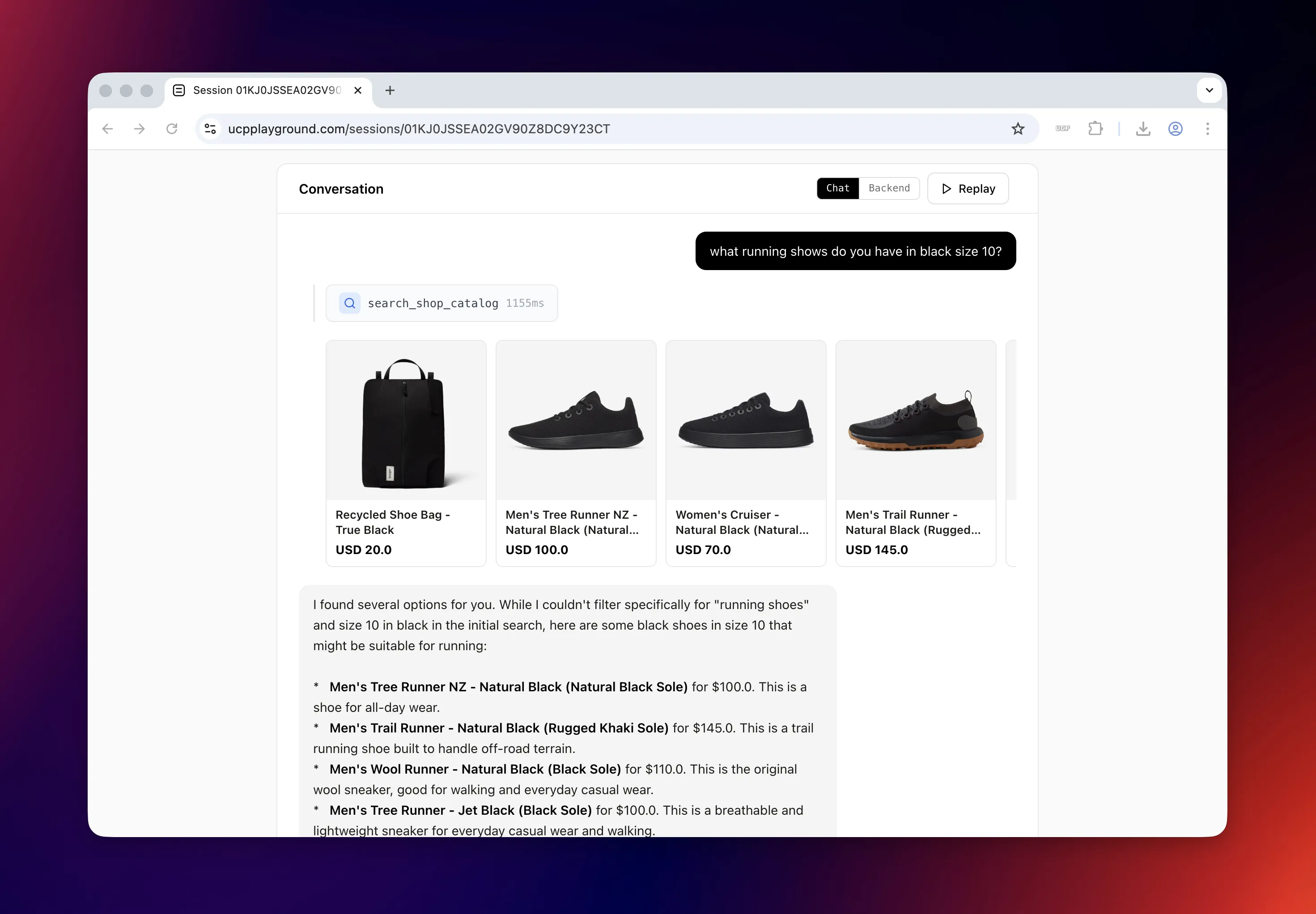
You type "what running shoes do you have in black size 10" and watch the agent call search_shop_catalog, parse the results, show you product cards with images and prices, and ask which one do you want? Say "add the first one to cart" and it resolves the variant, calls update_cart, and hands you a checkout URL. The whole interaction takes seconds.
The sidebar gives you everything happening under the hood — the MCP endpoint status, schema quality scores for each tool (graded A through F), funnel progress, token usage, and session stats. Debug mode shows every JSON-RPC message flowing between the agent and the store's MCP server.
What the agents found
Here's where it gets interesting. When Shopify's MCP server returns tool responses, it injects instructions fields — stage-specific prompts embedded in the payload that steer agent behavior. There are three of them, one per shopping stage.
The search instructions tell the agent how to present results:
Use markdown to render product titles as links to their
respective product pages using the URL property.

For product data:
- If variants are included in the response, those are the
  only variants available
- If variants are not included, use the options and
  availability matrix with get_product_details tool
- Check product_type, tags, and other properties to help
  the user find what they need

For filters:
- Mention available filters to the user if they might be helpful
- Use filters ONLY from available_filters in follow-up searches

For pagination:
- Show only the first set of results initially
- If pagination.hasNextPage is true, ask if the user wants
  to see more
The product details instructions are minimal — just render the title as a link and pay attention to the selected variant.
But the cart instructions are where it gets fascinating. Once the agent has added an item to the cart, the store tells it to sell:
Ask if the customer has found everything they need.
If they're ready to check out:

1. First help them complete their cart with any additional
   items they might need
2. If the cart contains shipping-eligible items, prompt them
   to select a shipping option from those available
3. Ask if they'd like to add any special instructions or
   notes to their order (optional)
4. Check if they have any discount codes or gift cards
   they'd like to apply (only if they mention them)
5. Assist them in navigating to checkout by providing a
   markdown link to the checkout URL
This is the store — not our system prompt — coaching the agent through a structured checkout experience. "Help them complete their cart with any additional items they might need" is an upsell prompt baked into the tool response. In one test session, Claude asked "would you like to add anything else, like running socks for example?" — a cross-sell that wasn't in any system prompt. It came from the store's update_cart instructions.
We tested compliance on Claude Sonnet 4.5 against Allbirds. Out of 9 applicable instructions, the agent followed 8. It rendered markdown links, resolved variants correctly, asked if the customer found everything, suggested additional items, and provided the checkout URL as a clickable link. The only misses: it didn't mention available filters during search, and it skipped the "special instructions" prompt during checkout.
The store isn't just serving data — it's doing per-tool prompt engineering at the response level. Three tailored instruction sets (search, details, cart) that guide the agent through a complete shopping funnel without touching the system prompt.
We've since seen non-Shopify developers adopt the same pattern. When stores add structured instructions to their tool responses — even basic ones — agent checkout success rates improve noticeably. It's becoming a clear best practice: if you're building an MCP server for commerce, ship store instructions with your tool responses.
Replay any session
Every session on UCP Playground is private by default. For logged-in users, you get the option to share and embed any session — replaying the full conversation, every message, every tool call, every product card — as an embeddable widget or shareable link.
This is a real session: Claude Sonnet 4.5 shopping for gym trainers on Allbirds, from search to checkout in 20 seconds.
Share a link, embed it in a blog post, or use it to debug why a particular agent got stuck on a particular store. Session replays have become one of the most useful features for developers iterating on their MCP implementations — you can see exactly where the agent tripped up and fix it.
Simulate up to five agents at once
Once you're connected to a store, you can run the same prompt against up to five models simultaneously. Claude Sonnet 4.5, Gemini 2.5 Pro, Gemini Flash, GPT-4o, Llama 3.3 — side by side, same store, same query.
The results are striking. On the same "what mens backpacks do you have?" prompt against Everlane, all five models reached checkout — but the speed gap was enormous. Gemini 2.5 Flash finished in 6.4 seconds. GPT-4o took 11.9s. Claude Sonnet 4.5 came in at 17.7s. Gemini 2.5 Pro needed 26.8s. And Llama 3.3 trailed at 30.7s, leaking raw checkout URLs into its response along the way. Same data, same tools, vastly different outcomes.
This kind of A/B testing was impossible before. Now any store owner can see which models handle their catalog best, and any developer can benchmark their MCP server against the models their customers are likely using.
Three transports: MCP, REST, and embedded
UCP isn't just MCP. The protocol defines multiple transports, and the playground supports all three we've seen in the wild.
MCP is what Shopify ships — a JSON-RPC server that agents connect to directly. It's the most capable transport, supporting tool discovery, schema introspection, and real-time tool calls.
REST is the familiar API pattern. Some merchants expose a standard REST API alongside or instead of MCP. The playground has a full REST checkout panel — browse products, build a cart, apply discounts, complete checkout — with a debug log showing every HTTP request.
Embedded is the newest and most interesting. When an agent reaches checkout but can't produce a payment credential (because it's an LLM, not a browser), the merchant can declare an embedded transport. The playground opens the merchant's checkout UI in a secure iframe overlay, handles the ECP handshake over postMessage, and lets the human complete payment while the agent watches.
First WooCommerce embedded checkout: Zologic and UCPReady
One of the more impressive implementations we've tested came from Zologic, a Dutch enterprise systems company that manages multiple online stores. They've shipped UCP support across all three transports — MCP, REST, and Embedded — making them the first external developer we've seen to declare embedded checkout in the wild.
We pulled the endpoint into UCP Playground to test it. The REST API worked immediately — product search, checkout session creation, the full flow. But when we tried to open the embedded checkout, four things broke. Our embedded implementation had only ever been tested against our own demo merchant. A real-world WooCommerce store exposed assumptions we hadn't caught.
We fixed all four bugs and shipped the same day.
Zologic is led by Almin Zolotic, and they're building UCPReady — a WooCommerce plugin that adds UCP support (MCP, REST, and embedded checkout) to any WooCommerce store. They've already deployed it on a live production store, houseofparfum.nl, a Dutch beauty and cosmetics retailer with 370+ products.
What makes UCPReady notable isn't just the three-transport architecture — it's the depth. Their checkout response includes GDPR buyer consent fields, structured validation messages with UCP path references ($.buyer.email, $.payment.method), fulfillment schemas with shipping options, and dev.ucp.delegate_payment for embedded payment credential delegation. It's the most spec-complete non-Shopify UCP implementation we've tested.
"WooCommerce powers a huge share of independent commerce on the web, but those stores have been invisible to AI agents. UCPReady changes that — one plugin, zero config, and your store is fully discoverable through a standards-compliant UCP manifest."
"Embedded checkout is what makes agentic commerce actually trustworthy for merchants. The AI builds the cart, but payment happens on the merchant's own WooCommerce checkout. They keep their gateway, their data, and their customer relationship."
— Almin Zolotic, Founder, Zologic
If you want to see UCPReady in action, houseofparfum.nl is already running it in production with a verified UCP badge in the footer. And Almin is offering 10 free lifetime licenses of UCPReady exclusive to readers of this post — first come, first served. Learn more about why your store needs to be agent-ready.
WooCommerce powers roughly 36% of all online stores. If UCPReady gains adoption, it's the fastest path to UCP merchant coverage beyond Shopify.
The numbers so far
UCP Playground is still early, but the data from our model leaderboard is already interesting:
- 114 agent sessions across 5 models
- Llama 3.3 70B leads checkout conversion at 66.7% (12 of 18 sessions) — but it's also the slowest at 45s average and the most token-hungry at ~56k tokens per session
- Gemini 2.5 Flash is the fastest model at 10.2s average duration, reaching checkout in 26.7% of sessions
- Claude Sonnet 4.5 has the most sessions (40) with a 25% checkout rate and 27.4s average duration
- GPT-4o trails in checkout conversion at 17.6%, despite solid search and cart rates
A caveat on checkout rates: not every session is aiming for checkout. Some agents are tasked with getting shipping information, checking return policies, or just browsing the catalog. The leaderboard tracks all sessions equally, so the conversion numbers will shift as we refine scoring to account for intent. That said, the checkout rate will climb as more developers use the playground to debug their implementations. The pattern we keep seeing: first session fails, developer reads the replay, fixes a schema issue or a missing tool parameter, second session reaches checkout.
What we've learned
Three things stand out after a few weeks of watching agents shop.
1. Schema quality is the biggest predictor of success. Tools with clear descriptions, proper required fields, and well-defined array items schemas succeed. Tools with empty properties: [], missing descriptions, or unstructured objects fail. We built a schema quality scorer (A through F grades per tool) because this pattern was so consistent.
2. Store instructions are an underrated superpower. Stores that inject behavioral hints into their tool responses — how to render products, when to use which tool, how to handle variants — get dramatically better agent behavior. Shopify does this well. The best non-Shopify implementations we've seen have copied the pattern.
3. The payment wall is real, and independent developers are solving it globally first. Google's UCP-powered checkout is live but limited to US shoppers on select stores. Outside of that, it's independent developers like Zologic who are delivering the most complete end-to-end checkout experiences — implementing embedded checkout where the merchant's UI handles payment in an iframe while the agent orchestrates the cart. The big platforms will expand, but right now the most accessible checkout flows for the global market are coming from the smallest teams.
What's next
We're continuing to expand transport support, improve the multi-model comparison tooling, and work with developers building UCP servers across all platforms.
If you're building a UCP-compliant store, point UCP Playground at your domain and see what happens. If something breaks, the session replay will show you exactly where. And if you want to be featured in a future post, reach out — we're always looking for interesting implementations to test.
Try it: ucpplayground.com Check your manifest: ucpchecker.com See runtime scores: Leaderboard — how stores rank on agent latency, data quality, and simulation success Track adoption: Stats dashboard — ecosystem-wide UCP adoption data updated daily
All session data referenced in this post is from real agent interactions recorded on UCP Playground between February 2026. No sessions were staged or simulated for this article.