


An agent that shops does two things a chat agent never does. It asks a merchant to hold something on its customer's behalf — a cart, a checkout, an offer, a booking — and it works from a set of capabilities the merchant declared before the conversation started. Until this release, neither was visible in UCP Playground. You could watch the tool calls go out and the JSON come back, but you could not see what the merchant was still holding for you, or why a capability the manifest advertised never got used.
Playground 0.12.0 adds three panels that answer those questions, on both the Tool Inspector and Agent runs: a Held state ledger, a Negotiation readout, and a Buyer context setting. And every session now records what it connected with, so a replay shows the run as it was rather than the merchant as it is today.
The merchant holds it. We mirror it.
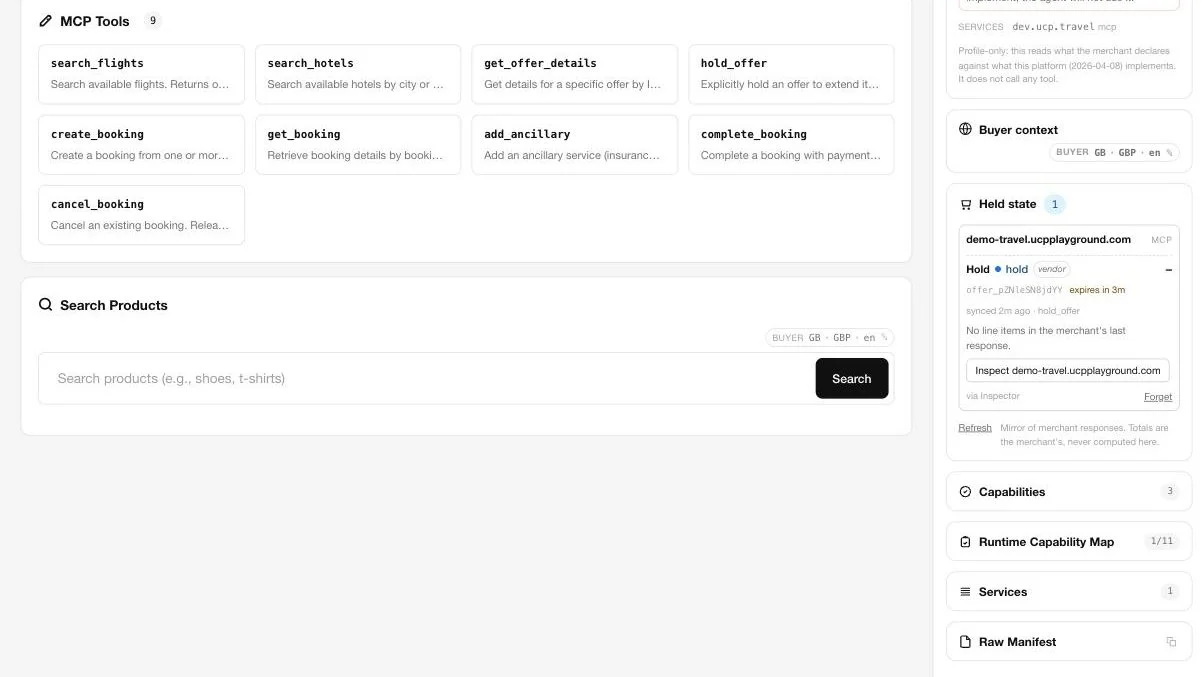
The Held state panel shows whatever a merchant has issued an id for on your behalf, grouped per merchant. Each row carries the merchant's own id, its own totals, its own expiry, and its own next step — and where the merchant returned warnings alongside a successful call, those ride along as a note on the row.
The design rule is the one that matters most: the merchant's response is the truth. Line items, currency and subtotals are projections of what came back, never something Playground computes. If a merchant returns a cart with an id, a 30-day expiry, a continue URL and zero line items because everything in it went out of stock, that is exactly what the panel shows — an id, an expiry, a next step, no lines, and the merchant's own merchandise_out_of_stock warning attached. A testing tool that quietly reconstructs a plausible cart is hiding the one thing you opened it to see.
Stage follows the merchant too: cart, checkout, escalated, completed, or stale. A row goes stale when a call against that id fails, or when a hold's expiry passes — the countdown ticks in the panel and the row flips on the spot, without a page reload. Stale rows lose their continue button, because the thing they pointed at is gone.
Forgetting a row drops our mirror of it. It never contacts the merchant. If you want a merchant to release something it is holding, that is a call you make to the merchant, and Playground will show you what it says back.
“Cart” is a retail word
The obvious way to build this panel is to call it a cart panel and give it lines, quantities and a subtotal. That works for exactly one vertical.
UCP at 2026-08-25 publishes three services: dev.ucp.shopping, dev.ucp.common and dev.ucp.payment. There is no travel service, no lodging service, no appointment or grocery service. Verticals arrive one of two ways — as a vendor namespace that extends a shopping capability, or as a gateway that sits outside the spec entirely. A flight offer held for 300 seconds is not a cart. A booking reference is not a cart. And the spec itself lets a merchant skip the cart: create_checkout accepts line items directly, so a merchant that goes straight to checkout is taking a valid path, not failing conformance.
So the thing worth mirroring is not “the cart”. It is whatever the merchant issued an id for. The kind — cart, checkout, hold, reservation — is a property of the row, read from the tool and capability that produced it, and the panel says “Hold · expires in 4:12” when that is what it is.
The line model follows the same logic. Quantity carries the unit the 2026-08-25 line item allows, so a kilogram and a night and a passenger are not silently rendered as “3”. Everything else vertical-specific — size and colour, origin and destination, check-in and nights, party size — lands in free-form attributes with the merchant's own labels, and a badge marks whether the capability behind the row is a spec capability or a vendor extension. Vertical fields stay vendor-defined until a vertical actually publishes. Guessing at them now would just be a second, worse spec.
A declared capability is not an available one
The Negotiation readout runs on connect and shows the handshake as five steps — discover, select version, intersect, resolve extensions, activate — followed by a row for every capability the merchant declared.
The readout interprets rather than mirrors. Every row carries a status and a reason:
- Active — both sides can use it, at a version both sides run.
- Passthrough — a vendor namespace, outside protocol governance. The agent can still call it; nothing in the spec says what it should do.
- Excluded — the name sits outside the supported set, either because the merchant publishes it at a version we do not read, or because the platform does not implement it.
Version state gets its own line, because a version mismatch is not the same failure as a missing capability. A capability declared at 2026-08-25 on a platform running 2026-04-08 is flagged as exactly that, with the note that the agent will call it at the merchant's version. A merchant that publishes an older version but also lists ours among its supported versions reads differently again.
This is the gap that a manifest alone can never show you. A manifest is a declaration. What a session can actually do with it is an observation, and the two disagree often enough that we built a company around the difference. Playground shows you the gap live, for one merchant, in one session. UCP Checker records it over time, across the fleet.
Where you're shopping from
UCP has carried buyer context signals since 2026-04-08 — country, region, postal code, language and currency — moving into the common types at 2026-08-25. Most tooling never sends them. Playground previously sent a single hard-coded intent string and nothing else, which meant every catalog search we made looked, to a merchant, like it came from nowhere in particular.
Buyer context is now a saved setting, per account or per workspace, sent on catalog search across the Inspector, Agent runs and the REST path, and accepted as buyer_context on the headless API. It is editable from a pill above the search box and above the Agent composer, so you can change country or currency and have the very next search carry it without leaving the page. On the Agent path, your saved settings override the model's guesses about locale — models are confident and wrong about where you are shopping from — while the intent the model wrote is preserved.
Whether any of it changes what comes back is the merchant's call, and that is the interesting part. Probing Shopify stores directly on release day: a store selling into several markets returned GBP, USD and CAD prices for the same query as the country and currency changed. Single-market stores returned their home currency regardless. Both are correct behaviour. The point of sending the signals is that you can now tell which kind of merchant you are talking to, instead of assuming.
A session remembers what it connected with
Negotiation and buyer context are both properties of a moment. A merchant can publish a new manifest an hour after your run, and the capabilities you were offered are not the ones the next person will see. If a replay reads the manifest fresh, it is showing you today's merchant explaining yesterday's session — which is the one thing a replay must not do.
So each session now stores the negotiation readout and the buyer context it began with, written once at the start of the run and never overwritten when a session continues. Open a stored session and a Connected with card shows the negotiation as it stood, the locale the searches carried, and the held state that run produced. Comparisons put it on a single line per column — version, how many capabilities were active, the platform — so when two models behave differently against the same store, you can see whether they were even offered the same thing.
Sessions recorded before this release say so, rather than showing empty blocks where the snapshot would be. Shared sessions carry less than your own: the negotiation, and country, currency and language — no region, no postal code, no ledger. A shared link is for showing someone what a store did, not where you live.
What this does not change
The handshake is untouched. Discovery, initialise and capability negotiation happen exactly as before; buyer context is a per-request search field in the spec, not a connection property, and it is sent where the merchant's tool schema declares a place for it. Existing sessions, collections and saved targets keep working. Held state is scoped to a signed-in account or workspace — guests do not get a ledger — and the ledger only ever writes down what a call already returned. It never makes a call of its own.
Try it
Connect a store in the Tool Inspector and the Negotiation and Held state sections appear in the sidebar; run a session on Agent runs and both panels update per turn. Buyer context is in settings, or inline from the pill. Anything you run shows up afterwards in Sessions and replays with its connect snapshot attached. The headless API accepts buyer_context per session — see the API reference.
If you run a UCP endpoint and want to see what an agent sees when it connects to you, that is the whole point of the tool. Full release notes are on the Playground changelog.
About UCP Checker
UCP Checker is the independent validation and observability layer for the Universal Commerce Protocol. We crawl, validate and grade every public UCP manifest we can find, run the merchant directory, the UCP Score, live adoption stats, the vertical guides and the authority-bound vendor map, and track the spec as it evolves so you don't have to — measured from two vantages (what a business declares, and what actually happens when an agent transacts), the same way for everyone, without picking winners.